Malware Devil

Wednesday, March 3, 2021

Veracode Named a Leader for AST on IT Central Station

To keep up with the pace of the modern world, organizations are constantly looking for ways to release software faster than their competitors. This ???need for speed??? has led many organizations to adopt DevSecOps. With DevSecOps, security is moved earlier in the software lifecycle, into the realm of developers. As a result of the changing development landscape, application security testing has also been evolving. Yesterday???s application security testing tools and processes will no longer do.

Organizations need an AppSec vendor that is not only DevSecOps friendly but also offers multiple testing types, developer security training, and keeps false positives to a minimum. IT Central Station users have recently ranked AppSec vendors on these attributes and awarded Veracode the top spot for application security testing (AST) solutions.

Be DevSecOps friendly

DevSecOps, which adds security to the already merging workstreams of development (Dev) and IT operations (Ops), is now a critical piece of the application security story. IT Central Station members acknowledged the importance of having application security testing integrated into the DevSecOps workflow. For example, according to Riley B., a senior security analyst at a wellness & fitness company with over 1,000 employees, ???Veracode has improved our application security program by providing numerous integrations and tools to take our AppSec/DevSecOps to the next level.???

Being able to integrate automated scans into the DevSecOps pipeline makes applications security testing more ???DevSecOps friendly.??? For a security architect at a financial services firm with over 1,000 employees, one of Veracode???s most valuable features is its ability to submit the software and get automated scan results from it.

Divakar R., a senior solutions architect at NessPRO Italy, a small tech services company, simply stated that Veracode is ???a well-supported and valuable tool that was part of our DevSecOps process,??? while a DevSecOps consultant at a communications service provider with over 10,000 employees compared Veracode to a competitor: ???Veracode is more API and DevSecOps friendly. Veracode’s scanning time is better.???

Cover all application types

Application security testing needs to cover a wide variety of application types if it???s going to contribute to positive outcomes in the modern world of DevSecOps. This means supporting testing for the web, mobile apps, microservices, and more. A senior security architect at a financial services firm with over 10,000 employees spoke to this need, saying, ???We are scanning external web applications, internal web applications, and mobile applications with various types/combinations of scanning. We use this both to improve our application security as well as achieve compliance with various compliance bodies that require code scanning.???

The communications service provider???s DevSecOps consultant echoed this approach, sharing, ???We use the Veracode SAST solution to scan the Java, Node.js, and Python microservices as part of our CI/CD pipeline, wherein we are using our CI/CD server as Bamboo, Jenkins, and GitLab CI/CD. It is an excellent solution. It finds a good number of the securities used, providing good coverage across the languages that we require at our client site.??? They have scanned more than 150 microservices in the last year and a half.

Engage developers with security training

Ideally, an application security testing platform provider should engage developers with security training that lets them exploit and fix real applications. As the financial services security architect put it, ???Veracode has helped immensely with developer security training and in building developer security skills. Before we implemented it, we would find a lot more vulnerabilities in our applications. Now, with Veracode, the developers have started doing a lot more secure coding and they have much better coding practices.???

Other notable comments about security training include:

  • ???The solution has helped with developer security training and has helped build developer security skills. It has definitely opened their eyes and made them more aware of things they should look for.??? – IT cybersecurity analyst at a small educational organization
  • ???Veracode has helped with developer security training and helped build developer security skills.??? – Head of information security at a small media company
  • ???The best stuff is the training: this enables your team to adopt the same programming approach, although these people have a different background or joined the projects in a different phase. Doing that, they can take the training and be aligned so that they all write code in a good way.??? – Mauro V., a cybersecurity expert at PSYND, a small technology services company
  • ???The training also helped us to identify the existing vulnerabilities in our code and some of the third-parties that we are using that have vulnerabilities in them. We know we need to upgrade them.??? – Heythem F., a product software engineer at a technology services company with over 1,000 employees

Keep false positives to a minimum

False positives waste time and cause stress for everyone in the DevSecOps process. An effective application security testing tool should keep false positives to a minimum. Veracode met this standard, as the financial services senior security architect explained. He said that Veracode ???gave us much higher quality dynamic scanning with very few false positives and a robust static scanning solution.??? In contrast, he added, when they used a ???heavyweight??? legacy dynamic scanning product, ???It would produce hundreds of pages of (mostly) false positives that were nearly impossible to digest and tune.???

???Veracode also reports far fewer false positives with the static scanning,??? said Srinivasa K., a manager of information technology at Broadcom Corporation, a technology services company with over 10,000 employees. He added, ???The scanner just goes through the code and analyzes all the security vulnerabilities. A lot of scanning tools in the market give you a lot of false positives. The false-positive rate in Veracode is notably less. That was very helpful to the product teams as they could spend most of their time fixing real issues.??? Christian C., a senior programmer/analyst at a financial services firm with over 10,000 employees, simply shared, ???I haven’t come across any false positives.???

To learn more about our ranking as a top application security testing solution, visit our page on IT Central Station.

The post Veracode Named a Leader for AST on IT Central Station appeared first on Security Boulevard.

Read More

The post Veracode Named a Leader for AST on IT Central Station appeared first on Malware Devil.


https://malwaredevil.com/2021/03/03/veracode-named-a-leader-for-ast-on-it-central-station/?utm_source=rss&utm_medium=rss&utm_campaign=veracode-named-a-leader-for-ast-on-it-central-station

AA21-062A: Mitigate Microsoft Exchange Server Vulnerabilities

Original release date: March 3, 2021

Summary

Cybersecurity and Infrastructure Security (CISA) partners have observed active exploitation of vulnerabilities in Microsoft Exchange Server products. Successful exploitation of these vulnerabilities allows an unauthenticated attacker to execute arbitrary code on vulnerable Exchange Servers, enabling the attacker to gain persistent system access, as well as access to files and mailboxes on the server and to credentials stored on that system. Successful exploitation may additionally enable the attacker to compromise trust and identity in a vulnerable network. Microsoft released out-of-band patches to address vulnerabilities in Microsoft Exchange Server. The vulnerabilities impact on-premises Microsoft Exchange Servers and are not known to impact Exchange Online or Microsoft 365 (formerly O365) cloud email services.

This Alert includes both tactics, techniques and procedures (TTPs) and the indicators of compromise (IOCs) associated with this malicious activity. To secure against this threat, CISA recommends organizations examine their systems for the TTPs and use the IOCs to detect any malicious activity. If an organization discovers exploitation activity, they should assume network identity compromise and follow incident response procedures. If an organization finds no activity, they should apply available patches immediately and implement the mitigations in this Alert.

Click here for IOCs in STIX format.

Technical Details

Microsoft has released out-of-band security updates to address four vulnerabilities in Exchange Server:

  • CVE-2021-26855 allows an unauthenticated attacker to send arbitrary HTTP requests and authenticate as the Exchange Server. The vulnerability exploits the Exchange Control Panel (ECP) via a Server-Side Request Forgery (SSRF). This would also allow the attacker to gain access to mailboxes and read sensitive information.
  • CVE-2021-26857, CVE-2021-26858, and CVE-2021-27065 allow for remote code execution.  
    • CVE-2021-26858 and CVE-2021-27065 are similar post-authentication arbitrary write file vulnerabilities in Exchange. An attacker, authenticated either by using CVE-2021-26855 or via stolen admin credentials, could write a file to any path on the server.

    • CVE-2021-26857 is an insecure deserialization vulnerability in the Unified Messaging service. An attacker, authenticated either by using CVE-2021-26855 or via stolen admin credentials, could execute arbitrary code as SYSTEM on the Exchange Server.

  • To locate a possible compromise of these CVEs, we encourage you to read the Microsoft Advisory.

It is possible for an attacker, once authenticated to the Exchange server, to gain access to the Active Directory environment and download the Active Directory Database.

Tactics, Techniques and Procedures

The majority of the TTPs in this section are sourced from a blog post from Volexity, a third party cybersecurity firm. Note: the United States Government does not endorse any commercial product or service, including any subjects of analysis. Any reference to specific commercial products, processes, or services by service mark, trademark, manufacturer, or otherwise, does not constitute or imply their endorsement, recommendation, or favoring by the United States Government.

Volexity has observed the following files as targets of HTTP POST requests:

  • /owa/auth/Current/themes/resources/logon.css
  • /owa/auth/Current/themes/resources/owafont_ja.css
  • /owa/auth/Current/themes/resources/lgnbotl.gif
  • /owa/auth/Current/themes/resources/owafont_ko.css
  • /owa/auth/Current/themes/resources/SegoeUI-SemiBold.eot
  • /owa/auth/Current/themes/resources/SegoeUI-SemiLight.ttf
  • /owa/auth/Current/themes/resources/lgnbotl.gif

Administrators should search the ECP server logs for the following string (or something similar):

S:CMD=Set-OabVirtualDirectory.ExternalUrl='

The logs can be found at <exchange install path>LoggingECPServer.

To determine possible webshell activity, administrators should search for aspx files in the following paths:

  • inetpubwwwrootaspnet_client (any .aspx file under this folder or sub folders)
  • <exchange install path>FrontEndHttpProxyecpauth (any file besides TimeoutLogoff.aspx)
  • <exchange install path>FrontEndHttpProxyowaauth (any file or modified file that is not part of a standard install)
  • <exchange install path>FrontEndHttpProxyowaauthCurrent (any aspx file in this folder or subfolders)
  • <exchange install path>FrontEndHttpProxyowaauth<folder with version number> (any aspx file in this folder or subfolders)

Administrators should search in the /owa/auth/Current directory for the following non-standard web log user-agents. These agents may be useful for incident responders to look at to determine if further investigation is necessary.

These should not be taken as definitive IOCs:

  • DuckDuckBot/1.0;+(+http://duckduckgo.com/duckduckbot.html)
  • facebookexternalhit/1.1+(+http://www.facebook.com/externalhit_uatext.php)
  • Mozilla/5.0+(compatible;+Baiduspider/2.0;++http://www.baidu.com/search/spider.html)
  • Mozilla/5.0+(compatible;+Bingbot/2.0;++http://www.bing.com/bingbot.htm)
  • Mozilla/5.0+(compatible;+Googlebot/2.1;++http://www.google.com/bot.html
  • Mozilla/5.0+(compatible;+Konqueror/3.5;+Linux)+KHTML/3.5.5+(like+Gecko)+(Exabot-Thumbnails)
  • Mozilla/5.0+(compatible;+Yahoo!+Slurp;+http://help.yahoo.com/help/us/ysearch/slurp)
  • Mozilla/5.0+(compatible;+YandexBot/3.0;++http://yandex.com/bots)
  • Mozilla/5.0+(X11;+Linux+x86_64)+AppleWebKit/537.36+(KHTML,+like+Gecko)+Chrome/51.0.2704.103+Safari/537.36

Volexity observed these user-agents in conjunction with exploitation to /ecp/ URLs:

  • ExchangeServicesClient/0.0.0.0
  • python-requests/2.19.1
  • python-requests/2.25.1

These user-agents were also observed having connections to post-exploitation web-shell access:

  • antSword/v2.1
  • Googlebot/2.1+(+http://www.googlebot.com/bot.html)
  • Mozilla/5.0+(compatible;+Baiduspider/2.0;++http://www.baidu.com/search/spider.html)

As with the non-standard user-agents, responders can examine internet information services (IIS) logs from Exchange Servers to identify possible historical activity. Also, as with the non-standard user agents, these should not be taken as definitive IOCs:

  • POST /owa/auth/Current/
  • POST /ecp/default.flt
  • POST /ecp/main.css
  • POST /ecp/<single char>.js

Volexity has seen attackers leverage the following IP addresses. Although these are tied to virtual private servers (VPSs) servers and virtual private networks (VPNs), responders should investigate these IP addresses on their networks and act accordingly:

  • 103.77.192[.]219
  • 104.140.114[.]110
  • 104.250.191[.]110
  • 108.61.246[.]56
  • 149.28.14[.]163
  • 157.230.221[.]198
  • 167.99.168[.]251
  • 185.250.151[.]72
  • 192.81.208[.]169
  • 203.160.69[.]66
  • 211.56.98[.]146
  • 5.254.43[.]18
  • 5.2.69[.]14
  • 80.92.205[.]81
  • 91.192.103[.]43

Volexity has also provided the following YARA signatures that can be run within your network to assist in finding signs of a compromise.

rule webshell_aspx_simpleseesharp : Webshell Unclassified
{
    meta:
        author = “threatintel@volexity.com”
        date = “2021-03-01”
        description = “A simple ASPX Webshell that allows an attacker to write further files to disk.”
        hash = “893cd3583b49cb706b3e55ecb2ed0757b977a21f5c72e041392d1256f31166e2”
 
    strings:
        $header = “<%@ Page Language=”C#” %>”
        $body = “<% HttpPostedFile thisFile = Request.Files[0];thisFile.SaveAs(Path.Combine”
 
    condition:
        $header at 0 and
        $body and
        filesize < 1KB
}
 
2.
rule webshell_aspx_reGeorgTunnel : Webshell Commodity
{
    meta:
        author = “threatintel@volexity.com”
        date = “2021-03-01”
        description = “A variation on the reGeorg tunnel webshell”
        hash = “406b680edc9a1bb0e2c7c451c56904857848b5f15570401450b73b232ff38928”
        reference = “https://github.com/sensepost/reGeorg/blob/master/tunnel.aspx”
 
    strings:
        $s1 = “System.Net.Sockets”
        $s2 = “System.Text.Encoding.Default.GetString(Convert.FromBase64String(StrTr(Request.Headers.Get”
        // a bit more experimental
        $t1 = “.Split(‘|’)”
        $t2 = “Request.Headers.Get”
        $t3 = “.Substring(“
        $t4 = “new Socket(“
        $t5 = “IPAddress ip;”
 
    condition:
        all of ($s*) or
        all of ($t*)
}
 
3
rule webshell_aspx_sportsball : Webshell Unclassified
{
    meta:
        author = “threatintel@volexity.com”
        date = “2021-03-01”
        description = “The SPORTSBALL webshell allows attackers to upload files or execute commands on the system.”
        hash = “2fa06333188795110bba14a482020699a96f76fb1ceb80cbfa2df9d3008b5b0a”
 
    strings:
        $uniq1 = “HttpCookie newcook = new HttpCookie(”fqrspt”, HttpContext.Current.Request.Form”
        $uniq2 = “ZN2aDAB4rXsszEvCLrzgcvQ4oi5J1TuiRULlQbYwldE=”
 
        $var1 = “Result.InnerText = string.Empty;”
        $var2 = “newcook.Expires = DateTime.Now.AddDays(”
        $var3 = “System.Diagnostics.Process process = new System.Diagnostics.Process();”
        $var4 = “process.StandardInput.WriteLine(HttpContext.Current.Request.Form[””
        $var5 = “else if (!string.IsNullOrEmpty(HttpContext.Current.Request.Form[””
        $var6 = “<input type=”submit” value=”Upload” />”
 
    condition:
        any of ($uniq*) or
        all of ($var*)
}

A list of web shell hashes have also been provided by Microsoft:

  • b75f163ca9b9240bf4b37ad92bc7556b40a17e27c2b8ed5c8991385fe07d17d0
  • 097549cf7d0f76f0d99edf8b2d91c60977fd6a96e4b8c3c94b0b1733dc026d3e
  • 2b6f1ebb2208e93ade4a6424555d6a8341fd6d9f60c25e44afe11008f5c1aad1
  • 65149e036fff06026d80ac9ad4d156332822dc93142cf1a122b1841ec8de34b5
  • 511df0e2df9bfa5521b588cc4bb5f8c5a321801b803394ebc493db1ef3c78fa1
  • 4edc7770464a14f54d17f36dc9d0fe854f68b346b27b35a6f5839adf1f13f8ea
  • 811157f9c7003ba8d17b45eb3cf09bef2cecd2701cedb675274949296a6a183d
  • 1631a90eb5395c4e19c7dbcbf611bbe6444ff312eb7937e286e4637cb9e72944

Note: this is not an all-inclusive list of indicators of compromise and threat actors have been known to use short-term leased IP addresses that change very frequently. Organizations that do not locate any of the IOCs in this Alert within your network traffic, may nevertheless have been compromised. CISA recommendations following the guidance located in the Microsoft Advisory to check your servers for any signs of a compromise.  

Conduct Forensic Analysis

Should your organization see evidence of compromise, your incident response should begin with conducting forensic analysis to collect artifacts and perform triage. Please see the following list of recommendations on how to conduct forensic analysis using various tools.

Although the following free tools are not endorsed by the Federal Government, incident responders commonly use them to perform forensics.

While collecting artifacts to perform triage, use processes and tools that minimize the alteration of the data being collected and that minimize impact to the operating system itself.

Ideally, during data collection, store the data on removable/external media and, when possible, run the artifact collection tools from the same media.

Key artifacts for triage that should be collected:

  • Memory
  • All registry hives
  • All windows event logs
  • All web logs

Memory can be collected with a variety of open source tools (e.g., FTK Imager by AccessData, Ram Capture by Belkasoft).

Registry and Windows Event logs can be collected with a variety of open source tools as well (e.g., FTK_Imager, Kroll Artifact Parser And Extractor [KAPE]).

Web logs can also be collected with a variety of open source tools (e.g., FTK Imager).

Windows Artifact Collection Guide

Execute the following steps in order.

1) Download the latest FTK Imager from https://accessdata.com/product-download/.

  • Note: Ensure your review of and compliance with the applicable license associated with the product referenced, which can be found in the product’s User Guide. The United States Government does not endorse any commercial product or service, including any subjects of analysis. Any reference to specific commercial products, processes, or services by service mark, trademark, manufacturer, or otherwise, does not constitute or imply their endorsement, recommendation, or favoring by the United States Government.

2) Collect memory from live system using FTK Imager. See Memory Capture with FTK Imager.pdf for instructions. Note: Download and copy “FTK Imager” folder to an external drive. Run FTK Imager.exe from the FTK Imager folder from external drive. Wait until memory collect is complete before proceeding to step 2.

3) Collect important system artifacts using KAPE. See KAPE Collection Procedure. Note: Download KAPE from a separate system; do not download KAPE to the target system. Run KAPE from external drive.

4) Collect disk image using FTK Imager. See Live Image with FTK Imager.pdf for instructions. Note: Run FTK Imager.exe from the “FTK Imager” folder from external drive.

Memory Capture with FTK Imager

1) Open FTK Imager. Log into the system with Administrator privileges and launch “FTK Imager.”

2) Open “Capture Memory.” Select “Capture Memory…” from the File menu.

Figure 1: FTK Imager – Capture Memory Command

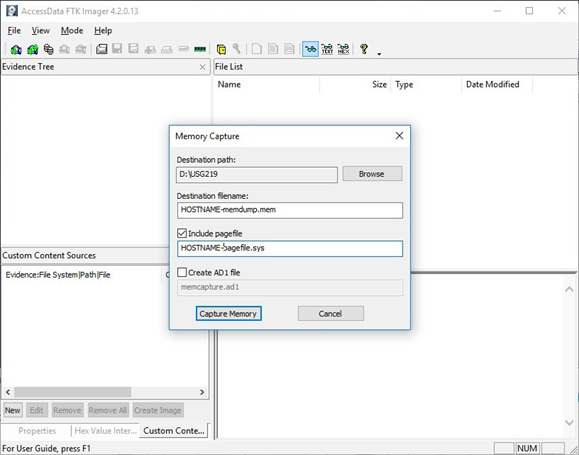
3) Select Path and Filenames. On the window that appears, use the “Browse” button to identify the destination of the memory capture. Save the memory capture to an external device and not the main hard drive of the system. Doing so will prevent the saved file from overwriting any dataspace on the system.

  • Name the destination file with a descriptive name (i.e., hostname of the system).
  • Select the box “Include pagefile” and provide a name of the pagefile that is descriptive of the system.
  • Do not select “Create AD1 file.”

Figure 2: FTK Imager – Memory Capture

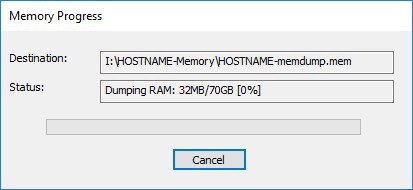
4) Capture Memory. Click on “Capture Memory” to begin the capture process. The process will take several minutes depending on the size of the pagefile and the amount of memory on the system.

Figure 3: FTK Imager – Capture Process

KAPE Collection Procedure [1]

1) Download KAPE from https://www.kroll.com/en/services/cyber-risk/investigate-and-respond/kroll-artifact-parser-extractor-kape.

2) Disable any antivirus or host protection mechanisms that prevent execution from removable media, or data loss prevention (DLP) mechanisms that restrict utilization of removable media.

  • Enable antivirus and host protection once this process is completed.

3) Unzip Kape.zip and run gkape.exe as admin from your removable media

4) Target source should be the drive on which the OS resides, typically C:.

5) Target destination should be an external drive folder, not the same drive as the Target source. If available, use an external hard drive or flash drive.

  • A KAPE execution with these parameters will typically produce output artifacts with a total size of 1-25 GB.
  • If you are going to be running KAPE on different machines and want to save to the same drive, ensure the Target destination folder is unique for each execution of KAPE.

6) Uncheck Flush checkbox (it is checked natively).

7) Check Add %d and Add %m checkboxes.

8) Select ALL checkboxes to ensure KAPE will target all available data that it is capable of targeting. This takes some time; use the down arrow and space bar to move through the list quickly.

9) Check Process VSCs checkbox.

10) Select Zip radio button and add Base name TargetOutput.

11) Ensure Deduplicate checkbox is checked (it is checked natively).

  • At the bottom you should now see a large Current command line, similar to:
.kape.exe –tsource C: –tdest E:%d%m –tflush –target !BasicCollection,!SANS_Triage,Avast,AviraAVLogs,Bitdefender,ComboFix,ESET,FSecure,HitmanPro,Malwarebytes, McAfee,McAfee_ePO,RogueKiller,SentinelOne,Sophos,SUPERAntiSpyware,Symantec_AV_Logs,TrendMicro,VIPRE, Webroot,WindowsDefender,Ammyy,AsperaConnect,BoxDrive,CiscoJabber,CloudStorage,ConfluenceLogs,Discord, Dropbox, Exchange,ExchangeClientAccess,ExchangeTransport,FileZilla,GoogleDrive,iTunesBackup,JavaWebCache,Kaseya,LogMeIn,Notepad++, OneDrive,OutlookPSTOST,ScreenConnect,Skype,TeamViewerLogs,TeraCopy,VNCLogs, Chrome,ChromeExtensions,Edge,Firefox,InternetExplorer,WebBrowsers,ApacheAccessLog,IISLogFiles,ManageEngineLogs, MSSQLErrorLog,NGINXLogs,PowerShellConsole,KapeTriage,MiniTimelineCollection,RemoteAdmin, VirtualDisks, Gigatribe,TorrentClients,Torrents,$Boot,$J,$LogFile,$MFT,$SDS,$T,Amcache,ApplicationEvents,BCD,CombinedLogs, EncapsulationLogging,EventLogs,EventLogs-RDP,EventTraceLogs, EvidenceOfExecution,FileSystem,GroupPolicy,LinuxOnWindowsProfileFiles,LnkFilesAndJumpLists,LogFiles,MemoryFiles, MOF,OfficeAutosave,OfficeDocumentCache,Prefetch,RDPCache,RDPLogs,RecentFileCache,Recycle, RecycleBin, RecycleBinContent,RecycleBinMetadata,RegistryHives,RegistryHivesSystem,RegistryHivesUser,ScheduledTasks,SDB, SignatureCatalog,SRUM,StartupInfo,Syscache,ThumbCache,USBDevicesLogs,WBEM,WER,WindowsFirewall,  WindowsIndexSearch,WindowsNotifcationsDB,WindowsTimeline,XPRestorePoints –vss –zip TargetOutput –gui
  • In the bottom right corner hit the Execute! Button.
  • Screenshot below shows gkape.exe during execution, you will also see a command window execute. Note: KAPE usually takes less than 20 minutes to complete on a workstation; if it is taking significantly longer there may be an issue.

Figure 4: gkape.exe screenshot

Mitigations

CISA strongly recommends organizations read Microsoft’s advisory and security blog post for more information on how to look for this malicious activity and apply critical patches as soon as possible.

If patching is not an immediate option, there are other mitigation options available. However, these options should only be used as a temporary solution, not a replacement for patching.  CISA recommends limiting or blocking external access to internet-facing Exchange Servers via the following:

  • Restrict untrusted connections to port 443, or set up a VPN to separate the Exchange Server from external access; note that this will not prevent an adversary from exploiting the vulnerability if the attacker is already in your network.
  • Block external access to on-premise Exchange:
    • Restrict external access to OWA URL: /owa/
    • Restrict external access to Exchange Admin Center (EAC) aka Exchange Control Panel (ECP) URL: /ecp/.

CISA would like to thank Microsoft and Volexity for their contributions to this alert.

RESOURCES


References

Revisions

  • March 3, 2021: Initial Version

This product is provided subject to this Notification and this Privacy & Use policy.

Read More

The post AA21-062A: Mitigate Microsoft Exchange Server Vulnerabilities appeared first on Malware Devil.


https://malwaredevil.com/2021/03/03/aa21-062a-mitigate-microsoft-exchange-server-vulnerabilities-2/?utm_source=rss&utm_medium=rss&utm_campaign=aa21-062a-mitigate-microsoft-exchange-server-vulnerabilities-2

AA21-062A: Mitigate Microsoft Exchange Server Vulnerabilities

Original release date: March 3, 2021SummaryCybersecurity and Infrastructure Security (CISA) partners have observed active exploitation of vulnerabilities in Microsoft Exchange Server products. Successful exploitation of these vulnerabilities allows an unauthenticated attacker to execute arbitrary code on vulnerable Exchange Servers, enabling the attacker to gain persistent system access, as well as access to files and mailboxes on the server and to credentials stored on that system. Successful exploitation may additionally enable the attacker to compromise trust and identity in a vulnerable network. Microsoft released out-of-band patches to address vulnerabilities in Microsoft Exchange Server. The vulnerabilities impact on-premises Microsoft Exchange Servers and are not known to impact Exchange Online or Microsoft 365 (formerly O365) cloud email services.

This Alert includes both tactics, techniques and procedures (TTPs) and the indicators of compromise (IOCs) associated with this malicious activity. To secure against this threat, CISA recommends organizations examine their systems for the TTPs and use the IOCs to detect any malicious activity. If an organization discovers exploitation activity, they should assume network identity compromise and follow incident response procedures. If an organization finds no activity, they should apply available patches immediately and implement the mitigations in this Alert.

Click here for IOCs in STIX format.
Technical DetailsMicrosoft has released out-of-band security updates to address four vulnerabilities in Exchange Server:

CVE-2021-26855 allows an unauthenticated attacker to send arbitrary HTTP requests and authenticate as the Exchange Server. The vulnerability exploits the Exchange Control Panel (ECP) via a Server-Side Request Forgery (SSRF). This would also allow the attacker to gain access to mailboxes and read sensitive information.
CVE-2021-26857, CVE-2021-26858, and CVE-2021-27065 allow for remote code execution.  

CVE-2021-26858 and CVE-2021-27065 are similar post-authentication arbitrary write file vulnerabilities in Exchange. An attacker, authenticated either by using CVE-2021-26855 or via stolen admin credentials, could write a file to any path on the server.

CVE-2021-26857 is an insecure deserialization vulnerability in the Unified Messaging service. An attacker, authenticated either by using CVE-2021-26855 or via stolen admin credentials, could execute arbitrary code as SYSTEM on the Exchange Server.

To locate a possible compromise of these CVEs, we encourage you to read the Microsoft Advisory.

It is possible for an attacker, once authenticated to the Exchange server, to gain access to the Active Directory environment and download the Active Directory Database.

Tactics, Techniques and Procedures

The majority of the TTPs in this section are sourced from a blog post from Volexity, a third party cybersecurity firm. Note: the United States Government does not endorse any commercial product or service, including any subjects of analysis. Any reference to specific commercial products, processes, or services by service mark, trademark, manufacturer, or otherwise, does not constitute or imply their endorsement, recommendation, or favoring by the United States Government.

Volexity has observed the following files as targets of HTTP POST requests:

/owa/auth/Current/themes/resources/logon.css
/owa/auth/Current/themes/resources/owafont_ja.css
/owa/auth/Current/themes/resources/lgnbotl.gif
/owa/auth/Current/themes/resources/owafont_ko.css
/owa/auth/Current/themes/resources/SegoeUI-SemiBold.eot
/owa/auth/Current/themes/resources/SegoeUI-SemiLight.ttf
/owa/auth/Current/themes/resources/lgnbotl.gif

Administrators should search the ECP server logs for the following string (or something similar):

S:CMD=Set-OabVirtualDirectory.ExternalUrl=’

The logs can be found at <exchange install path>LoggingECPServer.

To determine possible webshell activity, administrators should search for aspx files in the following paths:

inetpubwwwrootaspnet_client (any .aspx file under this folder or sub folders)
<exchange install path>FrontEndHttpProxyecpauth (any file besides TimeoutLogoff.aspx)
<exchange install path>FrontEndHttpProxyowaauth (any file or modified file that is not part of a standard install)
<exchange install path>FrontEndHttpProxyowaauthCurrent (any aspx file in this folder or subfolders)
<exchange install path>FrontEndHttpProxyowaauth<folder with version number> (any aspx file in this folder or subfolders)

Administrators should search in the /owa/auth/Current directory for the following non-standard web log user-agents. These agents may be useful for incident responders to look at to determine if further investigation is necessary.

These should not be taken as definitive IOCs:

DuckDuckBot/1.0;+(+http://duckduckgo.com/duckduckbot.html)
facebookexternalhit/1.1+(+http://www.facebook.com/externalhit_uatext.php)
Mozilla/5.0+(compatible;+Baiduspider/2.0;++http://www.baidu.com/search/spider.html)
Mozilla/5.0+(compatible;+Bingbot/2.0;++http://www.bing.com/bingbot.htm)
Mozilla/5.0+(compatible;+Googlebot/2.1;++http://www.google.com/bot.html
Mozilla/5.0+(compatible;+Konqueror/3.5;+Linux)+KHTML/3.5.5+(like+Gecko)+(Exabot-Thumbnails)
Mozilla/5.0+(compatible;+Yahoo!+Slurp;+http://help.yahoo.com/help/us/ysearch/slurp)
Mozilla/5.0+(compatible;+YandexBot/3.0;++http://yandex.com/bots)
Mozilla/5.0+(X11;+Linux+x86_64)+AppleWebKit/537.36+(KHTML,+like+Gecko)+Chrome/51.0.2704.103+Safari/537.36

Volexity observed these user-agents in conjunction with exploitation to /ecp/ URLs:

ExchangeServicesClient/0.0.0.0
python-requests/2.19.1
python-requests/2.25.1

These user-agents were also observed having connections to post-exploitation web-shell access:

antSword/v2.1
Googlebot/2.1+(+http://www.googlebot.com/bot.html)
Mozilla/5.0+(compatible;+Baiduspider/2.0;++http://www.baidu.com/search/spider.html)

As with the non-standard user-agents, responders can examine internet information services (IIS) logs from Exchange Servers to identify possible historical activity. Also, as with the non-standard user agents, these should not be taken as definitive IOCs:

POST /owa/auth/Current/
POST /ecp/default.flt
POST /ecp/main.css
POST /ecp/<single char>.js

Volexity has seen attackers leverage the following IP addresses. Although these are tied to virtual private servers (VPSs) servers and virtual private networks (VPNs), responders should investigate these IP addresses on their networks and act accordingly:

103.77.192[.]219
104.140.114[.]110
104.250.191[.]110
108.61.246[.]56
149.28.14[.]163
157.230.221[.]198
167.99.168[.]251
185.250.151[.]72
192.81.208[.]169
203.160.69[.]66
211.56.98[.]146
5.254.43[.]18
5.2.69[.]14
80.92.205[.]81
91.192.103[.]43

Volexity has also provided the following YARA signatures that can be run within your network to assist in finding signs of a compromise.

rule webshell_aspx_simpleseesharp : Webshell Unclassified
{
    meta:
        author = “threatintel@volexity.com”
        date = “2021-03-01”
        description = “A simple ASPX Webshell that allows an attacker to write further files to disk.”
        hash = “893cd3583b49cb706b3e55ecb2ed0757b977a21f5c72e041392d1256f31166e2”
 
    strings:
        $header = “<%@ Page Language=”C#” %>”
        $body = “<% HttpPostedFile thisFile = Request.Files[0];thisFile.SaveAs(Path.Combine”
 
    condition:
        $header at 0 and
        $body and
        filesize < 1KB
}
 
2.
rule webshell_aspx_reGeorgTunnel : Webshell Commodity
{
    meta:
        author = “threatintel@volexity.com”
        date = “2021-03-01”
        description = “A variation on the reGeorg tunnel webshell”
        hash = “406b680edc9a1bb0e2c7c451c56904857848b5f15570401450b73b232ff38928”
        reference = “https://github.com/sensepost/reGeorg/blob/master/tunnel.aspx”
 
    strings:
        $s1 = “System.Net.Sockets”
        $s2 = “System.Text.Encoding.Default.GetString(Convert.FromBase64String(StrTr(Request.Headers.Get”
        // a bit more experimental
        $t1 = “.Split(‘|’)”
        $t2 = “Request.Headers.Get”
        $t3 = “.Substring(“
        $t4 = “new Socket(“
        $t5 = “IPAddress ip;”
 
    condition:
        all of ($s*) or
        all of ($t*)
}
 
3
rule webshell_aspx_sportsball : Webshell Unclassified
{
    meta:
        author = “threatintel@volexity.com”
        date = “2021-03-01”
        description = “The SPORTSBALL webshell allows attackers to upload files or execute commands on the system.”
        hash = “2fa06333188795110bba14a482020699a96f76fb1ceb80cbfa2df9d3008b5b0a”
 
    strings:
        $uniq1 = “HttpCookie newcook = new HttpCookie(”fqrspt”, HttpContext.Current.Request.Form”
        $uniq2 = “ZN2aDAB4rXsszEvCLrzgcvQ4oi5J1TuiRULlQbYwldE=”
 
        $var1 = “Result.InnerText = string.Empty;”
        $var2 = “newcook.Expires = DateTime.Now.AddDays(”
        $var3 = “System.Diagnostics.Process process = new System.Diagnostics.Process();”
        $var4 = “process.StandardInput.WriteLine(HttpContext.Current.Request.Form[””
        $var5 = “else if (!string.IsNullOrEmpty(HttpContext.Current.Request.Form[””
        $var6 = “<input type=”submit” value=”Upload” />”
 
    condition:
        any of ($uniq*) or
        all of ($var*)
}

A list of web shell hashes have also been provided by Microsoft:

b75f163ca9b9240bf4b37ad92bc7556b40a17e27c2b8ed5c8991385fe07d17d0
097549cf7d0f76f0d99edf8b2d91c60977fd6a96e4b8c3c94b0b1733dc026d3e
2b6f1ebb2208e93ade4a6424555d6a8341fd6d9f60c25e44afe11008f5c1aad1
65149e036fff06026d80ac9ad4d156332822dc93142cf1a122b1841ec8de34b5
511df0e2df9bfa5521b588cc4bb5f8c5a321801b803394ebc493db1ef3c78fa1
4edc7770464a14f54d17f36dc9d0fe854f68b346b27b35a6f5839adf1f13f8ea
811157f9c7003ba8d17b45eb3cf09bef2cecd2701cedb675274949296a6a183d
1631a90eb5395c4e19c7dbcbf611bbe6444ff312eb7937e286e4637cb9e72944

Note: this is not an all-inclusive list of indicators of compromise and threat actors have been known to use short-term leased IP addresses that change very frequently. Organizations that do not locate any of the IOCs in this Alert within your network traffic, may nevertheless have been compromised. CISA recommendations following the guidance located in the Microsoft Advisory to check your servers for any signs of a compromise.  

Conduct Forensic Analysis

Should your organization see evidence of compromise, your incident response should begin with conducting forensic analysis to collect artifacts and perform triage. Please see the following list of recommendations on how to conduct forensic analysis using various tools.

Although the following free tools are not endorsed by the Federal Government, incident responders commonly use them to perform forensics.

While collecting artifacts to perform triage, use processes and tools that minimize the alteration of the data being collected and that minimize impact to the operating system itself.

Ideally, during data collection, store the data on removable/external media and, when possible, run the artifact collection tools from the same media.

Key artifacts for triage that should be collected:

Memory
All registry hives
All windows event logs
All web logs

Memory can be collected with a variety of open source tools (e.g., FTK Imager by AccessData, Ram Capture by Belkasoft).

Registry and Windows Event logs can be collected with a variety of open source tools as well (e.g., FTK_Imager, Kroll Artifact Parser And Extractor [KAPE]).

Web logs can also be collected with a variety of open source tools (e.g., FTK Imager).

Windows Artifact Collection Guide

Execute the following steps in order.

1) Download the latest FTK Imager from https://accessdata.com/product-download/.

Note: Ensure your review of and compliance with the applicable license associated with the product referenced, which can be found in the product’s User Guide. The United States Government does not endorse any commercial product or service, including any subjects of analysis. Any reference to specific commercial products, processes, or services by service mark, trademark, manufacturer, or otherwise, does not constitute or imply their endorsement, recommendation, or favoring by the United States Government.

2) Collect memory from live system using FTK Imager. See Memory Capture with FTK Imager.pdf for instructions. Note: Download and copy “FTK Imager” folder to an external drive. Run FTK Imager.exe from the FTK Imager folder from external drive. Wait until memory collect is complete before proceeding to step 2.

3) Collect important system artifacts using KAPE. See KAPE Collection Procedure. Note: Download KAPE from a separate system; do not download KAPE to the target system. Run KAPE from external drive.

4) Collect disk image using FTK Imager. See Live Image with FTK Imager.pdf for instructions. Note: Run FTK Imager.exe from the “FTK Imager” folder from external drive.

Memory Capture with FTK Imager

1) Open FTK Imager. Log into the system with Administrator privileges and launch “FTK Imager.”

2) Open “Capture Memory.” Select “Capture Memory…” from the File menu.

Figure 1: FTK Imager – Capture Memory Command

3) Select Path and Filenames. On the window that appears, use the “Browse” button to identify the destination of the memory capture. Save the memory capture to an external device and not the main hard drive of the system. Doing so will prevent the saved file from overwriting any dataspace on the system.

Name the destination file with a descriptive name (i.e., hostname of the system).
Select the box “Include pagefile” and provide a name of the pagefile that is descriptive of the system.
Do not select “Create AD1 file.”

Figure 2: FTK Imager – Memory Capture

4) Capture Memory. Click on “Capture Memory” to begin the capture process. The process will take several minutes depending on the size of the pagefile and the amount of memory on the system.

Figure 3: FTK Imager – Capture Process

KAPE Collection Procedure [1]

1) Download KAPE from https://www.kroll.com/en/services/cyber-risk/investigate-and-respond/kroll-artifact-parser-extractor-kape.

2) Disable any antivirus or host protection mechanisms that prevent execution from removable media, or data loss prevention (DLP) mechanisms that restrict utilization of removable media.

Enable antivirus and host protection once this process is completed.

3) Unzip Kape.zip and run gkape.exe as admin from your removable media

4) Target source should be the drive on which the OS resides, typically C:.

5) Target destination should be an external drive folder, not the same drive as the Target source. If available, use an external hard drive or flash drive.

A KAPE execution with these parameters will typically produce output artifacts with a total size of 1-25 GB.
If you are going to be running KAPE on different machines and want to save to the same drive, ensure the Target destination folder is unique for each execution of KAPE.

6) Uncheck Flush checkbox (it is checked natively).

7) Check Add %d and Add %m checkboxes.

8) Select ALL checkboxes to ensure KAPE will target all available data that it is capable of targeting. This takes some time; use the down arrow and space bar to move through the list quickly.

9) Check Process VSCs checkbox.

10) Select Zip radio button and add Base name TargetOutput.

11) Ensure Deduplicate checkbox is checked (it is checked natively).

At the bottom you should now see a large Current command line, similar to:

.kape.exe –tsource C: –tdest E:%d%m –tflush –target !BasicCollection,!SANS_Triage,Avast,AviraAVLogs,Bitdefender,ComboFix,ESET,FSecure,HitmanPro,Malwarebytes, McAfee,McAfee_ePO,RogueKiller,SentinelOne,Sophos,SUPERAntiSpyware,Symantec_AV_Logs,TrendMicro,VIPRE, Webroot,WindowsDefender,Ammyy,AsperaConnect,BoxDrive,CiscoJabber,CloudStorage,ConfluenceLogs,Discord, Dropbox, Exchange,ExchangeClientAccess,ExchangeTransport,FileZilla,GoogleDrive,iTunesBackup,JavaWebCache,Kaseya,LogMeIn,Notepad++, OneDrive,OutlookPSTOST,ScreenConnect,Skype,TeamViewerLogs,TeraCopy,VNCLogs, Chrome,ChromeExtensions,Edge,Firefox,InternetExplorer,WebBrowsers,ApacheAccessLog,IISLogFiles,ManageEngineLogs, MSSQLErrorLog,NGINXLogs,PowerShellConsole,KapeTriage,MiniTimelineCollection,RemoteAdmin, VirtualDisks, Gigatribe,TorrentClients,Torrents,$Boot,$J,$LogFile,$MFT,$SDS,$T,Amcache,ApplicationEvents,BCD,CombinedLogs, EncapsulationLogging,EventLogs,EventLogs-RDP,EventTraceLogs, EvidenceOfExecution,FileSystem,GroupPolicy,LinuxOnWindowsProfileFiles,LnkFilesAndJumpLists,LogFiles,MemoryFiles, MOF,OfficeAutosave,OfficeDocumentCache,Prefetch,RDPCache,RDPLogs,RecentFileCache,Recycle, RecycleBin, RecycleBinContent,RecycleBinMetadata,RegistryHives,RegistryHivesSystem,RegistryHivesUser,ScheduledTasks,SDB, SignatureCatalog,SRUM,StartupInfo,Syscache,ThumbCache,USBDevicesLogs,WBEM,WER,WindowsFirewall,  WindowsIndexSearch,WindowsNotifcationsDB,WindowsTimeline,XPRestorePoints –vss –zip TargetOutput –gui

In the bottom right corner hit the Execute! Button.
Screenshot below shows gkape.exe during execution, you will also see a command window execute. Note: KAPE usually takes less than 20 minutes to complete on a workstation; if it is taking significantly longer there may be an issue.

Figure 4: gkape.exe screenshot
MitigationsCISA strongly recommends organizations read Microsoft’s advisory and security blog post for more information on how to look for this malicious activity and apply critical patches as soon as possible.

If patching is not an immediate option, there are other mitigation options available. However, these options should only be used as a temporary solution, not a replacement for patching.  CISA recommends limiting or blocking external access to internet-facing Exchange Servers via the following:

Restrict untrusted connections to port 443, or set up a VPN to separate the Exchange Server from external access; note that this will not prevent an adversary from exploiting the vulnerability if the attacker is already in your network.
Block external access to on-premise Exchange:

Restrict external access to OWA URL: /owa/. 

Restrict external access to Exchange Admin Center (EAC) aka Exchange Control Panel (ECP) URL: /ecp/.

CISA would like to thank Microsoft and Volexity for their contributions to this alert.

RESOURCES

Microsoft Advisory: https://msrc-blog.microsoft.com/2021/03/02/multiple-security-updates-released-for-exchange-server/
Microsoft Security Blog – Hafnium targeting Exchange Servers: https://www.microsoft.com/security/blog/2021/03/02/hafnium-targeting-exchange-servers/
Volexity Blog: https://www.volexity.com/blog/2021/03/02/active-exploitation-of-microsoft-exchange-zero-day-vulnerabilities/

 
References
Eric Zimmerman: KAPE Documentation Revisions
March 3, 2021: Initial Version

This product is provided subject to this Notification and this Privacy & Use policy.
Read More

The post AA21-062A: Mitigate Microsoft Exchange Server Vulnerabilities appeared first on Malware Devil.


https://malwaredevil.com/2021/03/03/aa21-062a-mitigate-microsoft-exchange-server-vulnerabilities/?utm_source=rss&utm_medium=rss&utm_campaign=aa21-062a-mitigate-microsoft-exchange-server-vulnerabilities


Matt Kelly’s ‘Radical Compliance – The Risk Assessment’

The post Matt Kelly’s ‘Radical Compliance – The Risk Assessment’ appeared first on Security Boulevard.

Read More

The post Matt Kelly’s ‘Radical Compliance – The Risk Assessment’ appeared first on Malware Devil.


https://malwaredevil.com/2021/03/03/matt-kellys-radical-compliance-the-risk-assessment/?utm_source=rss&utm_medium=rss&utm_campaign=matt-kellys-radical-compliance-the-risk-assessment

How SolarWinds Busted Up Our Assumptions About Code Signing

With so much automation in code writing process, results are rarely double-checked, which opens the door to vulnerabilities and downright danger.

As the fallout from the SolarWinds hack broadens, we continue to learn more about just how it happened in the first place. There have now been four malware strains identified, one being Sunspot, which was installed on the SolarWinds build server that developers use to piece together software applications.

When it comes to software supply chains, code signing is a commonly used practice to indicate the provenance of software. In theory, the process validates the authenticity and integrity of the code. But as we all now know, that isn’t always the case.

As it turns out, code signing is the very last step in what is often a convoluted process to get from original source code to finalized packaged software. An attacker that can inject changes into a software build pipeline or continuous integration (CI) process — as was the case with SolarWinds — will be able to make changes that are included in the signed final product, altogether defeating the purpose of the signature.

Many software vendors may not have thought to take great care in securing their software release pipeline, but these recent attacks have more and more taking a deep look at how they can do that effectively. They need a system to certify that every step from source code to software has been executed correctly.

The Real Problem With Code Signing: Assuming It’s Fool-Proof
The process of code signing isn’t inherently bad. The problem is that it can (and often does) give people a false sense of security. The whole idea behind code signing is that it verifies that the code itself hasn’t been modified by anyone who doesn’t have the proper access.

A lot of the process is typically automated, and people don’t usually double-check things when it’s all set up — it’s just supposed to work. That’s when vulnerability and downright danger can strike.

If a cybercriminal or anyone else with malicious intent is able to make a change before code signing takes place, everything can seem to be working perfectly and no one will dive deep because everything is expected to function. In other words, code signing is designed to verify the software supply chain is legit, but if you’re signing something that’s already wrong or has been tampered with, it doesn’t matter.

Further, the size of an individual project may correlate with the amount of risk involved. If a mobile phone vendor is putting together a big release of an operating system such as Android, for example, there are so many components involved that not a single person understands every single thing. And more people involved creates more risk.

Strengthening the Integrity of Software Supply Chains
Fortunately, there are some steps vendors can take to better protect their software supply chain. On the most basic level, they can scour a list of all of the code components used to help identify potential vulnerabilities. This sort of “code audit” via a software bill of materials can help eliminate security risks for a specific release the vendor is working on, as well as provide guidance on what to look out for with future releases.

In my eyes, an emerging solution that vendors should consider is confidential computing, which is already being used in security-focused industries such as healthcare to improve clinical AI algorithms or financial services to prevent fraud. This, too, can come with a significant level of investment, particularly as it relates to underlying infrastructures, but it shouldn’t be an issue for many software vendors considering the software release pipeline is one of the most critical pieces of their business.

As SolarWinds has shown, the risk of a software vendors’ code being the source of a data breach to its customers can forever damage its reputation and relationships with its customers. With this precedent in place, enterprises will increase the level of scrutiny applied to the supply chain of its software vendors. Software app makers such as Signal are already taking advantage of using better privacy and security as a differentiator to encourage users to move from WhatsApp.

The key to implementing confidential computing is a trusted execution environment that secures encryption keys within secure enclaves to protect them from external threats such as root users, a compromised network, rogue hardware devices, or, as was the case in the SolarWinds attack, advanced malware.

A rule of thumb to live by, particularly for larger organizations, is to operate under the assumption that you’ve already been compromised. That assumption shouldn’t go away as confidential computing becomes more widely adopted, but it will be far less damning. I see this as the next logical evolution in automating and securing software releases, and vendors who take advantage now will future-proof themselves for years to come.

Dr. Jethro Beekman is a technical director and is working on next-generation cloud computing security at Fortanix. Jethro received his M.S. and Ph.D. degrees in Electrical Engineering and Computer Sciences from the University of California at Berkeley in 2014 and 2016, … View Full Bio

Recommended Reading:

Comment |

Email This |

Print |

RSS

More Insights

The post How SolarWinds Busted Up Our Assumptions About Code Signing appeared first on Malware Devil.


https://malwaredevil.com/2021/03/03/how-solarwinds-busted-up-our-assumptions-about-code-signing/?utm_source=rss&utm_medium=rss&utm_campaign=how-solarwinds-busted-up-our-assumptions-about-code-signing

Tuesday, March 2, 2021

‘ObliqueRAT’ Now Hides Behind Images on Compromised Websites

‘Transparent Tribe’ has switched its tactics for distributing the remote access Trojan, researchers found.

The post ‘ObliqueRAT’ Now Hides Behind Images on Compromised Websites appeared first on Malware Devil.


https://malwaredevil.com/2021/03/02/obliquerat-now-hides-behind-images-on-compromised-websites/?utm_source=rss&utm_medium=rss&utm_campaign=obliquerat-now-hides-behind-images-on-compromised-websites

Palo Alto Networks Completes Acquisition of Bridgecrew

SANTA CLARA, Calif., March 2, 2021 /PRNewswire/ — Palo Alto Networks (NYSE: PANW), the global cybersecurity leader, announced that it has completed its acquisition of Bridgecrew, a developer-first cloud security company. The acquisition will enable “shift left” security, with Prisma® Cloud becoming the first cloud security platform to deliver security across the full application lifecycle…

The post Palo Alto Networks Completes Acquisition of Bridgecrew appeared first on Security Boulevard.

Read More

The post Palo Alto Networks Completes Acquisition of Bridgecrew appeared first on Malware Devil.


https://malwaredevil.com/2021/03/02/palo-alto-networks-completes-acquisition-of-bridgecrew/?utm_source=rss&utm_medium=rss&utm_campaign=palo-alto-networks-completes-acquisition-of-bridgecrew

Misconfigurations Will Be Your Downfall

Cloud misconfigurations, seemingly small, could enable outsiders to infiltrate sensitive data, leading to financial losses for enterprises. Recent high-profile misconfiguration […]

The post Misconfigurations Will Be Your Downfall appeared first on Sonrai Security.

The post Misconfigurations Will Be Your Downfall appeared first on Security Boulevard.

Read More

The post Misconfigurations Will Be Your Downfall appeared first on Malware Devil.


https://malwaredevil.com/2021/03/02/misconfigurations-will-be-your-downfall/?utm_source=rss&utm_medium=rss&utm_campaign=misconfigurations-will-be-your-downfall

Is Your Fate In the Cloud?

This is a quick “let’s think about it together” post focused on the future of cloud security.

Our logical starting point is: “Through 2025, 99% of cloud security failures will be the customer’s fault.” (source: Gartner) My experience in my analyst days and perhaps today mostly confirms it. I’d say that “it feels right.” So, let’s agree that it describes today’s reality correctly.

Next point: now that we agree that this model describes reality in a useful manner, may I suggest that it indicates a problem. In other words, this means something needs to be changed or fixed. Why? Because who is better resourced (in terms of money, knowledge, people) to deal with tricky cloud security challenges, those who built it or those who use it?

Next naive point: if it feels like “99% is too high”, then there is an easy (and very wrong) solution: use a security-incompetent cloud provider who would then make more mistakes and can be blamed for them. Thus, customers will be less at fault, but will perhaps lose more. So, let’s not go there.

Next, still naive, point: if you do the opposite, and choose a more security-focused cloud provider, we may end up “99.99% of cloud security failures are customer’s fault” which is not what we want as per item above.

Now, can you solve this puzzle? How to keep the customers secure without cloud security failures mostly being their fault?

Well? Got ideas?!

This seems impossible to fix in the above context, but as with many puzzles and mysteries, the solution is lateral, not direct.

To arrive at it, let’s now ask “what is the context for this conundrum?” The shared responsibility model, of course. I will say that to crack this nut, we need to transcend the shared responsibility model somehow. Note my word choice: transcend, not discard.

And, drumroll, I think that we figured out how to do just that!

For this, I must explain the concept of “SHARED FATE” first introduced in this post about operations (2016). Share fate happens when “they [a cloud provider and a client] work together as a team for a common goal and share a fate greater than the dollars that pass between them.”

Security shared fate may be about preparing a secure landing zone for a client, guiding them while there, being clear and transparent about the security controls, perhaps sometimes offering guardrails for what they can do and then if something still happens, helping them out via insurance!

This will transcend the shared responsibility and get us some of the way to SHARED FATE, where “whose fault is it” may not have the same meaning … or any meaning. Thus, we will have a more secure, more trusted cloud for everybody.

Read the details here.

Related blog posts:


Is Your Fate In the Cloud? was originally published in Anton on Security on Medium, where people are continuing the conversation by highlighting and responding to this story.

The post Is Your Fate In the Cloud? appeared first on Security Boulevard.

Read More

The post Is Your Fate In the Cloud? appeared first on Malware Devil.


https://malwaredevil.com/2021/03/02/is-your-fate-in-the-cloud/?utm_source=rss&utm_medium=rss&utm_campaign=is-your-fate-in-the-cloud

Microsoft Fixes Exchange Server Zero-Days Exploited in Active Attacks

Microsoft fixes multiple Exchange Server vulnerabilities being weaponized in attacks from a group it believes operates out of China.

The post Microsoft Fixes Exchange Server Zero-Days Exploited in Active Attacks appeared first on Malware Devil.


https://malwaredevil.com/2021/03/02/microsoft-fixes-exchange-server-zero-days-exploited-in-active-attacks-2/?utm_source=rss&utm_medium=rss&utm_campaign=microsoft-fixes-exchange-server-zero-days-exploited-in-active-attacks-2

Microsoft Fixes Exchange Server Zero-Days Exploited in Active Attacks

Microsoft fixes multiple Exchange Server vulnerabilities being weaponized in attacks from a group it believes operates out of China.

Microsoft has released patches for four critical vulnerabilities being used to target on-premises versions of Microsoft Exchange Server in “limited and targeted” attacks. It attributes the activity to a group called Hafnium, which officials believe is state-sponsored and operates out of China.

The zero-days recently exploited include CVE-2021-26855, CVE-2021-26857, CVE-2021-26858, and CVE-2021-27065. Microsoft urges customers to update their on-premises systems with the patches “immediately” and says these flaws affect Microsoft Exchange Server versions 2013, 2016, and 2019. Exchange Online is not affected.

In the technical details of a blog post shared today, Microsoft says CVE-2021-26855 is a server-side request (SSRF) vulnerability that allows an attacker to send arbitrary HTTP requests and then authenticate as the Exchange server. CVE-2021-26857 is an insecure deserialization flaw in the Unified Messaging service; exploiting this allows attackers to run code as SYSTEM on the server.

CVE-2021-26858 and CVE-2021-27065 are both post-authentication arbitrary file write vulnerabilities in Exchange. If an attacker could authenticate with the Exchange server, they could use these flaws to write a file to any path on the server. Microsoft notes they could first authenticate by exploiting SSRF flaw CVE-2021-26855 or by compromising admin credentials.

Hafnium has been using these previously unknown vulnerabilities as part of an attack chain. So far, this is the only actor Microsoft has seen using these exploits.

Its attacks are made up of three steps: Hafnium first gains access to an Exchange server either with a stolen password or by exploiting one of the Exchange server zero-days to appear as someone with legitimate access. Attackers then deploy a Web shell so they can remotely control an affected server. This remote access enables them to steal data from target organizations.

Microsoft notes this group downloaded the Exchange offline address book from target systems; in doing so, Hafnium was able to access data about the target business and its users. Exchange Server is primarily used by businesses; officials note there is no evidence indicating Hafnium has targeted individual consumers or that its exploits affect other Microsoft products.

Who Is Hafnium?
Microsoft attributes this campaign to Hafnium “with high confidence.” This is the first time it’s discussing Hafnium, a state-sponsored actor described as “highly skilled and sophisticated.” While it’s believed to attack from China, Hafnium mostly conducts its operations from leased virtual private servers in the United States – where most of its victims are located.

Hafnium primarily targets US-based organizations to steal data across industries. It has previously targeted law firms, infectious disease researchers, institutions of higher education, defense contractors, policy think tanks, and non-governmental organizations (NGOs), Microsoft reports.

Researchers with Volexity and Dubex are credited for alerting Microsoft to aspects of this new Hafnium activity and working with them to address it. US government agencies have been informed of the attacks as well. Details and guidance on the updates can be found here.

Microsoft provides indicators of compromise, detection help, and advanced hunting queries in its writeup so businesses can determine whether they’ve been targeted in this type of attack.

The initial attack requires an untrusted connection to Exchange Server port 443. As a mitigation, Microsoft notes organizations can protect against this by blocking untrusted connections or using a VPN to separate an Exchange server from external access. However, Microsoft notes this will only work in blocking initial access. If attackers already have access or can convince an admin to run a malicious file, it’s possible they can launch other stages in the attack chain.

“Even though we’ve worked quickly to deploy an update for the Hafnium exploits, we know that many nation-state actors and criminal groups will move quickly to take advantage of any unpatched systems,” Microsoft officials wrote in a blog post. “Promptly applying today’s patches is the best protection against this attack.”

Microsoft also acknowledges the exploits announced today are not connected to attacks related to the SolarWinds incident.

Kelly Sheridan is the Staff Editor at Dark Reading, where she focuses on cybersecurity news and analysis. She is a business technology journalist who previously reported for InformationWeek, where she covered Microsoft, and Insurance & Technology, where she covered financial … View Full Bio

Recommended Reading:

Comment |

Email This |

Print |

RSS

More Insights

The post Microsoft Fixes Exchange Server Zero-Days Exploited in Active Attacks appeared first on Malware Devil.


https://malwaredevil.com/2021/03/02/microsoft-fixes-exchange-server-zero-days-exploited-in-active-attacks/?utm_source=rss&utm_medium=rss&utm_campaign=microsoft-fixes-exchange-server-zero-days-exploited-in-active-attacks

The Security Digest: #50

Hello and welcome to TSD, your weekly blog post with top of mind security issues. TSD began as an internal newsletter that our Security Lead, …

The post The Security Digest: #50 appeared first on Cyral.

The post The Security Digest: #50 appeared first on Security Boulevard.

Read More

The post The Security Digest: #50 appeared first on Malware Devil.


https://malwaredevil.com/2021/03/02/the-security-digest-50/?utm_source=rss&utm_medium=rss&utm_campaign=the-security-digest-50

Gootloader, The Darker & Lighter Web, Deep Fakes, & Aaran Leyland – SWN #103

This week in the Security Weekly News, Gootloader, the darker web, Copyright infringement, a very special guest from the future, and deep fakes, all this Aaran Leyland joins for guest expert commentary!

Visit https://www.securityweekly.com/swn for all the latest episodes!

Show Notes: https://securityweekly.com/swn103

The post Gootloader, The Darker & Lighter Web, Deep Fakes, & Aaran Leyland – SWN #103 appeared first on Malware Devil.


https://malwaredevil.com/2021/03/02/gootloader-the-darker-lighter-web-deep-fakes-aaran-leyland-swn-103/?utm_source=rss&utm_medium=rss&utm_campaign=gootloader-the-darker-lighter-web-deep-fakes-aaran-leyland-swn-103

Thycotic and Centrify to Merge In $1.4B Deal

TPG Capital will combine privileged access management providers into one company.

The post Thycotic and Centrify to Merge In $1.4B Deal appeared first on Malware Devil.


https://malwaredevil.com/2021/03/02/thycotic-and-centrify-to-merge-in-1-4b-deal-2/?utm_source=rss&utm_medium=rss&utm_campaign=thycotic-and-centrify-to-merge-in-1-4b-deal-2

Thycotic and Centrify to Merge In $1.4B Deal

Register for Dark Reading Newsletters

Subscribe to Newsletters

White Papers

Video

Cartoon Contest
Write a Caption, Win an Amazon Gift Card! Click Here
image
Latest Comment: “The truth behind Stonehenge….”
image

Current Issue

image2021 Top Enterprise IT TrendsWe’ve identified the key trends that are poised to impact the IT landscape in 2021. Find out why they’re important and how they will affect you today!
image

Flash Poll

Building the SOC of the Future
Digital transformation, cloud-focused attacks, and a worldwide pandemic. The past year has changed the way business works and the way security teams operate. There is no going back.
image

Twitter Feed

Dark Reading - Bug Report

Bug Report

Enterprise Vulnerabilities
From DHS/US-CERT’s National Vulnerability Database
CVE-2021-21255
PUBLISHED: 2021-03-02

GLPI is an open-source asset and IT management software package that provides ITIL Service Desk features, licenses tracking and software auditing. In GLPI version 9.5.3, it was possible to switch entities with IDOR from a logged in user. This is fixed in version 9.5.4.

CVE-2021-21258
PUBLISHED: 2021-03-02

GLPI is an open-source asset and IT management software package that provides ITIL Service Desk features, licenses tracking and software auditing. In GLPI from version 9.5.0 and before version 9.5.4, there is a cross-site scripting injection vulnerability when using ajax/kanban.php. This is fixed in…

CVE-2021-22294
PUBLISHED: 2021-03-02

A component API of the HarmonyOS 2.0 has a permission bypass vulnerability. Local attackers may exploit this vulnerability to issue commands repeatedly, exhausting system service resources.

CVE-2021-22296
PUBLISHED: 2021-03-02

A component of the HarmonyOS 2.0 has a DoS vulnerability. Local attackers may exploit this vulnerability to mount a file system to the target device, causing DoS of the file system.

CVE-2021-27885
PUBLISHED: 2021-03-02

usersettings.php in e107 through 2.3.0 lacks a certain e_TOKEN protection mechanism.

The post Thycotic and Centrify to Merge In $1.4B Deal appeared first on Malware Devil.


https://malwaredevil.com/2021/03/02/thycotic-and-centrify-to-merge-in-1-4b-deal/?utm_source=rss&utm_medium=rss&utm_campaign=thycotic-and-centrify-to-merge-in-1-4b-deal

Barbary Pirates and Russian Cybercrime

In 1801, the United States had a small Navy. Thomas Jefferson deployed almost half that Navy—three frigates and a schooner—to the Barbary C...