Malware Devil

Thursday, March 11, 2021

Microsoft Exchange Servers Face APT Attack Tsunami

At least 10 nation-state-backed groups are using the ProxyLogon exploit chain to compromise email servers, as compromises mount.
Read More

The post Microsoft Exchange Servers Face APT Attack Tsunami appeared first on Malware Devil.


https://malwaredevil.com/2021/03/11/microsoft-exchange-servers-face-apt-attack-tsunami/?utm_source=rss&utm_medium=rss&utm_campaign=microsoft-exchange-servers-face-apt-attack-tsunami

Actionable Tips for Engaging the Board on Cybersecurity

Up your game with your company’s board of directors to help them understand your cybersecurity priorities.

There’s never been a tougher time to be a chief information security officer (CISO). Since the onset of COVID-19 in March 2020, cyberattacks are up by 92%, and the average data breach now costs $3.86 million, according to IBM and the Ponemon Institute. Still, many CISOs find themselves struggling to engage their board members on cybersecurity priorities.

Generally speaking, there has been a lack of technology leadership on boards of directors. It’s beginning to change, but it’s important for CISOs and chief information officers (CIOs) to understand that they most likely will be starting cybersecurity and IT conversations with the board with the basics. They need to be prepared to build a foundation of education and understanding with board members on both cybersecurity challenges and technology solutions. When a board member sees a competitor’s massive breach and asks, “I just saw this ransomware attack in the news — can it happen to us?” the trust you previously established as an expert can help accelerate the discussion on potential risks and an action plan.

I recently attended a meeting with the AttackIQ Informed Defenders Council where cybersecurity leaders discussed challenges and solutions for building better engagement between CISOs and board members on cybersecurity, and a number of key themes emerged. The Council is a security-leader forum for sharing transformational technologies, organizational skills, and defense best practices to improve security program effectiveness and efficiency, and I am a founding member.

Actionable Tips for Building Board Rapport
A simple, yet powerful, approach to building rapport is holding one-on-one meetings with board members. Schedule meetings with each member to give them an understanding of where your cybersecurity program is today and the journey you want to take to get to a proactive, threat-informed cyber-defense strategy. Post COVID-19, when meetings are in-person again, look for opportunities to connect and converse with board members at dinner the night before the meeting, during breakfast, and over coffee breaks. Your goal is to break down the “wall of mystery” that some members feel about security practices.

Start by remembering how invested the board member is in the company’s success; in some cases, they’ve helped grow the company from an idea to the mature organization it is today. Help them understand what translates from your cybersecurity program to the business model, rather than a technology-only discussion. Clearly lay out the biggest risks, negative consequences, and threats that could do the most damage to your organization. Be proactive about assessing risk to the business at large. Ask the board member about their top concerns and share the top 10 cyber-risks that you see facing the organization. Help them understand that phishing is not the only risk to the company. Show them that their data and customer data are also at risk.

Watch Your Language
Use a common lexicon of terms at the beginning of the relationship. For example, are they familiar with the MITRE ATT&CK framework? If not, describe it in one sentence: It is a framework of known adversary tactics, techniques, and common knowledge, a kind of periodic table that lists and organizes malicious actor behavior in an accessible, user-friendly format, giving everyone in the security community a single tool to discuss and test against adversary activities.

What other concepts can you introduce in simple language? Are there events that might resonate with them? Are they familiar with how the Russians conducted a cyber-influence operation on the 2016 US presidential election or how the Chinese government allegedly stole Joint Strike Fighter data from a defense contractor? Create easily digestible content for them about hostile attackers, what they do, and how teams defend against them effectively. This will help you build a common foundation for moving forward as you discuss new threats, technologies, and security concepts.

Show and Tell
As a member of multiple public boards, I appreciate receiving concise, targeted articles and case studies to read or watch before meetings. In cybersecurity, tabletop exercises are also often illuminating. Why not show your members what a major ransomware attack looks like and use an exercise as a chance to talk about difficult choices the company may face in the event of an attack: How much would we pay if we were breached by a ransomware attack?

Many boards don’t realize that their company’s attack surface has grown and that the risk of an attack is exponentially higher than in the past. Tell the board when you stop an intruder from moving laterally. Send them quarterly reports describing lessons you have learned from your tabletop exercises and outlining progress you have made (and plans you have) for improving your security program effectiveness.

You can also leverage breaches that happen to competitors to learn what to do — and not do — in a situation. Talk openly about budget impacts and how to make the most of your limited resources. There are new security optimization platforms available that can help you speak confidently about where you may be overinvesting and where you are getting the right quality from your team, processes, and technologies.

Be Ready to Pivot
Lastly, be ready to pivot your architecture to be more competitive on the other side of the pandemic. Look for opportunities to accelerate your security program during COVID-19. Many teams have been able to speed up innovation, particularly around remote working for positions that previously weren’t thought possible outside the corporate office.

For many companies, security is transforming from being a business blocker to an enabler. Remember, diamonds are made under pressure, so make sure to use accelerating threats as an opportunity to harden your defenses and shine.

Virginia Gambale is a current board member of JetBlue, Nutanix, Virtu Financial, First Derivatives, and Regis and a technology advisor and investor with deep domain expertise in financial services, business services, and consumer sectors. Additionally, she serves as a … View Full Bio

Recommended Reading:

Comment |

Email This |

Print |

RSS

More Insights

Webcasts
More Webcasts

The post Actionable Tips for Engaging the Board on Cybersecurity appeared first on Malware Devil.


https://malwaredevil.com/2021/03/11/actionable-tips-for-engaging-the-board-on-cybersecurity-2/?utm_source=rss&utm_medium=rss&utm_campaign=actionable-tips-for-engaging-the-board-on-cybersecurity-2

Actionable Tips for Engaging the Board on Cybersecurity

Up your game with your company’s board of directors to help them understand your cybersecurity priorities.

The post Actionable Tips for Engaging the Board on Cybersecurity appeared first on Malware Devil.


https://malwaredevil.com/2021/03/11/actionable-tips-for-engaging-the-board-on-cybersecurity/?utm_source=rss&utm_medium=rss&utm_campaign=actionable-tips-for-engaging-the-board-on-cybersecurity

Panzura Makes Threat Detection Simple, Boosts Security with Release of CloudFS 8 Defend

Latest Product Update Provides Seamless Integration with Varonis, Next Generation Alerts and Warnings Relieve IT Security Blind Spots SAN JOSE, Calif.— March 11, 2021—The latest product release from Panzura, CloudFS 8 Defend, is available for general availability today. The product release provides seamless integration with the Varonis Data Security Platform, which protects enterprise data from..

The post Panzura Makes Threat Detection Simple, Boosts Security with Release of CloudFS 8 Defend appeared first on Security Boulevard.

Read More

The post Panzura Makes Threat Detection Simple, Boosts Security with Release of CloudFS 8 Defend appeared first on Malware Devil.


https://malwaredevil.com/2021/03/11/panzura-makes-threat-detection-simple-boosts-security-with-release-of-cloudfs-8-defend/?utm_source=rss&utm_medium=rss&utm_campaign=panzura-makes-threat-detection-simple-boosts-security-with-release-of-cloudfs-8-defend

How to Manage Gmail and Google Security and Privacy Settings

Google offers tools for enhancing your security and privacy settings. Here is how to run a Google Security Checkup, a Privacy Checkup, tweak Google’s settings, and more.

The post How to Manage Gmail and Google Security and Privacy Settings appeared first on The Mac Security Blog.

Read More

The post How to Manage Gmail and Google Security and Privacy Settings appeared first on Malware Devil.


https://malwaredevil.com/2021/03/11/how-to-manage-gmail-and-google-security-and-privacy-settings-2/?utm_source=rss&utm_medium=rss&utm_campaign=how-to-manage-gmail-and-google-security-and-privacy-settings-2

Everything You Need to Know About Batteries – Intego Mac Podcast Episode 178

Could Apple’s Rosetta emulation environment not be available in every country? We examine claims that it will be deleted in certain regions. Chrome changes the way it works to try HTTPS by default. And we discuss cookies: how Google will stop using them to track users, and how you can manage and delete them on your Mac or iOS device.

The post Everything You Need to Know About Batteries – Intego Mac Podcast Episode 178 appeared first on The Mac Security Blog.

Read More

The post Everything You Need to Know About Batteries – Intego Mac Podcast Episode 178 appeared first on Malware Devil.


https://malwaredevil.com/2021/03/11/everything-you-need-to-know-about-batteries-intego-mac-podcast-episode-178-2/?utm_source=rss&utm_medium=rss&utm_campaign=everything-you-need-to-know-about-batteries-intego-mac-podcast-episode-178-2

Critical Pre-Auth RCE Flaw Found in F5 Big-IP Platform — Patch ASAP!

Application security company F5 Networks on Wednesday published an advisory warning of four critical vulnerabilities impacting multiple products that could result in a denial of service (DoS) attack and even unauthenticated remote code execution on target networks.
The patches concern a total of seven related flaws (from CVE-2021-22986 through CVE-2021-22992), two of which were discovered and
Read More

The post Critical Pre-Auth RCE Flaw Found in F5 Big-IP Platform — Patch ASAP! appeared first on Malware Devil.


https://malwaredevil.com/2021/03/11/critical-pre-auth-rce-flaw-found-in-f5-big-ip-platform-patch-asap-2/?utm_source=rss&utm_medium=rss&utm_campaign=critical-pre-auth-rce-flaw-found-in-f5-big-ip-platform-patch-asap-2

Menlo Security Gateway Now Protects Mobile Devices

Menlo states cyber

Menlo Security this week announced it has extended the reach of its cloud service for isolating endpoints from web content to mobile computing devices. The company’s secure web gateway (SWG) only renders content on a remote cloud service that can be viewed using a browser running on an endpoint. That approach eliminates the possibility malware..

The post Menlo Security Gateway Now Protects Mobile Devices appeared first on Security Boulevard.

Read More

The post Menlo Security Gateway Now Protects Mobile Devices appeared first on Malware Devil.


https://malwaredevil.com/2021/03/11/menlo-security-gateway-now-protects-mobile-devices/?utm_source=rss&utm_medium=rss&utm_campaign=menlo-security-gateway-now-protects-mobile-devices

How to Manage Gmail and Google Security and Privacy Settings

How To

Google Security and Privacy settings checklist

Lots of people use Gmail for their email, either using Google’s website in a web browser, or through an email client. You may use an @gmail address, or you may have a domain hosted on Google’s G Suite. When you use Google for your email—as well as for search, maps, and more—there are a number of security and privacy options you can set.

Google has a full set of tools you can use to check and tweak your security settings, for both Gmail and for the rest of its services. In this article, you will discover how to run a Google Security Checkup, a Privacy Checkup, and how to tweak Google’s settings, so your account is secure.

Begin by going to myaccount.google.com, where you can manage many of the settings for your Google account. You’ll see several sections on this page, one for Privacy & Personalization, one for Security Checkup (We keep your account protected), one for Account storage, and one that offers to let you Take the Privacy Check-up (Privacy suggestions available). And there are additional options in the sidebar, such as your Personal Info, Data & Personalization, Security, People & Sharing, and Payments & Subscriptions.
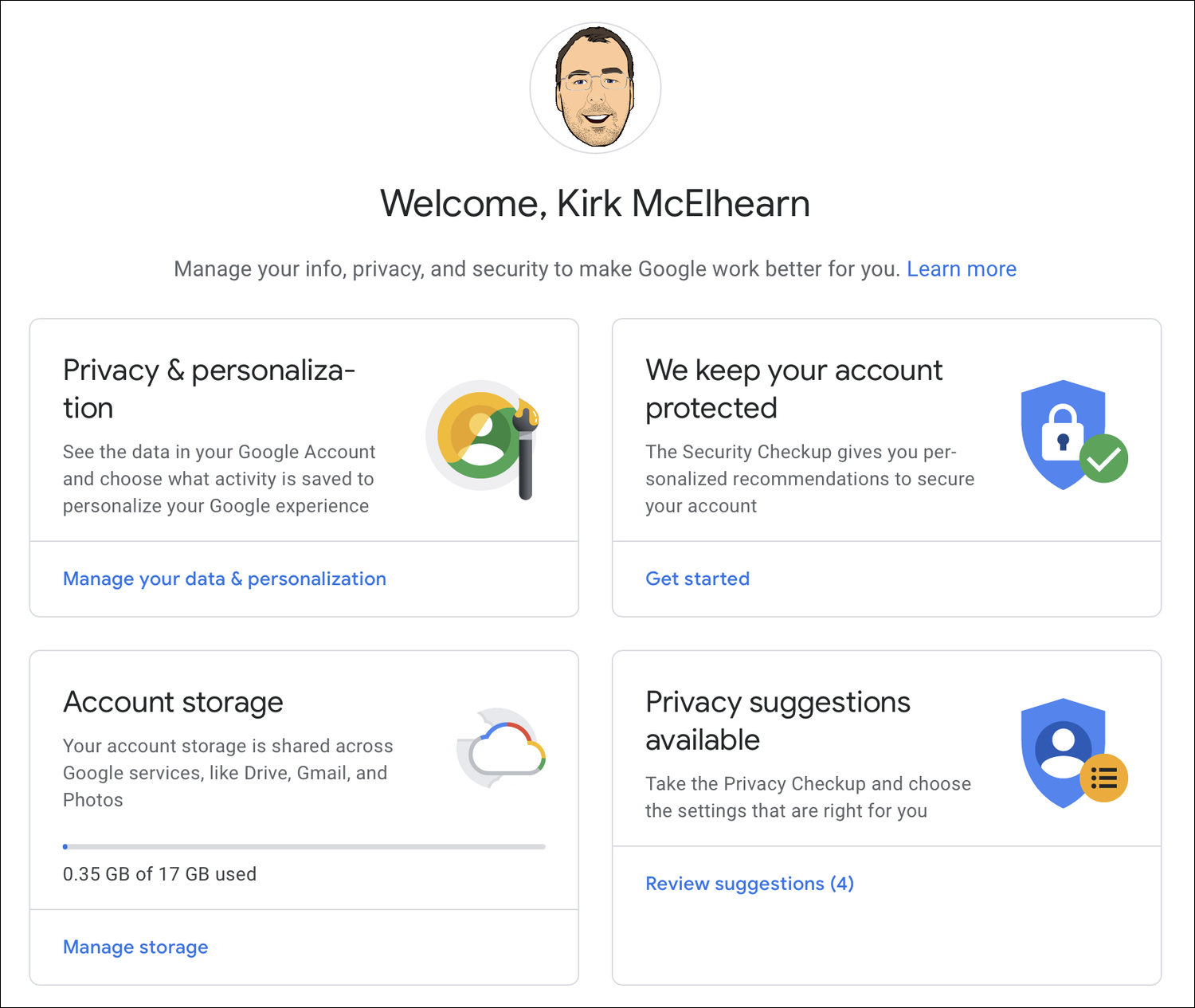
Google Security Checkup

Start with the Security Checkup, in the We keep your account protected section (this may display Security issues found, if there are issues you need to check). Click Get Started in that section, sign into your account, and follow the instructions. There are five items in this checklist to run through.
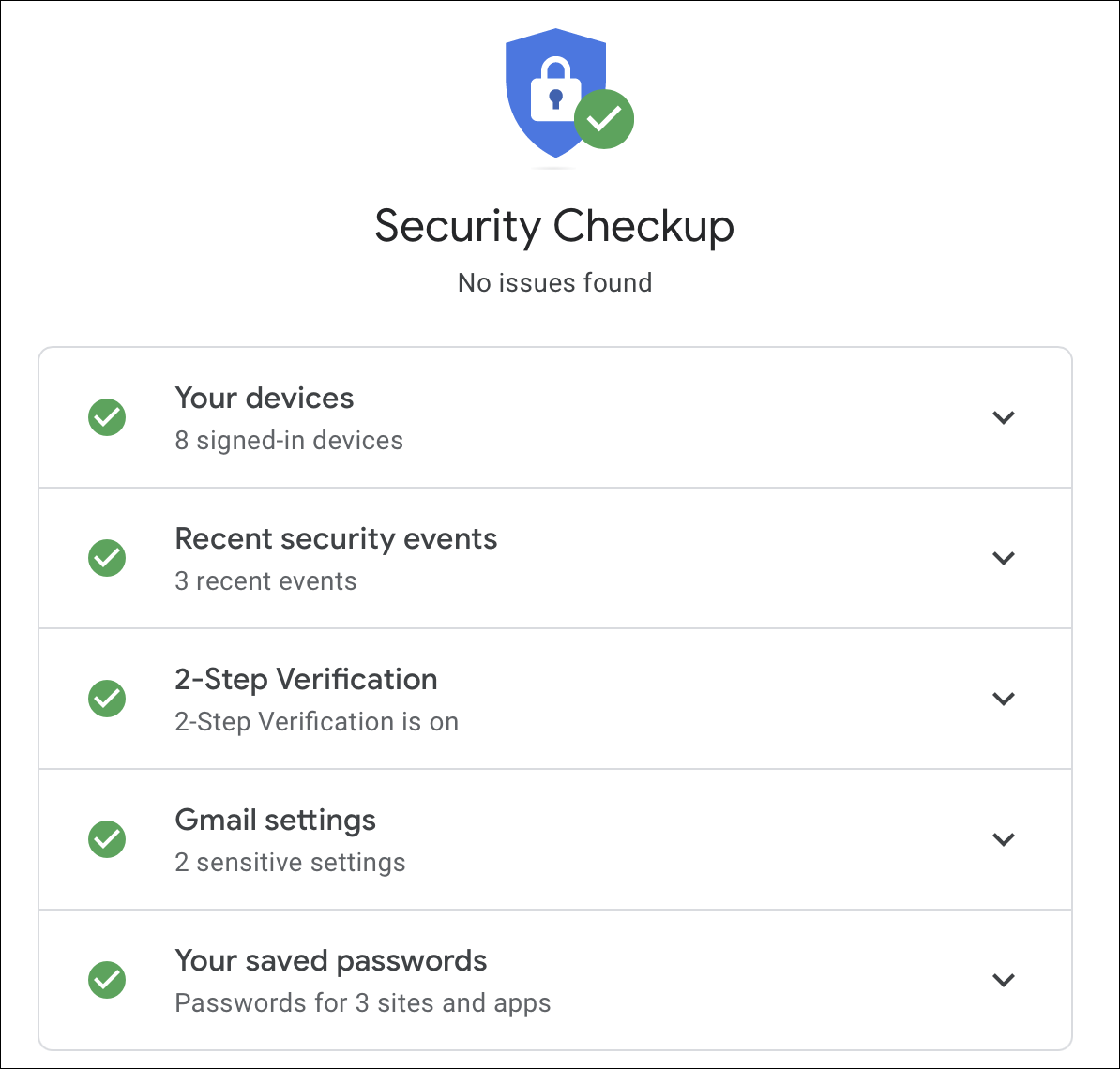
Your devices

You can check all your signed-in devices. These are computers, tablets, and smartphones that have logged into your Google account. If you’ve recently sold or given away a device, it’s a good idea to remove it from the list. Or if you see an unfamiliar device in the list, you should remove it. Click the three-dot menu and choose Sign Out. If you need more information, click Don’t recognize a device? and follow the instructions.

Recent security events

You can now see recent security events. This tells you when you logged into your account from different devices, and lists any changes you’ve made, such as to your password, or to your recovery phone number or email address. If anything looks suspicious, click Don’t recognize an event? and follow the instructions.

2-Step Verification

The next section is for 2-Step Verification. We’ve discussed two-step verification for a number of services, such as Amazon and iCloud. Google offers a similar feature, which protects your email and the rest of your Google account. It’s a good idea to set it up if you haven’t already. If you have already set up 2-Step Verification, you’ll see your phone numbers here, and you’ll also see if you have set up an authenticator app to create one-time codes. If not, you can turn on 2-Step Verification. (See this Google page for instructions on how to turn this on.) We’ve also looked at using a hardware security key to add extra protection to your account; Google has settings for this, which we explain in this article.

Gmail settings

In the Gmail settings section, you’ll see addresses that you have blocked, and you may see information about the fact that your name shows on your emails (rather than just the @gmail address), if you have automatic forwarding on, or other features. But most of the settings for your Gmail account are accessible from within the account. See below for more on Gmail settings.

If you return to the main account page, you can access other settings in the sidebar.

Your saved passwords

This section tells you how many passwords you’ve saved, for sites and apps, and offers to do a Password Checkup. This latter feature is useful to see if you’ve been reusing passwords, or if any of your passwords are weak.

Personal info

This section is where you update information about yourself, such as your name, date of birth, and password; this is information that is visible to others in your Google profile. (Edit what is visible in the Choose what others see section at the bottom of the page.) You can edit your contact info – alternate email addresses, a recovery email address, and others. You can also edit and verify a phone number that you use for two-factor authentication.

Data & personalization

This section offers a number of options. You can Take the Privacy Checkup, which walks you through a number of settings about how much of your data is stored and/or shared. This covers your “Google experience,” YouTube, Google Photos, information that others can see, and ad preferences.

One option available here is to enable auto-deletion of your location history, which you may want to do if you use Google Maps.
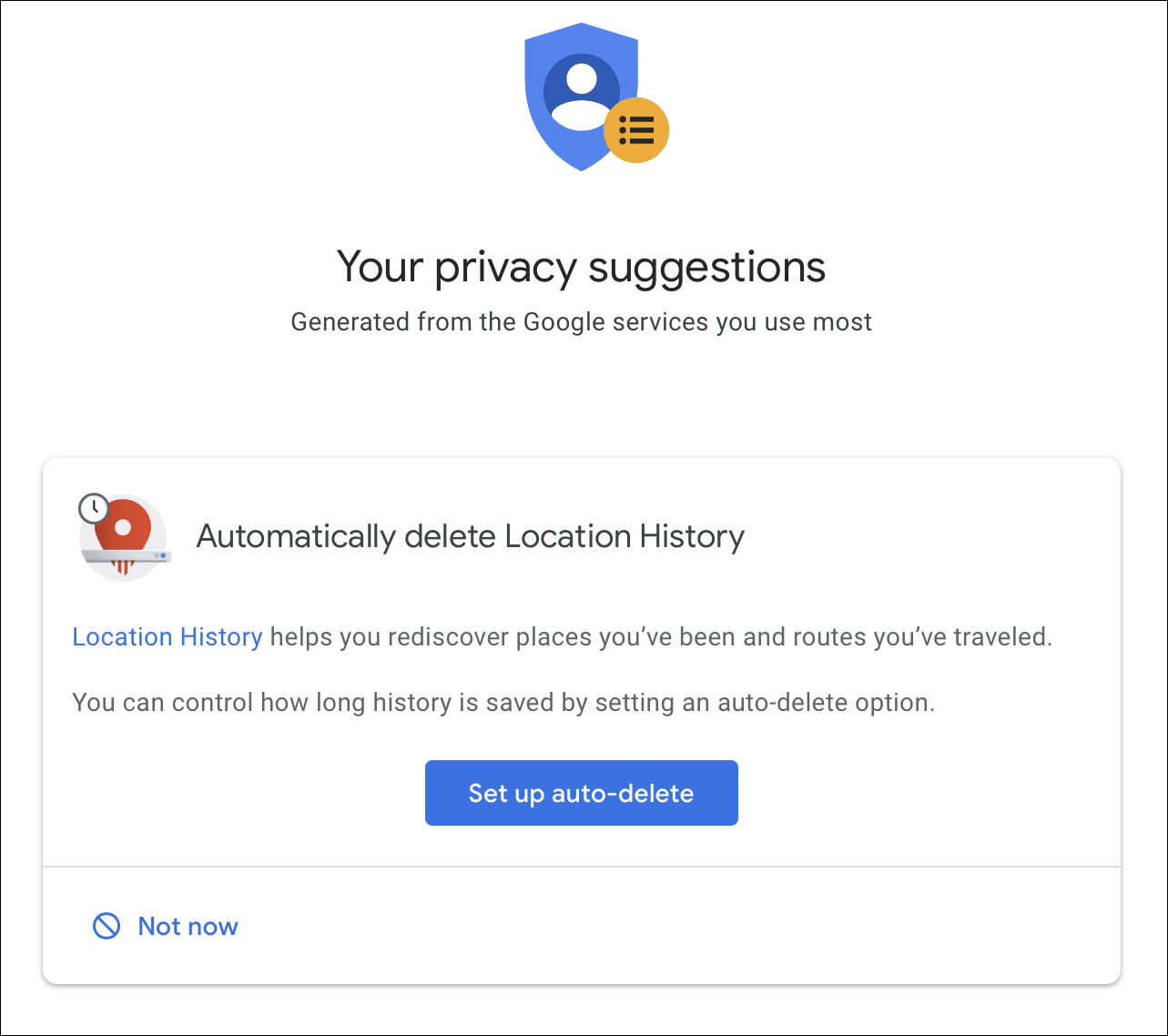
In the Personalize your Google experience section, you can turn on or off the recording of certain types of information such as Web & App Activity, Location History, Device Information, Voice & Audio activity, and YouTube Watch History. You can then manage what you share on YouTube, control what others see about you, and more.

Security

In the Security section, you’ll see some settings that also show up in the Google Security Checkup, described above. But there is also a Signing in to other sites section, which lists any websites where you gave signed in with your Google account. It’s a good idea to check these. The Password Manager section lists passwords that you have stored in Google Chrome; these are independent of any third-party password manager you may use. And Linked Accounts are ones where you have given Google access to your data from third-party sites. Check those, if there are any.

People & sharing

This section gives you access to your contacts, if you are using an Android device or Chromebook, and also lets you manage location sharing and lets you choose what others see about you (which are also available in the Personalize your Google experience section discussed above).

Payments & subscriptions

This section covers payment information, purchases, subscriptions, and reservations that you have paid for with Google Pay. If you don’t use Google Pay, you won’t have any data here. However, I found that I had an old, expired credit card in the Payment methods section; I don’t remember ever using it, and it had expired two years ago, but I deleted it anyway.

Gmail security tips

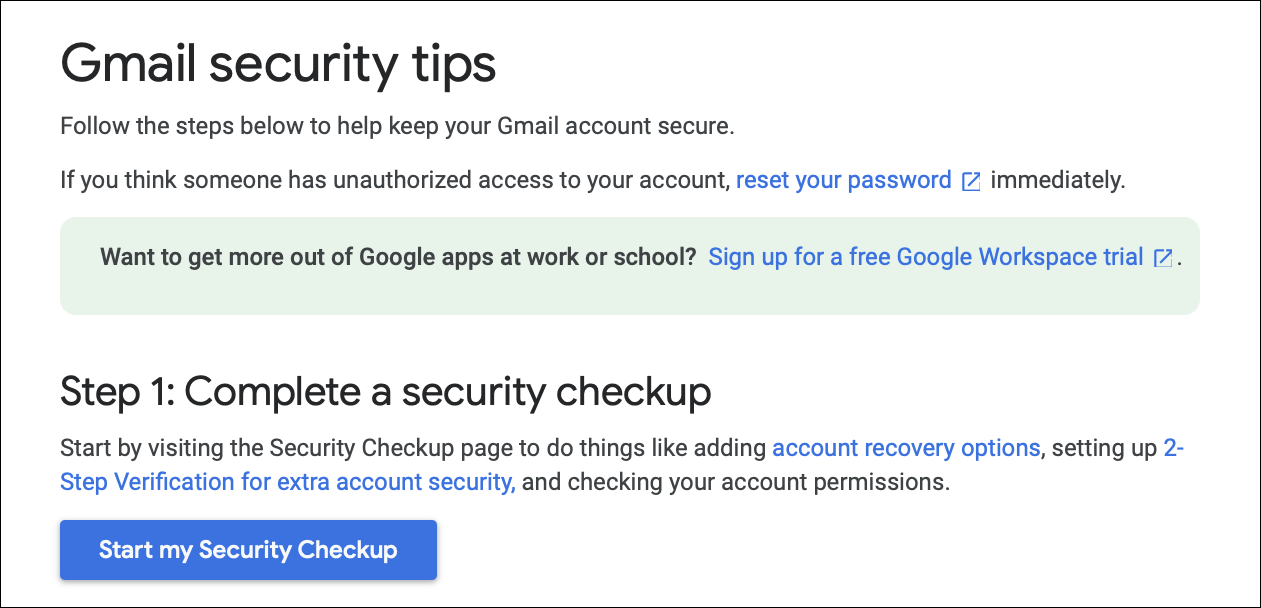
The Gmail Security tips page gives you some advice on securing your Gmail account. The first step sends you to the Google Security Checkup discussed above. The second step is a number of security tips specific to a computer, an Android device, or an iPhone or iPad. It includes items such as creating a strong password, checking your Gmail settings (see below), updating your browser, and reporting scams, spam, and phishing.
Gmail settings

To check settings for your Gmail account, log into that account. Above your inbox, to the right, you’ll see a gear icon. Click this, then click See all Settings. This page has a number of tabs, and dozens of individual settings. Most of these affect the way Gmail displays, how it handles different types of messages, any filtered or blocked addresses, and more. If you go to the Accounts tab, then the Google Account Settings, this takes you back to the main page where we started this article.

It’s a good idea to go through all of these security and privacy checks from time to time. Even if you only use Gmail, you still need to check your overall Google account settings to make sure your data is secure and your identity is protected. Google makes it fairly easy to manage security on your account, as long as you know where to look, but they also change the layout and scope of the settings from time to time, so if you haven’t checked them in a while, this would be a good time to do so.

About Kirk McElhearn

Kirk McElhearn writes about Macs, iPods, iTunes, books, music and more on his blog Kirkville.
He is co-host of the Intego Mac Podcast and PhotoActive, and a regular contributor to The Mac Security Blog, TidBITS, and several other websites and publications.
Kirk has written more than twenty books, including Take Control books about iTunes, LaunchBar, and Scrivener.
Follow him on Twitter at @mcelhearn.
View all posts by Kirk McElhearn →

Read More

The post How to Manage Gmail and Google Security and Privacy Settings appeared first on Malware Devil.


https://malwaredevil.com/2021/03/11/how-to-manage-gmail-and-google-security-and-privacy-settings/?utm_source=rss&utm_medium=rss&utm_campaign=how-to-manage-gmail-and-google-security-and-privacy-settings

Everything You Need to Know About Batteries – Intego Mac Podcast Episode 178

Intego Mac Security Podcast + Random

Could Apple’s Rosetta emulation environment not be available in every country? We examine claims that it will be deleted in certain regions. Chrome changes the way it works to try HTTPS by default. And we discuss cookies: how Google will stop using them to track users, and how you can manage and delete them on your Mac or iOS device.

If you like what you hear, be sure to rate and review the Intego Mac Podcast on Apple Podcasts.

Intego Mac Podcast

Have a question? Ask us! Contact Intego via email if you have any questions you want to hear discussed on the podcast, or to provide feedback and ideas for upcoming podcast episodes.

About Kirk McElhearn

Kirk McElhearn writes about Macs, iPods, iTunes, books, music and more on his blog Kirkville.
He is co-host of the Intego Mac Podcast and PhotoActive, and a regular contributor to The Mac Security Blog, TidBITS, and several other websites and publications.
Kirk has written more than twenty books, including Take Control books about iTunes, LaunchBar, and Scrivener.
Follow him on Twitter at @mcelhearn.
View all posts by Kirk McElhearn →

Read More

The post Everything You Need to Know About Batteries – Intego Mac Podcast Episode 178 appeared first on Malware Devil.


https://malwaredevil.com/2021/03/11/everything-you-need-to-know-about-batteries-intego-mac-podcast-episode-178/?utm_source=rss&utm_medium=rss&utm_campaign=everything-you-need-to-know-about-batteries-intego-mac-podcast-episode-178

Critical Vulnerabilities Affecting F5 Devices (CERT-EU Security Advisory 2021-015)

On the 10th or March 2021, F5 released several security advisories, including four identified as critical.
One of the vulnerabilities allows an unauthenticated attacker with network access to the iControl REST interface, through the BIG-IP management interface and self IP addresses, to execute arbitrary system commands, create or delete files, and disable services.
Another of the vulnerabilities may allow either a bypass of URL-based access control or remote code execution (RCE) if a request is incorrectly handled by Traffic Management Microkernel (TMM) URI normalisation.
No public proof of concept is available yet.
Read More

The post Critical Vulnerabilities Affecting F5 Devices (CERT-EU Security Advisory 2021-015) appeared first on Malware Devil.


https://malwaredevil.com/2021/03/11/critical-vulnerabilities-affecting-f5-devices-cert-eu-security-advisory-2021-015/?utm_source=rss&utm_medium=rss&utm_campaign=critical-vulnerabilities-affecting-f5-devices-cert-eu-security-advisory-2021-015

Critical Pre-Auth RCE Flaw Found in F5 Big-IP Platform — Patch ASAP!

Application security company F5 Networks on Wednesday published an advisory warning of four critical vulnerabilities impacting multiple products that could result in a denial of service (DoS) attack and even unauthenticated remote code execution on target networks.

The patches concern a total of seven related flaws (from CVE-2021-22986 through CVE-2021-22992), two of which were discovered and reported by Felix Wilhelm of Google Project Zero in December 2020.

The four critical flaws affect BIG-IP versions 11.6 or 12.x and newer, with a critical pre-auth remote code execution (CVE-2021-22986) also affecting BIG-IQ versions 6.x and 7.x. F5 said it’s not aware of any public exploitation of these issues.

Successful exploitation of these vulnerabilities could lead to a full compromise of vulnerable systems, including the possibility of remote code execution as well as trigger a buffer overflow, leading to a DoS attack.

Urging customers to update their BIG-IP and BIG-IQ deployments to a fixed version as soon as possible, F5 Networks’ Kara Sprague said the “vulnerabilities were discovered as a result of regular and continuous internal security testing of our solutions and in partnership with respected third parties working through F5’s security program.”

The vulnerabilities have been addressed in the following products:

  • BIG-IP versions: 16.0.1.1, 15.1.2.1, 14.1.4, 13.1.3.6, 12.1.5.3, and 11.6.5.3
  • BIG-IQ versions: 8.0.0, 7.1.0.3, and 7.0.0.2

Besides these flaws, Wednesday’s patches also include fixes for 14 other unrelated security issues.

The fixes are notable for the fact that it’s the second time in as many years that F5 has revealed flaws that could allow remote code execution.

The latest update to BIG-IP software arrives less than a year after the company addressed a similar critical flaw (CVE-2020-5902) in early July 2020, with multiple hacking groups exploiting the bug to target unpatched devices, prompting the U.S. Cybersecurity and Infrastructure Security Agency (CISA) to issue an alert cautioning of a “broad scanning activity for the presence of this vulnerability across federal departments and agencies.”

“This bug is probably going to fly under the radar, but this is a much bigger deal than it looks because it says something is really really broken in the internal security process of F5 BIG-IP devices,” said Matt “Pwn all the Things” Tait in a tweet.

Found this article interesting? Follow THN on Facebook, Twitter and LinkedIn to read more exclusive content we post.

Read More

The post Critical Pre-Auth RCE Flaw Found in F5 Big-IP Platform — Patch ASAP! appeared first on Malware Devil.


https://malwaredevil.com/2021/03/11/critical-pre-auth-rce-flaw-found-in-f5-big-ip-platform-patch-asap/?utm_source=rss&utm_medium=rss&utm_campaign=critical-pre-auth-rce-flaw-found-in-f5-big-ip-platform-patch-asap

Network Security News Summary for Thursday March 11st, 2021

A brief daily summary of what is important in cybersecurity. The podcast is published every weekday and designed to get you ready for the day with a brief, usually about 5 minutes long, summary of current network security-related events. The content is late breaking, educational and based on listener input as well as on input received by the SANS Internet Storm Center. You may submit questions and comments via our contact form at https://isc.sans.edu/contact.html .

The post Network Security News Summary for Thursday March 11st, 2021 appeared first on Malware Devil.


https://malwaredevil.com/2021/03/11/network-security-news-summary-for-thursday-march-11st-2021/?utm_source=rss&utm_medium=rss&utm_campaign=network-security-news-summary-for-thursday-march-11st-2021

Adobe Security Advisory

Identifier: AV21-120
Read More

The post Adobe Security Advisory appeared first on Malware Devil.


https://malwaredevil.com/2021/03/11/adobe-security-advisory-17/?utm_source=rss&utm_medium=rss&utm_campaign=adobe-security-advisory-17

Adobe Security Advisory

Identifier: AV21-120
Read More

The post Adobe Security Advisory appeared first on Malware Devil.


https://malwaredevil.com/2021/03/11/adobe-security-advisory-15/?utm_source=rss&utm_medium=rss&utm_campaign=adobe-security-advisory-15

[Control Systems] Siemens Security Advisory

Identifier: AV21-120
Read More

The post [Control Systems] Siemens Security Advisory appeared first on Malware Devil.


https://malwaredevil.com/2021/03/11/control-systems-siemens-security-advisory-12/?utm_source=rss&utm_medium=rss&utm_campaign=control-systems-siemens-security-advisory-12

iPhone app exposed other people’s call recordings

Video and audio are huge privacy concerns for people. If something goes wrong with tech it can have major ramifications. You’re likely very familiar with warnings about video. However, audio hasn’t always been so prominent. It’s only really since the rise of home assistants like Amazon’s Alexa that audio worries have gone mainstream.

Turning up the volume on audio threats

Bluetooth earphones and similar devices have only helped to raise awareness of potential issues, as we consider the tools we use the most. As per the link, it’s generally a lot harder to secure sound than vision. There isn’t an audio equivalent of the bit of tape over your webcam. You’re dealing with the innards of your device and that’s not for everyone. Either the hardware tinkering is beyond them, or their audio setup is a confusing mess of six audio devices and brand-specific audio controls.

It isn’t easy, and that’s just for desktop. Mobile is another proposition altogether, being an incredibly personal device yet something of a mystery-box to many owners. How does your Android phone work? Which version of Android is it even? How do the basic settings differ on your phone from mine? You’re giving me an iPhone for work? Sorry, I’ve never used one of those before.

These are just a sample selection of the things you’ll run into if you’ve ever been nominated your household’s Christmas season tech support. Worse, a lot of what seems to happen on a phone actually happens in the cloud (such as interpreting voice commands), where it’s completely beyond your reach.

Which brings us neatly to a recent discovery.

Listening in to someone else’s recordings

Researchers found an issue with an iPhone call recording app, which boasts of “more than 1,000,000 downloads”. Used to record and share clips via email, or saved to storage solutions such as Dropbox and Google Drive, it offers a fair bit of flexibility for people in need of some audio recording.

The researcher who discovered the vulnerability used various security testing tools to view and modify network traffic used by the app. From there, they discovered it was possible to replace their own phone number with someone else’s. With that done, recordings from that phone (located in the cloud, on an Amazon AWS bucket) were available to them, without a password. The entire call history and the numbers calls were made on were also available, at least until the app was updated and the problem fixed by the developers.

Or, as the researchers at PingSafe put it:

The vulnerability allowed any malicious actor to listen to any user’s call recording from the cloud storage bucket of the application and an unauthenticated API endpoint which leaked the cloud storage URL of the victim’s data

Considering the kind of recordings people could make, this is a worrying thing to have happened. Think of all the business sensitive conversations people might have, or personal discussions, random thoughts, or anything else. Yes, we can argue people shouldn’t upload mission critical work conversations into the cloud (or even a laundry list of complaints about their neighbour). However, if you give people a recording app then record they will.

The perils of audio data in the cloud

TechCrunch reports there were 130,000+ audio recordings, weighing in at some 300GB in size, in the storage bucket. That’s a lot of potential for mischief, pranks, trolling, or just plain old blackmail and extortion. If we’re lucky, the only person who noticed this was the researcher who reported it.

Audio has always been a source for security and privacy concerns. Whether we’re talking fake Twitch audio fixes or where people’s data ends up, it’s always worth keeping in mind.

It might not be as visible a concern as the usual security hot-spots on your laptops and mobile devices, or as obvious as video. All the same, it’s an important part of your overall security hygiene.

This is probably an excellent moment to check:

  • if your audio software need updating
  • your streaming accounts are secure
  • you’re happy with any audio files kept in the cloud

Follow these steps and hopefully your audio security will soon catch up with your visual-based best practices.

The post iPhone app exposed other people’s call recordings appeared first on Malware Devil.


https://malwaredevil.com/2021/03/10/iphone-app-exposed-other-peoples-call-recordings-4/?utm_source=rss&utm_medium=rss&utm_campaign=iphone-app-exposed-other-peoples-call-recordings-4

iPhone app exposed other people’s call recordings

Video and audio are huge privacy concerns for people. If something goes wrong with tech it can have major ramifications. You’re likely very familiar with warnings about video. However, audio hasn’t always been so prominent. It’s only really since the rise of home assistants like Amazon’s Alexa that audio worries have gone mainstream.

Turning up the volume on audio threats

Bluetooth earphones and similar devices have only helped to raise awareness of potential issues, as we consider the tools we use the most. As per the link, it’s generally a lot harder to secure sound than vision. There isn’t an audio equivalent of the bit of tape over your webcam. You’re dealing with the innards of your device and that’s not for everyone. Either the hardware tinkering is beyond them, or their audio setup is a confusing mess of six audio devices and brand-specific audio controls.

It isn’t easy, and that’s just for desktop. Mobile is another proposition altogether, being an incredibly personal device yet something of a mystery-box to many owners. How does your Android phone work? Which version of Android is it even? How do the basic settings differ on your phone from mine? You’re giving me an iPhone for work? Sorry, I’ve never used one of those before.

These are just a sample selection of the things you’ll run into if you’ve ever been nominated your household’s Christmas season tech support. Worse, a lot of what seems to happen on a phone actually happens in the cloud (such as interpreting voice commands), where it’s completely beyond your reach.

Which brings us neatly to a recent discovery.

Listening in to someone else’s recordings

Researchers found an issue with an iPhone call recording app, which boasts of “more than 1,000,000 downloads”. Used to record and share clips via email, or saved to storage solutions such as Dropbox and Google Drive, it offers a fair bit of flexibility for people in need of some audio recording.

The researcher who discovered the vulnerability used various security testing tools to view and modify network traffic used by the app. From there, they discovered it was possible to replace their own phone number with someone else’s. With that done, recordings from that phone (located in the cloud, on an Amazon AWS bucket) were available to them, without a password. The entire call history and the numbers calls were made on were also available, at least until the app was updated and the problem fixed by the developers.

Or, as the researchers at PingSafe put it:

The vulnerability allowed any malicious actor to listen to any user’s call recording from the cloud storage bucket of the application and an unauthenticated API endpoint which leaked the cloud storage URL of the victim’s data

Considering the kind of recordings people could make, this is a worrying thing to have happened. Think of all the business sensitive conversations people might have, or personal discussions, random thoughts, or anything else. Yes, we can argue people shouldn’t upload mission critical work conversations into the cloud (or even a laundry list of complaints about their neighbour). However, if you give people a recording app then record they will.

The perils of audio data in the cloud

TechCrunch reports there were 130,000+ audio recordings, weighing in at some 300GB in size, in the storage bucket. That’s a lot of potential for mischief, pranks, trolling, or just plain old blackmail and extortion. If we’re lucky, the only person who noticed this was the researcher who reported it.

Audio has always been a source for security and privacy concerns. Whether we’re talking fake Twitch audio fixes or where people’s data ends up, it’s always worth keeping in mind.

It might not be as visible a concern as the usual security hot-spots on your laptops and mobile devices, or as obvious as video. All the same, it’s an important part of your overall security hygiene.

This is probably an excellent moment to check:

  • if your audio software need updating
  • your streaming accounts are secure
  • you’re happy with any audio files kept in the cloud

Follow these steps and hopefully your audio security will soon catch up with your visual-based best practices.

The post iPhone app exposed other people’s call recordings appeared first on Malware Devil.


https://malwaredevil.com/2021/03/10/iphone-app-exposed-other-peoples-call-recordings-3/?utm_source=rss&utm_medium=rss&utm_campaign=iphone-app-exposed-other-peoples-call-recordings-3

iPhone app exposed other people’s call recordings

Video and audio are huge privacy concerns for people. If something goes wrong with tech it can have major ramifications. You’re likely very familiar with warnings about video. However, audio hasn’t always been so prominent. It’s only really since the rise of home assistants like Amazon’s Alexa that audio worries have gone mainstream.

Turning up the volume on audio threats

Bluetooth earphones and similar devices have only helped to raise awareness of potential issues, as we consider the tools we use the most. As per the link, it’s generally a lot harder to secure sound than vision. There isn’t an audio equivalent of the bit of tape over your webcam. You’re dealing with the innards of your device and that’s not for everyone. Either the hardware tinkering is beyond them, or their audio setup is a confusing mess of six audio devices and brand-specific audio controls.

It isn’t easy, and that’s just for desktop. Mobile is another proposition altogether, being an incredibly personal device yet something of a mystery-box to many owners. How does your Android phone work? Which version of Android is it even? How do the basic settings differ on your phone from mine? You’re giving me an iPhone for work? Sorry, I’ve never used one of those before.

These are just a sample selection of the things you’ll run into if you’ve ever been nominated your household’s Christmas season tech support. Worse, a lot of what seems to happen on a phone actually happens in the cloud (such as interpreting voice commands), where it’s completely beyond your reach.

Which brings us neatly to a recent discovery.

Listening in to someone else’s recordings

Researchers found an issue with an iPhone call recording app, which boasts of “more than 1,000,000 downloads”. Used to record and share clips via email, or saved to storage solutions such as Dropbox and Google Drive, it offers a fair bit of flexibility for people in need of some audio recording.

The researcher who discovered the vulnerability used various security testing tools to view and modify network traffic used by the app. From there, they discovered it was possible to replace their own phone number with someone else’s. With that done, recordings from that phone (located in the cloud, on an Amazon AWS bucket) were available to them, without a password. The entire call history and the numbers calls were made on were also available, at least until the app was updated and the problem fixed by the developers.

Or, as the researchers at PingSafe put it:

The vulnerability allowed any malicious actor to listen to any user’s call recording from the cloud storage bucket of the application and an unauthenticated API endpoint which leaked the cloud storage URL of the victim’s data

Considering the kind of recordings people could make, this is a worrying thing to have happened. Think of all the business sensitive conversations people might have, or personal discussions, random thoughts, or anything else. Yes, we can argue people shouldn’t upload mission critical work conversations into the cloud (or even a laundry list of complaints about their neighbour). However, if you give people a recording app then record they will.

The perils of audio data in the cloud

TechCrunch reports there were 130,000+ audio recordings, weighing in at some 300GB in size, in the storage bucket. That’s a lot of potential for mischief, pranks, trolling, or just plain old blackmail and extortion. If we’re lucky, the only person who noticed this was the researcher who reported it.

Audio has always been a source for security and privacy concerns. Whether we’re talking fake Twitch audio fixes or where people’s data ends up, it’s always worth keeping in mind.

It might not be as visible a concern as the usual security hot-spots on your laptops and mobile devices, or as obvious as video. All the same, it’s an important part of your overall security hygiene.

This is probably an excellent moment to check:

  • if your audio software need updating
  • your streaming accounts are secure
  • you’re happy with any audio files kept in the cloud

Follow these steps and hopefully your audio security will soon catch up with your visual-based best practices.

The post iPhone app exposed other people’s call recordings appeared first on Malware Devil.


https://malwaredevil.com/2021/03/10/iphone-app-exposed-other-peoples-call-recordings-2/?utm_source=rss&utm_medium=rss&utm_campaign=iphone-app-exposed-other-peoples-call-recordings-2

OVH cloud datacenter destroyed by fire

A fire in one of the OVH datacenters has destroyed one datacenter and knocked two others offline. It took 100 firefighters and 43 fire trucks to fight the fire in the five-story building. Even though the fire department was quick to respond, and the fire was brought under control relatively quickly, the impact has been big.

In a press statement OVH promised “to communicate as transparently as possible on the progress of our analyses and the implementation of solutions”.

OVH is the largest hosting provider in Europe and the third largest in the world. The cloud computing company provides virtual private servers, dedicated servers, and other web services.

Customers are being advised by the company to enact their disaster recovery plans after the fire has rendered multiple data centres unserviceable, impacting websites around the world, and a number of organisations involved in cybersecurity.

One such company, Acceis, met the situation with an admirable sense of humour, while providing a dramatic view of the fire.

Data and servers in the cloud

Many organizations use some type of cloud services to keep their setup flexible. But the old saying about the cloud that “it’s your data on someone else’s computer” hits home when you suddenly loose a big chunk of your server capacity or your web services out of the blue.

It’s too late to think about a backup plan when you find yourself needing one. As a result of this incident some customers of OVH state their web services are inaccessible. Which usually means that their websites are inaccessible as well.

Sadly, for video game maker Rust, the incident has led to a total data loss, leaving no way for recovery (although the company seems to be restoring services fairly rapidly).

BleepingComputer provided this list of victims:

“The list of impacted clients includes cyber threat intelligence company Bad Packets, provider of free chess server Lichess.org, videogame maker Rust, cryptocurrency exchange Deribit’s blog and docs sites, telecom company AFR-IX, encryption utility VeraCrypt, news outlet eeNews Europe, the art building complex Centre Pompidou, and many others.”

And since the data centre site is off limits for now, it will take a while before the offline centres can be restarted.

OVH’s Octave Klaba tweeted:

“We plan to restart SBG1+SBG4+the network by Monday March,15 and SBG3 by Friday March,19.”

Pros and cons of the cloud

The fire is a very dramatic reminder that the cloud has a down side. As with all technology, there are pros and cons to using it.

The great advantages of the cloud are that it makes worrying about hardware somebody else’s problem, its scalable and flexible–it can react quickly to changes in demand and you pay for what you use–and it’s accessible from anywhere.

But even in the cloud your data is always somewhere, and that somewhere still needs security (which may be different from what you’re used to), data protection, internet access, backups and disaster recovery.

As OVH put it:

Customers should immediately bring into effect their disaster recovery plans as OVH is working on restoring its services.

That raises the question of how many of its customers had such a disaster recovery plan. It’s too late for them if they didn’t, but if you weren’t affected by this fire, now is the perfect time to check that you have one!

The post OVH cloud datacenter destroyed by fire appeared first on Malware Devil.


https://malwaredevil.com/2021/03/10/ovh-cloud-datacenter-destroyed-by-fire/?utm_source=rss&utm_medium=rss&utm_campaign=ovh-cloud-datacenter-destroyed-by-fire

Barbary Pirates and Russian Cybercrime

In 1801, the United States had a small Navy. Thomas Jefferson deployed almost half that Navy—three frigates and a schooner—to the Barbary C...