Malware Devil

Monday, March 22, 2021

Nim Strings, (Mon, Mar 22nd)

On Tuesday’s Stormcast, Johannes talked about malware written in the Nim Programming language.

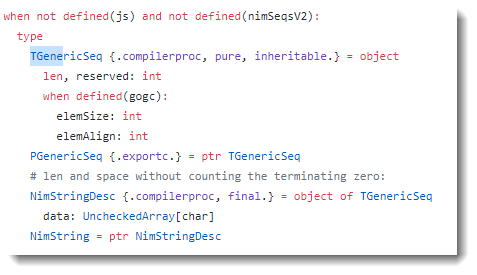
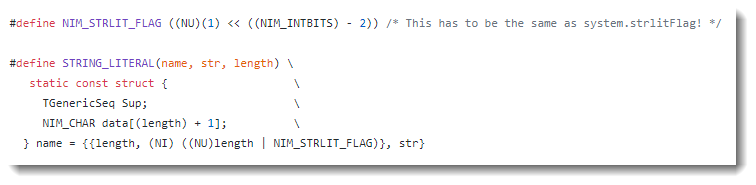
Internally, strings in the Nim programming language are stored inside a structure (STRING_LITERAL) that consists of 2 integers followed by the string.

Both integers represent the length of the string, although the second integer has one bit set to indicate it is a string literal.

Here is an example of a program I wrote and compiled to a 32-bit PE file:

In red is the string itself (17 bytes long, 0x11). Green is the first integer: the length of the string (0x00000011) encoded as a little-endian 32-bit integer (0x11000000). Yellow is the second integer: the length of the string encoded as a little-endian 32-bit integer with the 3rd most-significant bit set (0x00000011 + x40000000 -> 0x11000040).

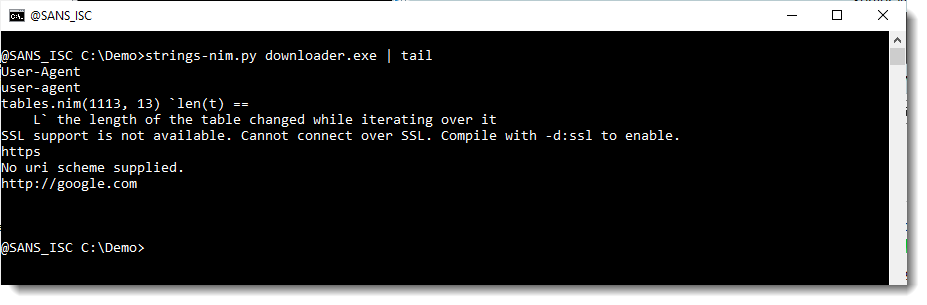
I wrote a Python script to extract these strings. It’s beta: I still have to decided if and how to integrate this in my strings.py tool).

Unlike the classic tool strings, this tool will also extract strings that contain non-printable characters.


Didier Stevens
Senior handler
Microsoft MVP
blog.DidierStevens.com DidierStevensLabs.com

(c) SANS Internet Storm Center. https://isc.sans.edu Creative Commons Attribution-Noncommercial 3.0 United States License. Read More

The post Nim Strings, (Mon, Mar 22nd) appeared first on Malware Devil.


https://malwaredevil.com/2021/03/22/nim-strings-mon-mar-22nd/?utm_source=rss&utm_medium=rss&utm_campaign=nim-strings-mon-mar-22nd

Researchers Discover Two Dozen Malicious Chrome Extensions

Extensions are being used to serve up unwanted adds, steal data, and divert users to malicious sites, Cato Networks says.

Researchers at Cato Networks have discovered two dozen malicious Google Chrome browser extensions and 40 associated malicious domains that are being used to introduce adware on victim systems, steal credentials, or quietly redirect victims to malware distribution sites.

The security vendor discovered the extensions on networks belonging to hundreds of its customers and found that they were not being flagged as malicious by endpoint protection tools and threat intelligence systems.

Etay Maor, senior director of security strategy at Cato Networks, says such extensions can pose risks for enterprise organizations. “Security researchers have found extensions performing malicious activity that ranged from stealing usernames and passwords to stealing financial data,” he says. The theft of personal and corporate data is a real threat for organizations, and there have already been multiple instances of extensions doing so, he notes.

While malicious extensions are an issue with all browsers, it’s especially significant with Chrome because of how widely used the browser is, Maor says. It’s hard to say what proportion of the overall Chrome extensions currently available are malicious. It’s important to note that just a relatively small number of malicious extensions are needed to infect millions of Internet users, he says.

One case in point was Awake Security’s discovery last June of over 100 malicious Google Chrome extensions that were being used as part of a massive global campaign to steal credentials, take screenshots, and carry out other malicious activity. Awake Security estimated that there were at least 32 million downloads of the malicious extensions. In February 2020, Google removed some 500 problematic Chrome extensions from its official Chrome Web Store after being tipped off to the problem by security researchers. Some 1.7 million users were believed affected in that incident.

In a soon-to-be-released report, Cato says it analyzed five days of network data collected from customer networks to see if it could identify evidence of extensions communicating with command-and-control servers. The company basically correlated Chrome browser extension behavior with network traffic to preliminarily classify extensions as benign or malicious. The exercise resulted in Cato identifying 97 out of 551 unique extensions on customer networks as being potentially problematic. Researchers from the company then manually inspected each extension to see if they could definitively classify them as malicious or benign. That process in turn ended up identifying 87 extensions as being definitely malicious. Out of that number, 24 had not been previously identified as being malicious.

Multiple Methods
Google, like other browser makers, has implemented multiple measures to vet the security of extensions uploaded to its Chrome store. According to Cato, the process of uploading an extension to Google’s official store can take weeks and involves both automated and manual reviews of the extension code and activity. Chrome’s standard security settings also block installations of extensions sourced from outside of Chrome Web Store. Even so, Cato’s research showed threat actors employing at least four different approaches to introduce malicious extensions into users’ browsers.

One common way is to sneak it in via extension installation files from unofficial stores. “Some developers prefer not to go through the Google’s set of installation restrictions and offer their extensions for download from unofficial stores,” Maor says. While not all extensions on unofficial sites are malicious, it’s still a risk to get Chrome extensions from anywhere but Google’s official Chrome Web Store. Attackers have found ways to bypass Chrome’s blocking of unofficial extensions by using iframes, a mechanism for embedding documents and other content inside a webpage, he says.

In other instances, an attacker may sneak malicious code into a Chrome browser extension update. Maor points to several ways this can happen. A developer, for instance, might sell code to a third party that later injects malicious code into it. Or a developer might initially release a benign browser that performs as advertised but then gets updated with malicious properties once it gets popular. Developers could also get scammed into giving up control of their account to an attacker. “In almost every instance, the app initially is not harmful but rather updated later with malicious code, as it is easier to bypass security checks that occur at the Google store that way,” Maor says.

Adversaries have also been known to purchase rights to a legitimate Chrome extension and then modify it later with malicious code or to use a malicious extension to download additional malicious extensions.

Jai Vijayan is a seasoned technology reporter with over 20 years of experience in IT trade journalism. He was most recently a Senior Editor at Computerworld, where he covered information security and data privacy issues for the publication. Over the course of his 20-year … View Full Bio

Recommended Reading:

Comment |

Email This |

Print |

RSS

More Insights

The post Researchers Discover Two Dozen Malicious Chrome Extensions appeared first on Malware Devil.


https://malwaredevil.com/2021/03/22/researchers-discover-two-dozen-malicious-chrome-extensions/?utm_source=rss&utm_medium=rss&utm_campaign=researchers-discover-two-dozen-malicious-chrome-extensions

Acer Reportedly Hit With $50M Ransomware Attack

Register for Dark Reading Newsletters

Subscribe to Newsletters

White Papers

Video

Cartoon Contest

Current Issue

image2021 Top Enterprise IT TrendsWe’ve identified the key trends that are poised to impact the IT landscape in 2021. Find out why they’re important and how they will affect you today!
image

Flash Poll

How Enterprises are Developing Secure Applications
Recent breaches of third-party apps are driving many organizations to think harder about the security of their off-the-shelf software as they continue to move left in secure software development practices.
image

Twitter Feed

Dark Reading - Bug Report

Bug Report

Enterprise Vulnerabilities
From DHS/US-CERT’s National Vulnerability Database
CVE-2021-25922
PUBLISHED: 2021-03-22

In OpenEMR, versions 4.2.0 to 6.0.0 are vulnerable to Reflected Cross-Site-Scripting (XSS) due to user input not being validated properly. An attacker could trick a user to click on a malicious url and execute malicious code.

CVE-2021-22314
PUBLISHED: 2021-03-22

There is a local privilege escalation vulnerability in some versions of ManageOne. A local authenticated attacker could perform specific operations to exploit this vulnerability. Successful exploitation may cause the attacker to obtain a higher privilege and compromise the service.

CVE-2021-22321
PUBLISHED: 2021-03-22

There is a use-after-free vulnerability in a Huawei product. A module cannot deal with specific operations in special scenarios. Attackers can exploit this vulnerability by performing malicious operations. This can cause memory use-after-free, compromising normal service. Affected product include so…

CVE-2021-25917
PUBLISHED: 2021-03-22

In OpenEMR, versions 5.0.2 to 6.0.0 are vulnerable to Stored Cross-Site-Scripting (XSS) due to user input not being validated properly. A highly privileged attacker could inject arbitrary code into input fields when creating a new user.

CVE-2021-25918
PUBLISHED: 2021-03-22

In OpenEMR, versions 5.0.2 to 6.0.0 are vulnerable to Stored Cross-Site-Scripting (XSS) due to user input not being validated properly. A highly privileged attacker could inject arbitrary code into input fields when creating a new user.

The post Acer Reportedly Hit With $50M Ransomware Attack appeared first on Malware Devil.


https://malwaredevil.com/2021/03/22/acer-reportedly-hit-with-50m-ransomware-attack-2/?utm_source=rss&utm_medium=rss&utm_campaign=acer-reportedly-hit-with-50m-ransomware-attack-2

Acer Reportedly Hit With $50M Ransomware Attack

Reports say a ransomware gang has given Acer until March 28 to pay, or it will double the ransom amount.

The post Acer Reportedly Hit With $50M Ransomware Attack appeared first on Malware Devil.


https://malwaredevil.com/2021/03/22/acer-reportedly-hit-with-50m-ransomware-attack/?utm_source=rss&utm_medium=rss&utm_campaign=acer-reportedly-hit-with-50m-ransomware-attack

O que é SNMP e como ele funciona?

Para começar do começo, SNMP é uma sigla que significa Simple Network Management Protocol, o protocolo padrão para monitoramento e gerenciamento de redes. Existente desde 1988, ele é usado para monitorar o estado atual de equipamentos de redes e modificar …

The post O que é SNMP e como ele funciona? appeared first on ManageEngine Blog.

The post O que é SNMP e como ele funciona? appeared first on Security Boulevard.

Read More

The post O que é SNMP e como ele funciona? appeared first on Malware Devil.


https://malwaredevil.com/2021/03/22/o-que-e-snmp-e-como-ele-funciona/?utm_source=rss&utm_medium=rss&utm_campaign=o-que-e-snmp-e-como-ele-funciona

How to enable Facebook’s hardware key authentication for iOS and Android

Since 2017 desktop users have had the opportunity to use physical security keys to log in to their Facebook accounts. Now iOS and Android users have the same option too. Physical security keys are a more secure option for two-factor authentication (2FA) than SMS (which is vulnerable to SIM swap attacks and phishing), and apps that generate codes or push notifications (which are also vulnerable to phishing).

Two-factor authentication (2FA)

2FA is the least complex version of multi-factor authorization (MFA) and was invented to add an extra layer of security to the–now considered old-fashioned and insecure–simple login procedure of using a username and password. By definition, 2FA depends on two different methods of identifying a user.

Authentication factors are commonly divided into three groups:

  • Something you know, such as a password.
  • Something you have, such as a code sent by SMS, or a hardware key.
  • Something you are, such as your face or fingerprints.

Different 2FA schemes typically rely on users providing a password and one of the other factors. If you are an Android or iOS user, Facebook will now let you authenticate yourself with a password (something you know) and a hardware security key (something you have).

Hardware security keys

Hardware keys, also known as physical security keys, connect to your device via USB-A, USB-C, Lightning, NFC, or Bluetooth, and are portable enough to be carried on a keychain.

Most of them use an open authentication standard, called FIDO U2F. U2F enables internet users to securely access any number of online services with one single security key, with no drivers or client software needed.

FIDO2 is the latest generation of the U2F protocol and it allows devices other than hardware keys, such as fingerprint sensors or laptops and phones with face recognition, to act as hardware keys.

How do security keys work?

You can use a hardware security key for as many accounts as you like. Once the key has been set up to work with a service, logging in is as simple as inserting the security key into your device (or wirelessly connecting it) and pressing a button on the key itself.

Behind the scenes, the security key is presented with a challenge by your web browser or app. It then cryptographically signs the challenge, verifying your identity.

Setting up Facebook for physical security keys

To add a physical security key as a 2FA factor for Facebook, open Facebook on your device and open the menu.

In the Menu click on Settings under Settings and Privacy.

Settings

You will see the Account Settings menu. Click on Security and Login under Security.

security and login

You will see the Security and Login menu. Click on Use two-factor authentication under Two-Factor Authentication.

Two-Factor Authentication

In the Two-Factor Authentication menu select the Security Key option and click on Continue.

security keys

From there, follow the instructions that are device and key-specific to add your security key as an extra factor of authentication.

Privacy and security

Imagine all the information an attacker might find out about you if they should get hold of your Facebook credentials. It’s not just all your public, and private posts, but your Messenger conversations as well. The first thing a successful attacker will do is enable 2FA to lock you out. So get ahead in the game and enable it yourself. Any 2FA is better than none, but a security key is the most secure form of 2FA.

2FA enabled

Stay safe, everyone!

The post How to enable Facebook’s hardware key authentication for iOS and Android appeared first on Malware Devil.


https://malwaredevil.com/2021/03/22/how-to-enable-facebooks-hardware-key-authentication-for-ios-and-android-2/?utm_source=rss&utm_medium=rss&utm_campaign=how-to-enable-facebooks-hardware-key-authentication-for-ios-and-android-2

How to enable Facebook’s hardware key authentication for iOS and Android

Since 2017 desktop users have had the opportunity to use physical security keys to log in to their Facebook accounts. Now iOS and Android users have the same option too. Physical security keys are a more secure option for two-factor authentication (2FA) than SMS (which is vulnerable to SIM swap attacks and phishing), and apps that generate codes or push notifications (which are also vulnerable to phishing).

Two-factor authentication (2FA)

2FA is the least complex version of multi-factor authorization (MFA) and was invented to add an extra layer of security to the—now considered old-fashioned and insecure—simple login procedure of using a username and password. By definition, 2FA depends on two different methods of identifying a user.

Authentication factors are commonly divided into three groups:

  • Something you know, such as a password.
  • Something you have, such as a code sent by SMS, or a hardware key.
  • Something you are, such as your face or fingerprints.

Different 2FA schemes typically rely on users providing a password and one of the other factors. If you are an Android or iOS user, Facebook will now let you authenticate yourself with a password (something you know) and a hardware security key (something you have).

Hardware security keys

Hardware keys, also known as physical security keys, connect to your device via USB-A, USB-C, Lightning, NFC, or Bluetooth, and are portable enough to be carried on a keychain.

Most of them use an open authentication standard, called FIDO U2F. U2F enables internet users to securely access any number of online services with one single security key, with no drivers or client software needed. 

FIDO2 is the latest generation of the U2F protocol and it allows devices other than hardware keys, such as fingerprint sensors or laptops and phones with face recognition, to act as hardware keys.

How do security keys work?

You can use a hardware security key for as many accounts as you like. Once the key has been set up to work with a service, logging in is as simple as inserting the security key into your device (or wirelessly connecting it) and pressing a button on the key itself.

Behind the scenes, the security key is presented with a challenge by your web browser or app. It then cryptographically signs the challenge, verifying your identity.

Setting up Facebook for physical security keys

To add a physical security key as a 2FA factor for Facebook, open Facebook on your device and open the menu.

In the Menu click on Settings under Settings and Privacy.

Settings

You will see the Account Settings menu. Click on Security and Login under Security.

security and login

You will see the Security and Login menu. Click on Use two-factor authentication under Two-Factor Authentication.

Two-Factor Authentication

In the Two-Factor Authentication menu select the Security Key option and click on Continue.

security keys

From there, follow the instructions that are device and key-specific to add your security key as an extra factor of authentication.

Privacy and security

Imagine all the information an attacker might find out about you if they should get hold of your Facebook credentials. It’s not just all your public, and private posts, but your Messenger conversations as well. The first thing a successful attacker will do is enable 2FA to lock you out. So get ahead in the game and enable it yourself. Any 2FA is better than none, but a security key is the most secure form of 2FA.

2FA enabled

Stay safe, everyone!

The post How to enable Facebook’s hardware key authentication for iOS and Android appeared first on Malwarebytes Labs.

The post How to enable Facebook’s hardware key authentication for iOS and Android appeared first on Malware Devil.


https://malwaredevil.com/2021/03/22/how-to-enable-facebooks-hardware-key-authentication-for-ios-and-android/?utm_source=rss&utm_medium=rss&utm_campaign=how-to-enable-facebooks-hardware-key-authentication-for-ios-and-android

Why Banks Are Still A Top Target For DDoS Attacks

The financial services sector is still a prime target for cyber criminals and it has been widely reported that in 2020 financial institutions came under attack more than ever before. According to Boston Consulting Group research, financial service firms are up to 300 times more likely to experience a cyber attack per year compared to […]

The post Why Banks Are Still A Top Target For DDoS Attacks appeared first on Blog.

The post Why Banks Are Still A Top Target For DDoS Attacks appeared first on Security Boulevard.

Read More

The post Why Banks Are Still A Top Target For DDoS Attacks appeared first on Malware Devil.


https://malwaredevil.com/2021/03/22/why-banks-are-still-a-top-target-for-ddos-attacks/?utm_source=rss&utm_medium=rss&utm_campaign=why-banks-are-still-a-top-target-for-ddos-attacks

Dictionary Attacks, SASE Misinformation, & 3 Key Tasks – BSW #210

In the Leadership and Communication Segment, 5 Reasons Why Cybersecurity Should Be A Priority While Planning Your Business, 3 Key Tasks That Help Me Work Way Less and Accomplish More, Everything You Need to Know About Dictionary Attacks, Is Misinformation Slowing SASE Adoption, & more!

Visit https://www.securityweekly.com/bsw for all the latest episodes!

Show Notes: https://securityweekly.com/bsw210

The post Dictionary Attacks, SASE Misinformation, & 3 Key Tasks – BSW #210 appeared first on Malware Devil.


https://malwaredevil.com/2021/03/22/dictionary-attacks-sase-misinformation-3-key-tasks-bsw-210/?utm_source=rss&utm_medium=rss&utm_campaign=dictionary-attacks-sase-misinformation-3-key-tasks-bsw-210

CISA Warns of Security Flaws in GE Power Management Devices

The flaws could allow an attacker to access sensitive information, reboot the UR, gain privileged access, or cause a denial-of-service condition.
Read More

The post CISA Warns of Security Flaws in GE Power Management Devices appeared first on Malware Devil.


https://malwaredevil.com/2021/03/22/cisa-warns-of-security-flaws-in-ge-power-management-devices/?utm_source=rss&utm_medium=rss&utm_campaign=cisa-warns-of-security-flaws-in-ge-power-management-devices

RedTorch Formed from Ashes of Norse Corp.

Remember Norse Corp., the company behind the interactive “pew-pew” cyber attack map shown in the image blow? Norse imploded rather suddenly in 2016 following a series of managerial missteps and funding debacles. Now, the founders of Norse have launched a new company with a somewhat different vision: RedTorch, which for the past two years has marketed a mix of services to high end celebrity clients, including spying and anti-spying tools and services.
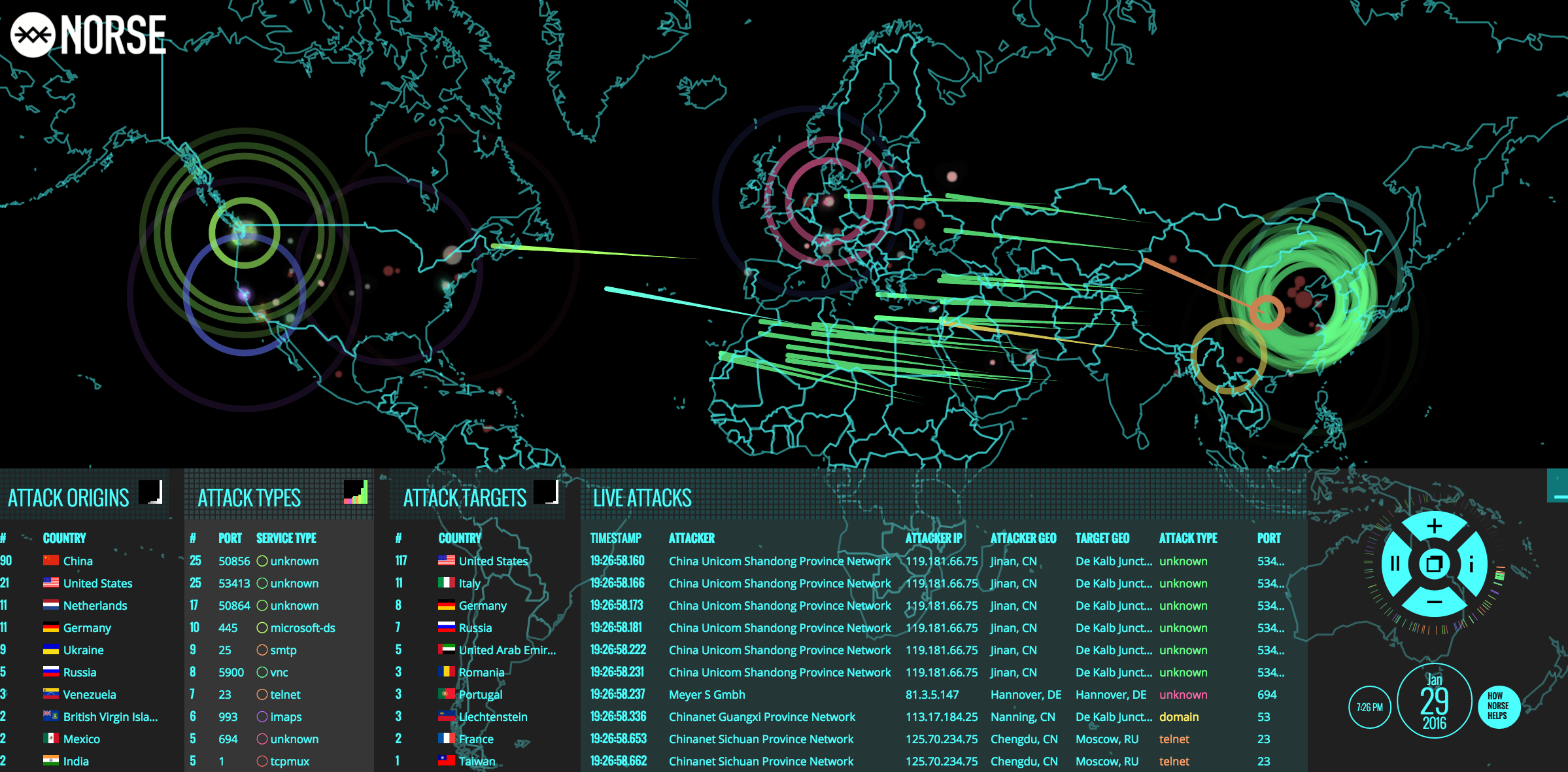
A snapshot of Norse’s semi-live attack map, circa Jan. 2016.

Norse’s attack map was everywhere for several years, and even became a common sight in the “brains” of corporate security operations centers worldwide. Even if the data that fueled the maps was not particularly useful, the images never failed to enthrall visitors viewing them on room-sized screens.

“In the tech-heavy, geek-speak world of cybersecurity, these sorts of infographics and maps are popular because they promise to make complicated and boring subjects accessible and sexy,” I wrote in a January 2016 story about Norse’s implosion. “And Norse’s much-vaunted interactive attack map was indeed some serious eye candy: It purported to track the source and destination of countless Internet attacks in near real-time, and showed what appeared to be multicolored fireballs continuously arcing across the globe.”

That story showed the core Norse team had a history of ambitious but ultimately failed or re-branded companies. One company proclaimed it was poised to spawn a network of cyber-related firms, but instead ended up selling cigarettes online. That company, which later came under investigation by state regulators concerned about underage smokers, later rebranded to another start-up that tried to be an online copyright cop.

Flushed with venture capital funding in 2012, Norse’s founders started hiring dozens of talented cybersecurity professionals. By 2014 was throwing lavish parties at top internet security conferences. It spent quite a bit of money on marketing gimmicks and costly advertising stunts, burning through millions in investment funding. In 2016, financial reality once again would catch up with the company’s leadership when Norse abruptly ceased operations and was forced to lay off most of its staff.

Now the top executives behind Norse Corp. are working on a new venture: A corporate security and investigations company called RedTorch that’s based in Woodland Hills, Calif, the home of many Hollywood celebrities.

RedTorch’s website currently displays a “We’re coming soon” placeholder page. But a version of the site that ran for two years beginning in 2018 explained what clients can expect from the company’s services:

  • “Frigg Mobile Intelligence,” for helping celebrities and other wealthy clients do background checks on the people in their lives;
  • “Cheetah Counter Surveillance” tools/services to help deter others from being able to spy on clients electronically;
  • A “Centurion Research” tool for documenting said snooping on others.
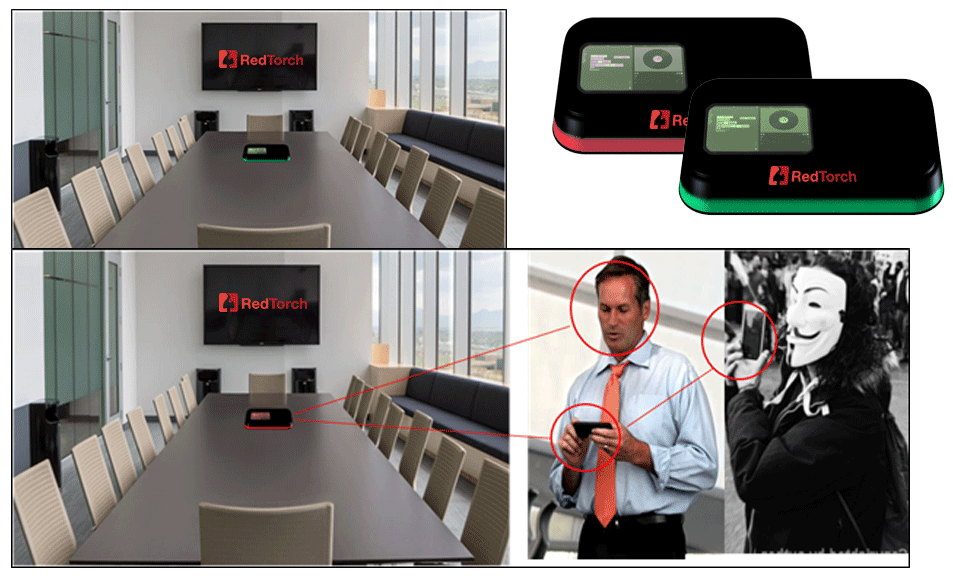
An ad for RedTorch’s “Cheetah” counter-surveillance tech. The Guy Fawkes mask/Anonymous threat featured prominently and often on RedTorch’s website.

The closest thing to eye candy for RedTorch is its Cheetah Counter Surveillance product line, a suite of hardware and software meant to be integrated into other security products which — according to RedTorch — constantly sweeps the client’s network and physical office space with proprietary technology designed to detect remote listening bugs and other spying devices.

Frigg, another core RedTorch offering, is…well, friggin’ spooky:

“Frigg is the easiest way to do a full background check and behavioral analysis on people,” the product pitch reads. “Frigg not only shows background checks, but social profiles and a person’s entire internet footprint, too. This allows one to evaluate a person’s moral fiber and ethics. Frigg employs machine learning and analytics on all known data from a subject’s footprint, delivering instant insight so you can make safer decisions, instantly.”
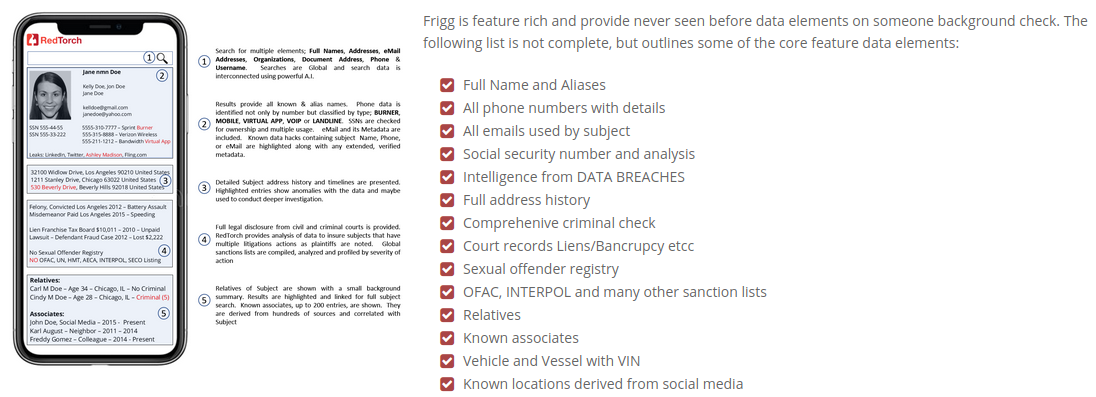
The background checking service from RedTorch, called Frigg, says it’s building “one of the world’s largest facial recognition databases and a very accurate facial recognition match standard.”

Frigg promises to include “elements that stems [sic] from major data hacks of known systems like Ashley Madison, LinkedIn, Dropbox, Fling.com, AdultFriendFinder and hundreds more. Victims of those breaches lost a lot of private data including passwords, and Frigg will help them secure their private data in the future. The matching that is shown will use email, phone and full name correlation.”

From the rest of Frigg:

Frigg references sanction lists such as OFAC, INTERPOL wanted persons, and many more international and domestic lists. Known locations results are based on social media profiles and metadata where, for example, there was an image posted that showed GPS location, or the profile mentions locations among its comments.

Frigg provides the option of continuous monitoring on searched background reports. Notification will be sent or shown once an important update or change has been detected

The flagship version of Frigg will allow a user to upload a picture of a face and get a full background check instantly. RedTorch is working to develop one of the world’s largest facial recognition databases and a very accurate facial recognition match standard.

WHO IS REDTORCH?
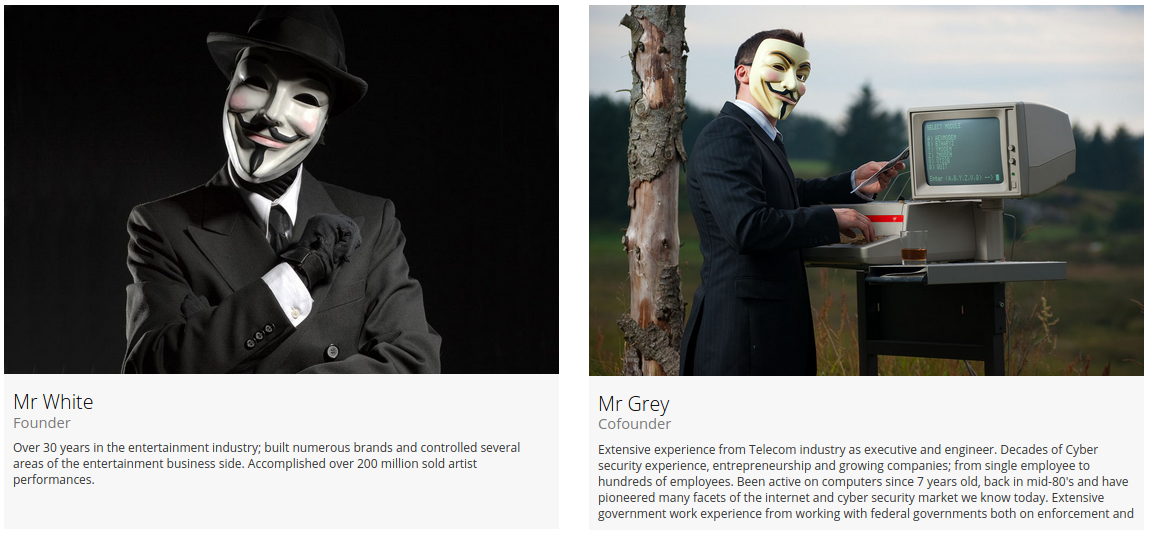
The co-founders of Norse Networks, “Mr. White” (left) Norse Corp. co-founder and RedTorch CEO Henry Marx;, and “Mr. Grey,” CTO and Norse Corp. co-founder Tommy Stiansen.

RedTorch claims it is building a huge facial recognition database, so it’s perhaps no surprise that its founders prefer to obscure theirs. The contact email on RedTorch says henry @retorch dot com. That address belongs to RedTorch Inc. CEO Henry Marx, a former music industry executive and co-founder of Norse Networks.

Marx did not respond to requests for comment. Nor did any of the other former Norse Corp. executives mentioned throughout this story. So I should emphasize that it’s not even clear whether the above-mentioned products and services from RedTorch actually exist.

One executive at Red Torch told this author privately that the company had plenty of high-paying clients, although that person declined to be more specific about what RedTorch might do for those clients or why the company’s site was currently in transition.

Now a cadre of former Norse Corp. employees who have been tracking the company’s past executives say they’ve peered through the playful subterfuge in the anonymous corporate identities on the archived RedTorch website.

Marx appears to be the “Mr. White” referenced in the screenshot below, taken from an archived Aug. 2020 version of RedTorch.com. He is wearing a Guy Fawkes mask, a symbol favored by the Anonymous hacker collective, the doomed man behind the failed Gunpowder plot of 1604 in England, and by possibly the most annoying costumes that darken your front door each Halloween.

Mr. White says he has “over 30 years in the entertainment industry; built numerous brands and controlled several areas of the entertainment business side,” and that he’s “accomplished over 200 million sold artist performances.”

Pictured beside Mr. White is RedTorch’s co-founder, “Mr. Grey.” Norse watchers say that would be Tommy Stiansen, the Norwegian former co-founder of Norse Corp. whose LinkedIn profile says is now chief technology officer at RedTorch. One of his earliest companies provided “operational billing solutions for telecom networks.”

“Extensive experience from Telecom industry as executive and engineer,” reads Mr. Grey’s profile at RedTorch. “Decades of Cyber security experience, entrepreneurship and growing companies; from single employee to hundreds of employees. Been active on computers since 7 years old, back in mid-80’s and have pioneered many facets of the internet and cyber security market we know today. Extensive government work experience from working with federal governments.”

Stiansen’s leadership at Norse coincided with the company’s release of a report in 2014 on Iran’s cyber prowess that was widely trounced as deeply flawed and headline-grabbing. Norse’s critics said the company’s founders had gone from selling smokes to selling smoke and mirrors.

In its report, Norse said it saw a half-million attacks on industrial control systems by Iran in the previous 24 months — a 115 percent increase in attacks! But there was just one problem: The spike in attacks Norse cited weren’t real attacks against actual industrial targets. Rather, they were against “honeypot” systems set up by Norse to mimic a broad range of devices online.

Translation: The threats Norse warned about weren’t actionable, and weren’t anything that people could use to learn about actual attack events hitting sensitive control system networks.

In a scathing analysis of Norse’s findings, critical infrastructure security expert Robert M. Lee said Norse’s claim of industrial control systems being attacked and implying it was definitively the Iranian government was disingenuous at best. Lee had obtained an advanced copy of a draft version of the Norse report that was shared with unclassified government and private industry channels, and said the data in the report simply did not support its conclusions.

Around the same time, Stiansen was reportedly telling counterparts at competing security firms that Norse had data showing that the Sony Pictures hack in November 2014 — in which Sony’s internal files and emails were published online — was in fact the work of a disgruntled insider at Sony.

Norse’s crack team of intelligence analysts had concluded that the FBI and other intelligence sources were wrong in publicly blaming the massive breach on North Korean hackers. But Norse never published that report, nor did it produce any data that might support their insider claim in the Sony hack.

Last month, the U.S. Justice Department unsealed indictments against three North Korean hackers accused of plundering and pillaging Sony Pictures, launching the WannaCry ransomware contagion of 2017, and stealing more than $200 million from banks and other victims worldwide.

Norse’s conclusions on Iran and Sony were supported by Tyson Yee, a former Army intelligence analyst who worked at Norse from 2012 to Jan. 2016. Yee is listed on LinkedIn as director of intelligence at RedTorch, and his LinkedIn profile says his work prior to RedTorch in Nov. 2018 was for two years as a “senior skunk works analyst” at an unnamed employer.

Read More

The post RedTorch Formed from Ashes of Norse Corp. appeared first on Malware Devil.


https://malwaredevil.com/2021/03/22/redtorch-formed-from-ashes-of-norse-corp-2/?utm_source=rss&utm_medium=rss&utm_campaign=redtorch-formed-from-ashes-of-norse-corp-2

RedTorch Formed from Ashes of Norse Corp.

Remember Norse Corp., the company behind the interactive “pew-pew” cyber attack map shown in the image blow? Norse imploded rather suddenly in 2016 following a series of managerial missteps and funding debacles. Now, the founders of Norse have launched a new company with a somewhat different vision: RedTorch, which for the past two years has marketed a mix of services to high end celebrity clients, including spying and anti-spying tools and services.

The post RedTorch Formed from Ashes of Norse Corp. appeared first on Security Boulevard.

Read More

The post RedTorch Formed from Ashes of Norse Corp. appeared first on Malware Devil.


https://malwaredevil.com/2021/03/22/redtorch-formed-from-ashes-of-norse-corp/?utm_source=rss&utm_medium=rss&utm_campaign=redtorch-formed-from-ashes-of-norse-corp

Medical Device Secure Development Lifecycle – Christopher Gates – BSW #210

How to incorporate security into your existing medical device development process, What artifacts need to be created, & Security activities that are new.

Visit https://www.securityweekly.com/bsw for all the latest episodes!

Show Notes: https://securityweekly.com/bsw210

The post Medical Device Secure Development Lifecycle – Christopher Gates – BSW #210 appeared first on Malware Devil.


https://malwaredevil.com/2021/03/22/medical-device-secure-development-lifecycle-christopher-gates-bsw-210/?utm_source=rss&utm_medium=rss&utm_campaign=medical-device-secure-development-lifecycle-christopher-gates-bsw-210

Barbary Pirates and Russian Cybercrime

In 1801, the United States had a small Navy. Thomas Jefferson deployed almost half that Navy—three frigates and a schooner—to the Barbary C...