Malware Devil

Friday, March 26, 2021

Office macro execution evidence, (Fri, Mar 26th)

Microsoft Office Macros continue to be the security nightmare that they have been for the past 3 decades. System and security admins everywhere continue to try to protect their users from prevalent macro malware, but they find Microsoft’s tooling often less than helpful.

Case in point, the Microsoft page that describes how to disable macros sports this useful warning:

If only life were so easy…. The only two people who will ever be “sure” what a macro is doing are its original developer, and the malware analyst who just reverse engineered it. And I’m actually even doubtful about the developer.  

Considering how shaky and often bypassed the avialable mechanisms are to control macro usage, we would expect to at least see some decent instrumentation that allows us to log, monitor and reproduce “what happened”. But… no. There are hardly any useful logs. Which over the years led to a plethora of work-arounds, YARA rules, Powershell scripts, and reverse engineering. 

This week, I had the “joy” of doing a bit of the latter, while investigating an incident. One of the few places where macro execution leaves traces is in the “TrustRecords” entry in the registry:

HKCU:SOFTWAREMicrosoftOffice16.0WordSecurityTrusted DocumentsTrustRecords
HKCU:SOFTWAREMicrosoftOffice16.0ExcelSecurityTrusted DocumentsTrustRecords
HKCU:SOFTWAREMicrosoftOffice16.0PowerPointSecurityTrusted DocumentsTrustRecords

The version number (16.0) might vary depending on your Office installation. Whether, when and how the keys get populated also depends on the “Trust Center” setting as described in the Microsoft link above.

But in general, the registry entries will look something like this:


The rightmost value (00 or 7f) indicates which trust center warning the user clicked away. “00” means “Open for Editing” and “7F” means “Allow Macros to Run”. The other hex values encode, amongst other data, the original creation time stamp of the file whose name is shown. This can be extremely helpful when you need to determine the exact time of original download, if the file came from a shady source. In combination with the file name, this can be the “pivot points” that you need in an incident to go hunting in proxy or email logs, to determine how that file got to the user in the first place. 

Volatility has support to extract this information, but if you are forensicating on a live system, you can also wing it with Powershell in a pinch:

$regkeys =  'HKCU:SOFTWAREMicrosoftOffice16.0WordSecurityTrusted DocumentsTrustRecords',
            'HKCU:SOFTWAREMicrosoftOffice16.0ExcelSecurityTrusted DocumentsTrustRecords',
            'HKCU:SOFTWAREMicrosoftOffice16.0PowerPointSecurityTrusted DocumentsTrustRecords'
foreach ($key in $regkeys) {
        try {$item = Get-Item $key -erroraction stop} catch { $item = "" }
        foreach ($line in $item.property) {
            $values = $item.getvalue($line)
            if ($values[-1] -gt 0) {$type="RUN"} else {$type="EDIT"}
            $timestamp = [datetime]::FromFileTimeUtc([System.BitConverter]::ToUint64($values,0))
            Write-Output "$line $timestamp $type"
        }
}

Yep, not exactly the most beautiful code. It ain’t my fault that Microsoft insists on using 64bits for a time stamp, nor that converting such a value back into human readable time is so convoluted in Powershell :).

In my case, for the registry screenshot shown above, the Powershell spits out the following

%USERPROFILE%/Downloads/invoice%2058633.xls 03/24/2021 23:52:21 RUN
%USERPROFILE%/Downloads/Invoice%2038421.xls 03/22/2021 23:45:42 EDIT
%USERPROFILE%/Downloads/Invoice%2094377.xls 03/22/2021 21:02:04 EDIT

which tells me that the file I want is “invoice 58633.xls”, because for it, Macros were allowed to run. It also gives me a timestamp for when the user made the download – March 24, 23:52 UTC. 

If you have savvy ways of keeping track of or analyzing macro execution in your environment, please let us know, or share in the comments below.

(c) SANS Internet Storm Center. https://isc.sans.edu Creative Commons Attribution-Noncommercial 3.0 United States License. Read More

The post Office macro execution evidence, (Fri, Mar 26th) appeared first on Malware Devil.


https://malwaredevil.com/2021/03/26/office-macro-execution-evidence-fri-mar-26th/?utm_source=rss&utm_medium=rss&utm_campaign=office-macro-execution-evidence-fri-mar-26th

Network Security News Summary for Friday March 26th, 2021

A brief daily summary of what is important in cybersecurity. The podcast is published every weekday and designed to get you ready for the day with a brief, usually about 5 minutes long, summary of current network security-related events. The content is late breaking, educational and based on listener input as well as on input received by the SANS Internet Storm Center. You may submit questions and comments via our contact form at https://isc.sans.edu/contact.html .

The post Network Security News Summary for Friday March 26th, 2021 appeared first on Malware Devil.


https://malwaredevil.com/2021/03/25/network-security-news-summary-for-friday-march-26th-2021/?utm_source=rss&utm_medium=rss&utm_campaign=network-security-news-summary-for-friday-march-26th-2021

Fleeceware Apps Bank $400M in Revenue

The cache of apps, found in Apple and Google’s official marketplaces is largely targeted towards children, including several “slime simulators.”
Read More

The post Fleeceware Apps Bank $400M in Revenue appeared first on Malware Devil.


https://malwaredevil.com/2021/03/25/fleeceware-apps-bank-400m-in-revenue/?utm_source=rss&utm_medium=rss&utm_campaign=fleeceware-apps-bank-400m-in-revenue

Microsoft Offers Up To $30K For Teams Bugs

A bug-bounty program launched for the Teams desktop videoconferencing and collaboration application has big payouts for finding security holes.
Read More

The post Microsoft Offers Up To $30K For Teams Bugs appeared first on Malware Devil.


https://malwaredevil.com/2021/03/25/microsoft-offers-up-to-30k-for-teams-bugs/?utm_source=rss&utm_medium=rss&utm_campaign=microsoft-offers-up-to-30k-for-teams-bugs

Thursday, March 25, 2021

Slack hurries to fix direct message flaw that allowed harassment

The enormous work messaging platform Slack quickly reversed course yesterday, promising to revise a brand-new direct message feature that could have been misused for harassment.

Added to the company’s “Slack Connect” product–which lets enterprise users share messages with contract workers and third-party partners outside their company–the new “direct message” feature allowed paying Slack users to message anyone outside of their company or organization, so long as they had another person’s email address. The messages came attached to an invite, but as many tech news outlets and concerned online users noted, there was no way for recipients to block the invites, or to block the content of the messages that came attached to the invites.

As Twitter product employee Menotti Minutillo said on Twitter, the implementation of Slack Connect DMs meant that malicious users could send repeated DM invites with harassing language, and that Slack would also email the DM’s recipient with the invite, including the harassing language. DM recipients would also have trouble blocking those emails as they came from a generic email address, too, Minutillo said.

Further, according to TechCrunch, the Slack Connect DM feature is opt-in at the organizational level, meaning that individual employees could not, alone, overwrite their company’s decision, should it choose to enable the feature.

Less than 24 hours after Slack Connect DM’s full release, Slack realigned. According to Slack Vice President of Communications and Policy Jonathan Prince, the company will disable the capability to customize messages that are attached to Slack Connect DM invites.

Prince’s full statement is as follows:

“After rolling out Slack Connect DMs this morning, we received valuable feedback from our users about how email invitations to use the feature could potentially be used to send abusive or harassing messages. We are taking immediate steps to prevent this kind of abuse, beginning today with the removal of the ability to customize a message when a user invites someone to Slack Connect DMs. Slack Connect’s security features and robust administrative controls are a core part of its value both for individual users and their organizations. We made a mistake in this initial roll-out that is inconsistent with our goals for the product and the typical experience of Slack Connect usage. As always, we are grateful to everyone who spoke up, and we are committed to fixing this issue.”

Slack’s quick work to fix the problem is appreciated, but it is curious that the company did not catch the problem before the full rollout. The company has already faced complaints about the limited features in the free version of its platform, which allows users to visibly show harassing language without even having to actually write and send messages. This is because Slack automatically sends notifications when new users join a thread, so if those new users stylize their username to be an insult, then the users in that thread will receive a notification that includes that language.

Further, the problem of harassment on messaging platforms is far from new. On the Lock and Code podcast, when we spoke with Electronic Frontier Foundation’s Director of Cybersecurity Eva Galperin, Galperin warned about this very issue.

“Primarily, the onus for making safe platforms, is on the makers of the platforms,” Galperin said. “And so, if there are people who are listening to this podcast, who are developing software or who are developing platforms or services for commercial use, I encourage them to think about how their tool will be used for harassment.”

Galperin provided specific guidance for any platform with messaging capabilities. She said that those platforms should make it possible for users to not use their real names, and for users to block other users or to mute certain keywords. This setup, Galperin said, is beneficial for both the user and the company.

“If you give the power to the users, then they can decide what is harassment and what is abuse, and it really takes the onus off the platform to be judge, jury, and executioner for every communication that somebody has online.”

Unfortunately, Slack users could not block users–and in fact the company has pushed back against such a feature for years–or mute keywords, and users would have trouble filtering out emails from Slack’s generic email addresses that included the DM invites and the accompanying messages.

These may sound like high-level discussions that are difficult to forecast, but there is actually a far simpler way to look at the problem. To borrow the words of Twitter user @geekgalgroks, a developer and accessibility advocate:

“Seriously with every new messaging system and feature ask yourself if people can send unsolicited dick pics and if those receiving them can block the sender.

Because it will happen.”

The post Slack hurries to fix direct message flaw that allowed harassment appeared first on Malware Devil.


https://malwaredevil.com/2021/03/25/slack-hurries-to-fix-direct-message-flaw-that-allowed-harassment-8/?utm_source=rss&utm_medium=rss&utm_campaign=slack-hurries-to-fix-direct-message-flaw-that-allowed-harassment-8

Slack hurries to fix direct message flaw that allowed harassment

The enormous work messaging platform Slack quickly reversed course yesterday, promising to revise a brand-new direct message feature that could have been misused for harassment.

Added to the company’s “Slack Connect” product–which lets enterprise users share messages with contract workers and third-party partners outside their company–the new “direct message” feature allowed paying Slack users to message anyone outside of their company or organization, so long as they had another person’s email address. The messages came attached to an invite, but as many tech news outlets and concerned online users noted, there was no way for recipients to block the invites, or to block the content of the messages that came attached to the invites.

As Twitter product employee Menotti Minutillo said on Twitter, the implementation of Slack Connect DMs meant that malicious users could send repeated DM invites with harassing language, and that Slack would also email the DM’s recipient with the invite, including the harassing language. DM recipients would also have trouble blocking those emails as they came from a generic email address, too, Minutillo said.

Further, according to TechCrunch, the Slack Connect DM feature is opt-in at the organizational level, meaning that individual employees could not, alone, overwrite their company’s decision, should it choose to enable the feature.

Less than 24 hours after Slack Connect DM’s full release, Slack realigned. According to Slack Vice President of Communications and Policy Jonathan Prince, the company will disable the capability to customize messages that are attached to Slack Connect DM invites.

Prince’s full statement is as follows:

“After rolling out Slack Connect DMs this morning, we received valuable feedback from our users about how email invitations to use the feature could potentially be used to send abusive or harassing messages. We are taking immediate steps to prevent this kind of abuse, beginning today with the removal of the ability to customize a message when a user invites someone to Slack Connect DMs. Slack Connect’s security features and robust administrative controls are a core part of its value both for individual users and their organizations. We made a mistake in this initial roll-out that is inconsistent with our goals for the product and the typical experience of Slack Connect usage. As always, we are grateful to everyone who spoke up, and we are committed to fixing this issue.”

Slack’s quick work to fix the problem is appreciated, but it is curious that the company did not catch the problem before the full rollout. The company has already faced complaints about the limited features in the free version of its platform, which allows users to visibly show harassing language without even having to actually write and send messages. This is because Slack automatically sends notifications when new users join a thread, so if those new users stylize their username to be an insult, then the users in that thread will receive a notification that includes that language.

Further, the problem of harassment on messaging platforms is far from new. On the Lock and Code podcast, when we spoke with Electronic Frontier Foundation’s Director of Cybersecurity Eva Galperin, Galperin warned about this very issue.

“Primarily, the onus for making safe platforms, is on the makers of the platforms,” Galperin said. “And so, if there are people who are listening to this podcast, who are developing software or who are developing platforms or services for commercial use, I encourage them to think about how their tool will be used for harassment.”

Galperin provided specific guidance for any platform with messaging capabilities. She said that those platforms should make it possible for users to not use their real names, and for users to block other users or to mute certain keywords. This setup, Galperin said, is beneficial for both the user and the company.

“If you give the power to the users, then they can decide what is harassment and what is abuse, and it really takes the onus off the platform to be judge, jury, and executioner for every communication that somebody has online.”

Unfortunately, Slack users could not block users–and in fact the company has pushed back against such a feature for years–or mute keywords, and users would have trouble filtering out emails from Slack’s generic email addresses that included the DM invites and the accompanying messages.

These may sound like high-level discussions that are difficult to forecast, but there is actually a far simpler way to look at the problem. To borrow the words of Twitter user @geekgalgroks, a developer and accessibility advocate:

“Seriously with every new messaging system and feature ask yourself if people can send unsolicited dick pics and if those receiving them can block the sender.

Because it will happen.”

The post Slack hurries to fix direct message flaw that allowed harassment appeared first on Malware Devil.


https://malwaredevil.com/2021/03/25/slack-hurries-to-fix-direct-message-flaw-that-allowed-harassment-7/?utm_source=rss&utm_medium=rss&utm_campaign=slack-hurries-to-fix-direct-message-flaw-that-allowed-harassment-7

Slack hurries to fix direct message flaw that allowed harassment

The enormous work messaging platform Slack quickly reversed course yesterday, promising to revise a brand-new direct message feature that could have been misused for harassment.

Added to the company’s “Slack Connect” product–which lets enterprise users share messages with contract workers and third-party partners outside their company–the new “direct message” feature allowed paying Slack users to message anyone outside of their company or organization, so long as they had another person’s email address. The messages came attached to an invite, but as many tech news outlets and concerned online users noted, there was no way for recipients to block the invites, or to block the content of the messages that came attached to the invites.

As Twitter product employee Menotti Minutillo said on Twitter, the implementation of Slack Connect DMs meant that malicious users could send repeated DM invites with harassing language, and that Slack would also email the DM’s recipient with the invite, including the harassing language. DM recipients would also have trouble blocking those emails as they came from a generic email address, too, Minutillo said.

Further, according to TechCrunch, the Slack Connect DM feature is opt-in at the organizational level, meaning that individual employees could not, alone, overwrite their company’s decision, should it choose to enable the feature.

Less than 24 hours after Slack Connect DM’s full release, Slack realigned. According to Slack Vice President of Communications and Policy Jonathan Prince, the company will disable the capability to customize messages that are attached to Slack Connect DM invites.

Prince’s full statement is as follows:

“After rolling out Slack Connect DMs this morning, we received valuable feedback from our users about how email invitations to use the feature could potentially be used to send abusive or harassing messages. We are taking immediate steps to prevent this kind of abuse, beginning today with the removal of the ability to customize a message when a user invites someone to Slack Connect DMs. Slack Connect’s security features and robust administrative controls are a core part of its value both for individual users and their organizations. We made a mistake in this initial roll-out that is inconsistent with our goals for the product and the typical experience of Slack Connect usage. As always, we are grateful to everyone who spoke up, and we are committed to fixing this issue.”

Slack’s quick work to fix the problem is appreciated, but it is curious that the company did not catch the problem before the full rollout. The company has already faced complaints about the limited features in the free version of its platform, which allows users to visibly show harassing language without even having to actually write and send messages. This is because Slack automatically sends notifications when new users join a thread, so if those new users stylize their username to be an insult, then the users in that thread will receive a notification that includes that language.

Further, the problem of harassment on messaging platforms is far from new. On the Lock and Code podcast, when we spoke with Electronic Frontier Foundation’s Director of Cybersecurity Eva Galperin, Galperin warned about this very issue.

“Primarily, the onus for making safe platforms, is on the makers of the platforms,” Galperin said. “And so, if there are people who are listening to this podcast, who are developing software or who are developing platforms or services for commercial use, I encourage them to think about how their tool will be used for harassment.”

Galperin provided specific guidance for any platform with messaging capabilities. She said that those platforms should make it possible for users to not use their real names, and for users to block other users or to mute certain keywords. This setup, Galperin said, is beneficial for both the user and the company.

“If you give the power to the users, then they can decide what is harassment and what is abuse, and it really takes the onus off the platform to be judge, jury, and executioner for every communication that somebody has online.”

Unfortunately, Slack users could not block users–and in fact the company has pushed back against such a feature for years–or mute keywords, and users would have trouble filtering out emails from Slack’s generic email addresses that included the DM invites and the accompanying messages.

These may sound like high-level discussions that are difficult to forecast, but there is actually a far simpler way to look at the problem. To borrow the words of Twitter user @geekgalgroks, a developer and accessibility advocate:

“Seriously with every new messaging system and feature ask yourself if people can send unsolicited dick pics and if those receiving them can block the sender.

Because it will happen.”

The post Slack hurries to fix direct message flaw that allowed harassment appeared first on Malware Devil.


https://malwaredevil.com/2021/03/25/slack-hurries-to-fix-direct-message-flaw-that-allowed-harassment-6/?utm_source=rss&utm_medium=rss&utm_campaign=slack-hurries-to-fix-direct-message-flaw-that-allowed-harassment-6

Slack hurries to fix direct message flaw that allowed harassment

The enormous work messaging platform Slack quickly reversed course yesterday, promising to revise a brand-new direct message feature that could have been misused for harassment.

Added to the company’s “Slack Connect” product–which lets enterprise users share messages with contract workers and third-party partners outside their company–the new “direct message” feature allowed paying Slack users to message anyone outside of their company or organization, so long as they had another person’s email address. The messages came attached to an invite, but as many tech news outlets and concerned online users noted, there was no way for recipients to block the invites, or to block the content of the messages that came attached to the invites.

As Twitter product employee Menotti Minutillo said on Twitter, the implementation of Slack Connect DMs meant that malicious users could send repeated DM invites with harassing language, and that Slack would also email the DM’s recipient with the invite, including the harassing language. DM recipients would also have trouble blocking those emails as they came from a generic email address, too, Minutillo said.

Further, according to TechCrunch, the Slack Connect DM feature is opt-in at the organizational level, meaning that individual employees could not, alone, overwrite their company’s decision, should it choose to enable the feature.

Less than 24 hours after Slack Connect DM’s full release, Slack realigned. According to Slack Vice President of Communications and Policy Jonathan Prince, the company will disable the capability to customize messages that are attached to Slack Connect DM invites.

Prince’s full statement is as follows:

“After rolling out Slack Connect DMs this morning, we received valuable feedback from our users about how email invitations to use the feature could potentially be used to send abusive or harassing messages. We are taking immediate steps to prevent this kind of abuse, beginning today with the removal of the ability to customize a message when a user invites someone to Slack Connect DMs. Slack Connect’s security features and robust administrative controls are a core part of its value both for individual users and their organizations. We made a mistake in this initial roll-out that is inconsistent with our goals for the product and the typical experience of Slack Connect usage. As always, we are grateful to everyone who spoke up, and we are committed to fixing this issue.”

Slack’s quick work to fix the problem is appreciated, but it is curious that the company did not catch the problem before the full rollout. The company has already faced complaints about the limited features in the free version of its platform, which allows users to visibly show harassing language without even having to actually write and send messages. This is because Slack automatically sends notifications when new users join a thread, so if those new users stylize their username to be an insult, then the users in that thread will receive a notification that includes that language.

Further, the problem of harassment on messaging platforms is far from new. On the Lock and Code podcast, when we spoke with Electronic Frontier Foundation’s Director of Cybersecurity Eva Galperin, Galperin warned about this very issue.

“Primarily, the onus for making safe platforms, is on the makers of the platforms,” Galperin said. “And so, if there are people who are listening to this podcast, who are developing software or who are developing platforms or services for commercial use, I encourage them to think about how their tool will be used for harassment.”

Galperin provided specific guidance for any platform with messaging capabilities. She said that those platforms should make it possible for users to not use their real names, and for users to block other users or to mute certain keywords. This setup, Galperin said, is beneficial for both the user and the company.

“If you give the power to the users, then they can decide what is harassment and what is abuse, and it really takes the onus off the platform to be judge, jury, and executioner for every communication that somebody has online.”

Unfortunately, Slack users could not block users–and in fact the company has pushed back against such a feature for years–or mute keywords, and users would have trouble filtering out emails from Slack’s generic email addresses that included the DM invites and the accompanying messages.

These may sound like high-level discussions that are difficult to forecast, but there is actually a far simpler way to look at the problem. To borrow the words of Twitter user @geekgalgroks, a developer and accessibility advocate:

“Seriously with every new messaging system and feature ask yourself if people can send unsolicited dick pics and if those receiving them can block the sender.

Because it will happen.”

The post Slack hurries to fix direct message flaw that allowed harassment appeared first on Malware Devil.


https://malwaredevil.com/2021/03/25/slack-hurries-to-fix-direct-message-flaw-that-allowed-harassment-5/?utm_source=rss&utm_medium=rss&utm_campaign=slack-hurries-to-fix-direct-message-flaw-that-allowed-harassment-5

Security Operations in the World We Live in Now

Despite the challenges of remote work, security operations teams can position themselves well for the future.

The past year has been incredibly challenging for cybersecurity professionals. As the COVID-19 pandemic rolled across the globe, a wave of cybersecurity threats quickly followed as everyone from individual hackers to organized cybercrime rings and nation-states ramped up their attacks.

We were all happy to proclaim good riddance to 2020, but the fallout from the shift to remote work remains. During private conversations, many of my industry friends and peers have expressed distress and uneasiness over the crisis. They are all well-versed in what can happen when the attack surface suddenly expands, and professional criminal groups sense weakness and opportunity.

Indeed, ransomware has increased sevenfold during the pandemic, phishing has risen 350% and hackers have made headlines with targeted attacks on vaccine makers, critical infrastructure, government agencies, and other important industries throughout the public and private sectors. The list goes on. At the same time that cybersecurity analysts are dealing with this onslaught of threats, they are doubly challenged by the fact that they themselves are suddenly working from home, without many of the benefits they would normally enjoy when working in a physical security operations center (SOC).

Security operations (SecOps) is a highly collaborative function where teams are on the front lines of threat detection and response. Cybersecurity analysts often work together in a state-of-the-art SOC, triaging alerts, hunting for threats, investigating incidents, and determining the proper response. They rely as much on each other’s insights and expertise as they do the sophisticated technologies deployed in their SOCs.

Yet when the COVID-19 pandemic hit, SecOps professionals found themselves needing to quickly secure a newly remote workforce at the same time that they themselves were unexpectedly forced into remote work. It was a kick in the teeth, and the impact has been felt by SOC teams across the world.

The Challenges of Working From Home
Our survey of nearly 400 SecOps professionals recently revealed that it is indeed more difficult to respond to alerts and investigate threats in a work-from-home environment. More than half (51%) said investigating suspicious activities is more challenging in a remote environment, 49% said collaborating with their peers is more difficult, and 39% said problem solving and alert handling is more challenging from home. At the same time, 42% reported that their alert volume is higher than it was pre-pandemic and 57% said phishing attempts have increased.

Despite the challenges of performing SecOps from home and the increased threats facing organizations, many security analysts reported that their organizations’ overall cybersecurity posture remained strong. Just under three-quarters (74%) said their cybersecurity posture is equal to or stronger than it was before the pandemic. This may be due to organizations investing more in security automation technologies and increasing their reliance on managed security service providers (MSSPs) as a way to support their SecOps as they work from home. More than three-fourths (76%) of respondents said they have taken action to increase SecOps automation as a result of the pandemic or planned to in the near future, and 52% said their use of an MSSP has increased.

The effects of the pandemic on the global workforce will be long-lasting, even after the immediate health threat is over. Many organizations will now allow employees to work remotely indefinitely. This means that the future of SecOps will also be different moving forward.

Centralized, physical SOCs may become a thing of the past as organizations better equip their SecOps teams with the technologies and tools they need to detect, investigate, and remediate threats from the comfort of their homes. To ease the transition, teams will require the ability to respond quickly to new threats and ensure that communication, knowledge capture, and camaraderie so inherent to the SOC can still thrive in a remote world. The good news? In a remote world, organizations may be well equipped to answer these new demands thanks to their ability to expand the geographies from which they can draw talent — in the process, helping to condense the notorious cybersecurity skills gap.

Ultimately, the future of SecOps will look different when teams are primarily working from home rather than in a centralized SOC. However, the security best practices that organizations should follow largely remain the same. Moreover, by adopting technologies like automation and leveraging the help of trusted partners to address capability gaps and form hybrid approaches, organizations can ensure that their cybersecurity posture remains strong even in the face of increased threats and unique challenges related to our new dynamic.

Amos Stern is CEO and co-founder of Siemplify, the independent provider of security orchestration, automation, and response (SOAR). He brings to Siemplify a unique technical and business background that includes leadership of the Cyber Security Department within the Israeli … View Full Bio

Recommended Reading:

Comment |

Email This |

Print |

RSS

More Insights

The post Security Operations in the World We Live in Now appeared first on Malware Devil.


https://malwaredevil.com/2021/03/25/security-operations-in-the-world-we-live-in-now/?utm_source=rss&utm_medium=rss&utm_campaign=security-operations-in-the-world-we-live-in-now

Sonrai Security Deepens Security Ties With AWS

Recently, Michael Vizard, IT journalist at Security Boulevard spoke with Brendan Hannigan, CEO and Co-founder of Sonrai Security for a recent […]

The post Sonrai Security Deepens Security Ties With AWS appeared first on Sonrai Security.

The post Sonrai Security Deepens Security Ties With AWS appeared first on Security Boulevard.

Read More

The post Sonrai Security Deepens Security Ties With AWS appeared first on Malware Devil.


https://malwaredevil.com/2021/03/25/sonrai-security-deepens-security-ties-with-aws-3/?utm_source=rss&utm_medium=rss&utm_campaign=sonrai-security-deepens-security-ties-with-aws-3

Sonrai Security Deepens Security Ties With AWS

Recently, Michael Vizard, IT journalist at Security Boulevard spoke with Brendan Hannigan, CEO and Co-founder of Sonrai Security for a recent […]

The post Sonrai Security Deepens Security Ties With AWS appeared first on Sonrai Security.

The post Sonrai Security Deepens Security Ties With AWS appeared first on Security Boulevard.

Read More

The post Sonrai Security Deepens Security Ties With AWS appeared first on Malware Devil.


https://malwaredevil.com/2021/03/25/sonrai-security-deepens-security-ties-with-aws-2/?utm_source=rss&utm_medium=rss&utm_campaign=sonrai-security-deepens-security-ties-with-aws-2

Submitting pfSense Firewall Logs to DShield, (Thu, Mar 25th)

In my previous diaries, I wrote about pfSense firewalls [1], [2]. I hope the diaries have given some insight to current pfSense users, and also inspire individuals who have yet to deploy any form of information security mechanisms in their homes/personal networks to do so. At the SANS Internet Storm Center, we welcome interested participants to submit firewall logs to DShield [3]. In this diary entry, I would like to share how to do so if you are using a pfSense firewall. I also highlight some minor issues I discovered when I was trying set up the DShield pfSense client, and how to resolve them so you can send your logs to DShield successfully. Please remember to do a config backup on your pfSense firewall before changing anything, and test the changes made in a test network before deploying them into the production environment. At this point of writing, all configuration and testing were done on pfSense 2.5.0-RELEASE Community Edition.

1) Configure pfSense E-Mail Settings
E-Mail settings inside the pfSense Notifications menu have to be enabled if you want to submit your pfSense firewall logs to DShield. To navigate to the appropriate settings page, please go to “System > Advanced > Notifications”. Figure 1 shows the corresponding screenshot, and also some sample settings if you are using Google Mail. When the corresponding details have been added, scroll down and select “Save” first. After that, click on “Test SMTP Settings” and see if you received the test e-mail. Please use the e-mail address that you have registered with the SANS Internet Storm Center.
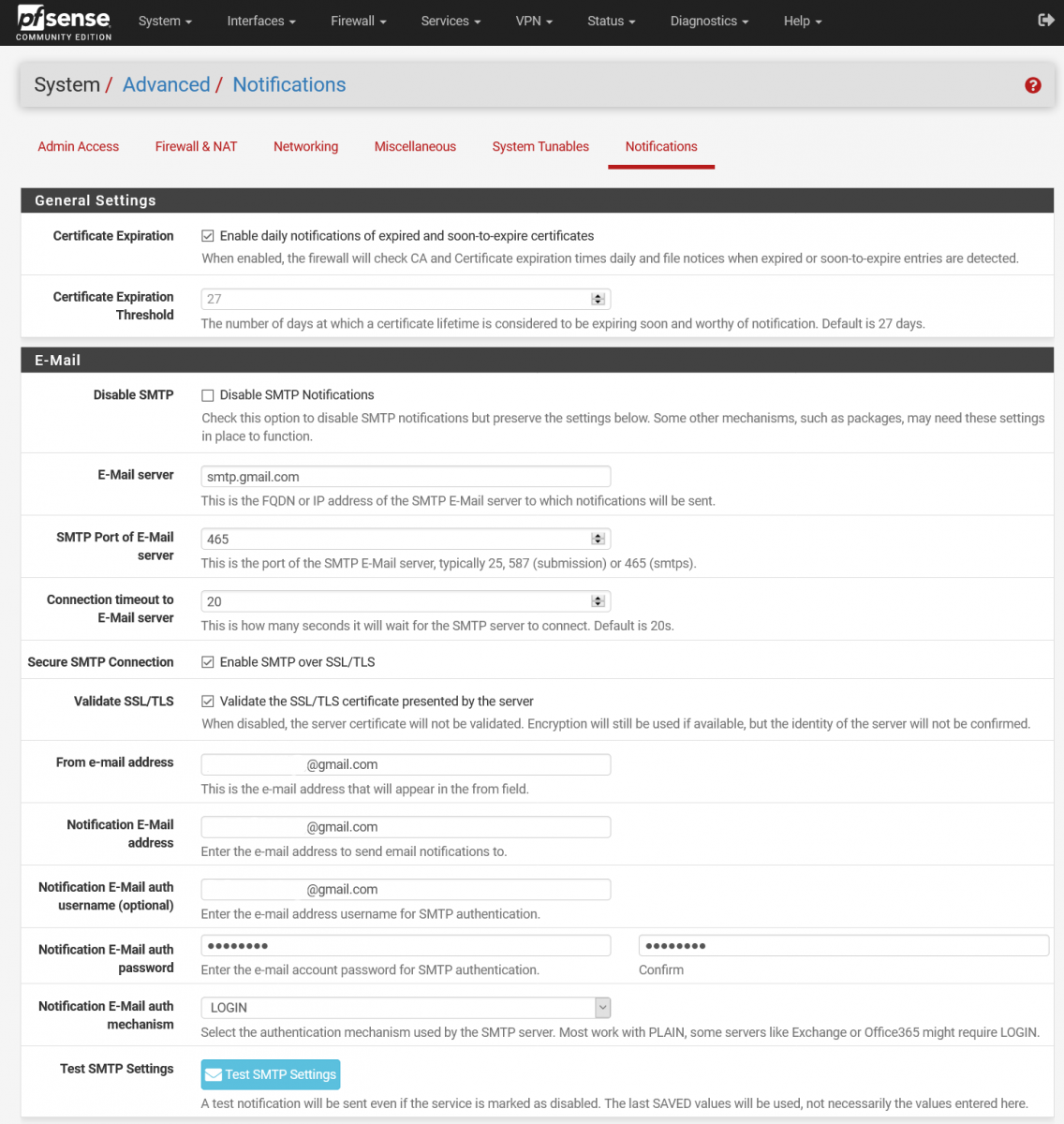
Figure 1: SMTP Settings on pfSense (Google Mail is being used here)

Note: You have to save the details before testing the SMTP settings. There is currently a bug in pfSense that loads the wrong password if you test SMTP settings and subsequently save them [4].
If you are using Google Mail, you may get an error message about SMTP failure and that the test e-mail could not be sent. Following that, you may receive an e-mail from Google that a sign-in attempt was blocked. If you follow on the error code, it will lead to a Google Account Help page that states “Less secure app access” may have to be enabled as 2-step verification is not enabled. If you do get this, please enable 2-step verification, configure an App password to use for the E-Mail settings in pfSense, and then complete Google’s Display Unlock Captcha [5]. For a detailed explanation on how to configure an App password, it can be found here [6]. It is highly not recommended to enable less secure app access, and it is always a good security practice to use two-factor authentication (2FA) when logging in to your accounts.

2) Create a new directory to store DShield files
It was recommended that the DShield files to be put at a convenient directory (/root/bin/). In a default installation of pfSense, there is no /bin directory inside /root. As such, it has to be created manually. To do so, navigate over to the pfSense WebGUI Command Prompt. To go to the page, navigate to “Diagnostics > Command Prompt”. Type in the command mkdir /root/bin/ under the “Execute Shell Command” section. Figure 2 below shows successful execution of the command.
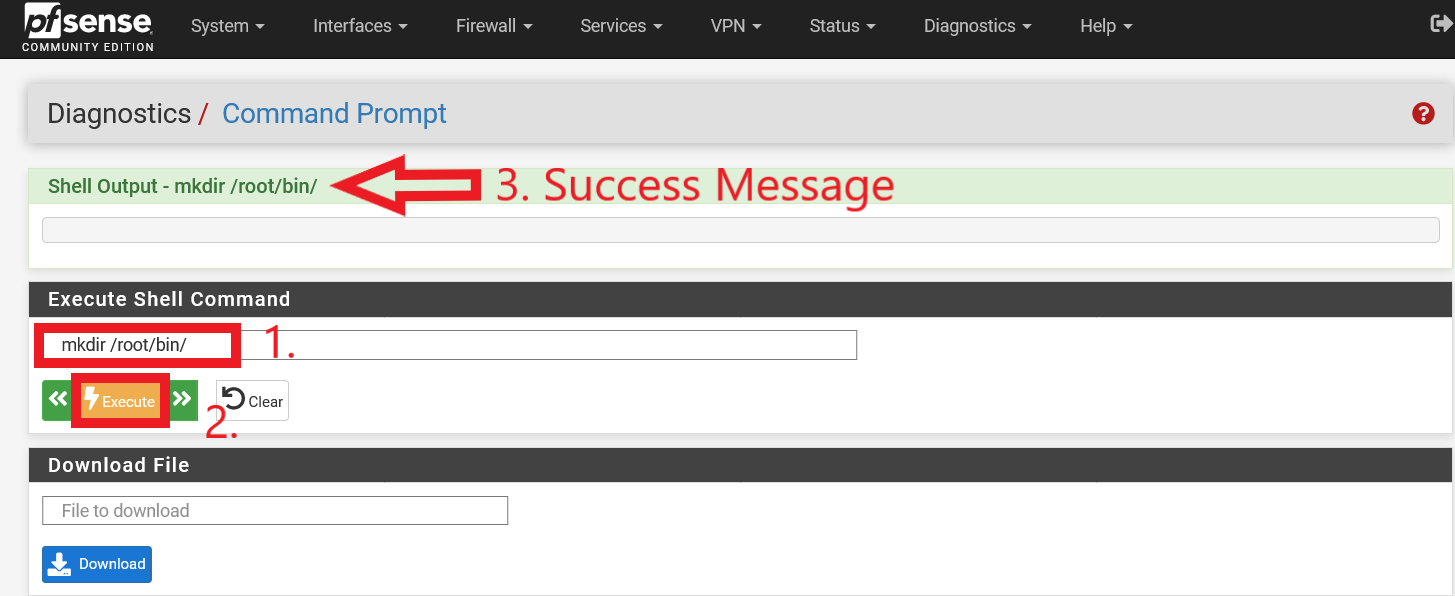
Figure 2: Creation of /root/bin/ directory

3) Download and edit DShield pfSense Client

It is now time to prepare 2 files that are required to be copied to your pfSense firewall – dshield.php and dshield.sample (dshield.sample will have to be renamed to dshield.ini after relevant details are filled in). They can be downloaded from Johannes Ullrich’s GitHub repository over here [7]. There are multiple ways of loading these 2 files into the firewall, such as via SSH, SCP or even via a direct curl command. However, since dshield.sample has to be modified and renamed before it can be used by dshield.php, I will be modifying the files locally on a computer before uploading them via pfSense WebGUI Command Prompt page (if you prefer to modify them directly on the firewall via SSH or direct interaction via the firewall, by all means. However, I personally prefer to finalize file edits before pushing them to the firewall). With reference to Figure 3, edit lines 4, 5 and 6 of dshield.sample with your SANS Internet Storm Center details (these can be found when you go to https://isc.sans.edu/myaccount.html. Please refer to Figure 4 to see the information required for Line 4 and Line 6). You will also need to edit line 13 and input the IP address that you are sending the firewall logs from (i.e. your public IP address). This is to prevent your IP address from being blocked/reported as an offender if some outgoing traffic is blocked within your network (e.g. NTP, or some other traffic due to security policies).
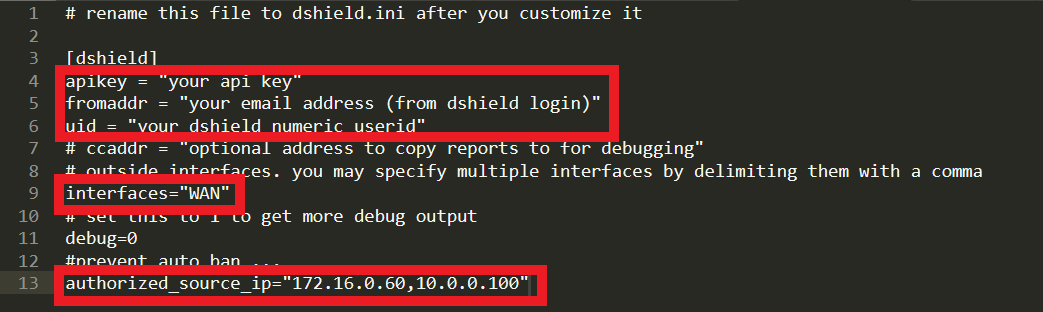
Figure 3: Details to be amended in dshield.sample (to be renamed to dshield.ini)

Figure 4: User ID # and API Key Details for dshield.sample (to be renamed to dshield.ini)

You will need to ensure that the interfaces name (Line 9) matches the alias name of your WAN interface (with reference to Figure 5, and this information can be retrieved at https://<yourpfsenseipaddress>/status_interfaces.php). By default, if it was not amended when pfSense was first installed, you should not need to amend Line 9 of dshield.sample.
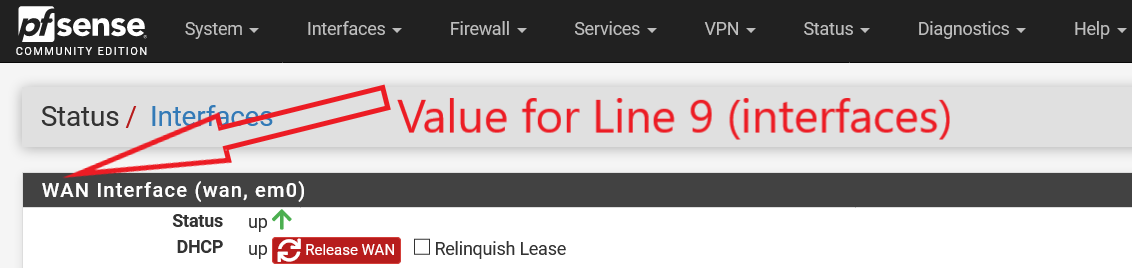
Figure 5: WAN Name for Line 9 in dshield.sample (to be renamed to dshield.ini)

Finally, remember to rename dshield.sample to dshield.ini (do not forget this, or else dshield.php will not work).

4) Upload dshield.php and dshield.ini to your pfSense firewall

Finally, we can now upload dshield.php and dshield.ini into your pfSense firewall. We will use the pfSense WebGUI Command Prompt page to upload the 2 files. Under the “Upload File” section, browse to where dshield.php and dshield.ini was saved on your computer and select “Upload” (please refer to Figures 6 and 7).

Figure 6: dshield.php Uploaded to pfSense Firewall

Figure 7: dshield.ini Uploaded to pfSense Firewall

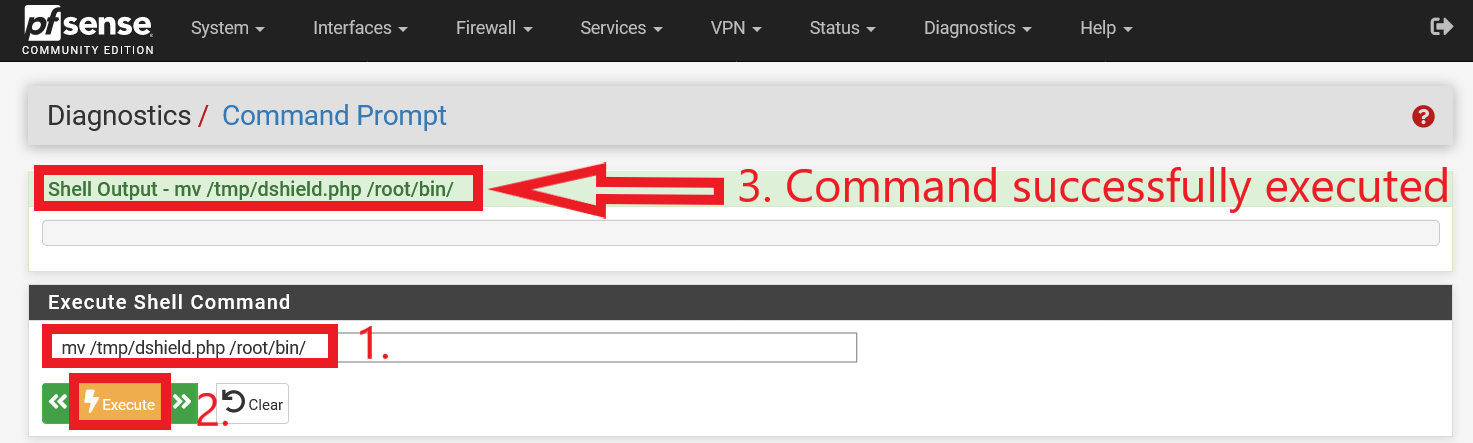
They will first end up in the /tmp directory. Type in the following commands (without quotes) “mv /tmp/dshield.ini /root/bin/“ and “mv /tmp/dshield.php /root/bin/” under the “Execute Shell Command” section of the pfSense WebGUI Command Prompt page to move them into the /root/bin/ directory (Figure 8 and 9 shows the commands being executed successfully).
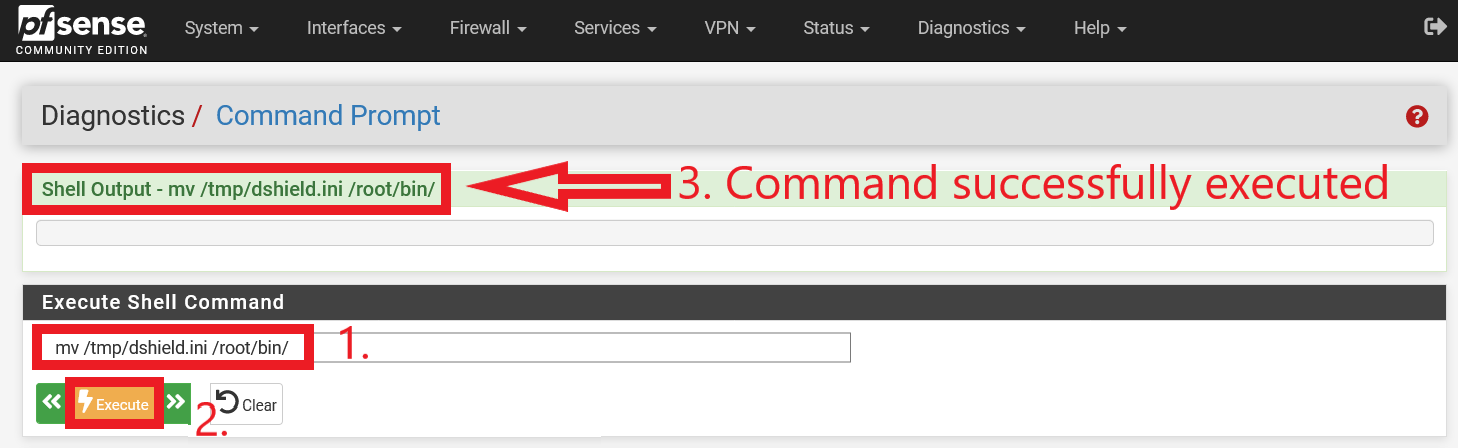
Figure 8: Execution of command (without quotes) “mv /tmp/dshield.ini /root/bin/

Figure 9: Execution of command (without quotes) “mv /tmp/dshield.php /root/bin/

5) Make dshield.php executable, and add a Cron Job

We also have to make dshield.php executable. With reference to Figure 10, the command (without quotes) “chmod +x /root/bin/dshield.php” is executed.
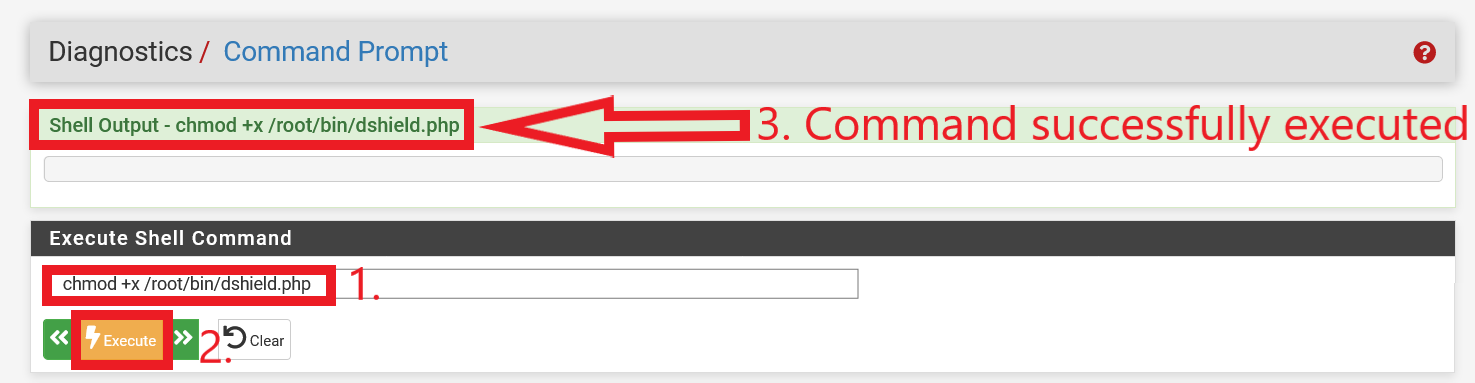
Figure 10: Making dshield.php Executable

Finally, to ensure that firewall logs are regularly sent to DShield, a cron job for dshield.php has to be scheduled. There are a few ways to schedule such a job. For example, you could SSH into your pfSense firewall and run the command (without quotes) “crontab -e”, and add the line (without quotes) “11,41 * * * * /root/bin/dshield.php” (this means at 11th and 41st minute of the hour, dshield.php is executed). However, if we are strictly using the pfSense WebGUI Command Prompt, “crontab -e” would not work as the WebGUI Command Prompt does not support interactive sessions. As such, we will install the “Cron” package that is located under “System > Package Manager > Available Packages”. If you had previously installed the Cron package, this step can be skipped.
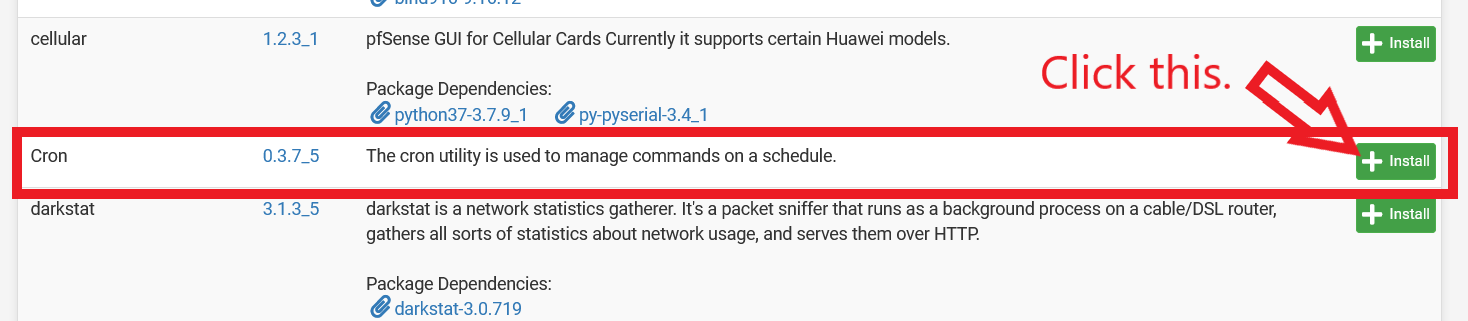
Figure 11: Installing pfSense Cron Package

After Cron is installed, it can be found under “Services > Cron” (please refer to Figure 12 for an illustration).
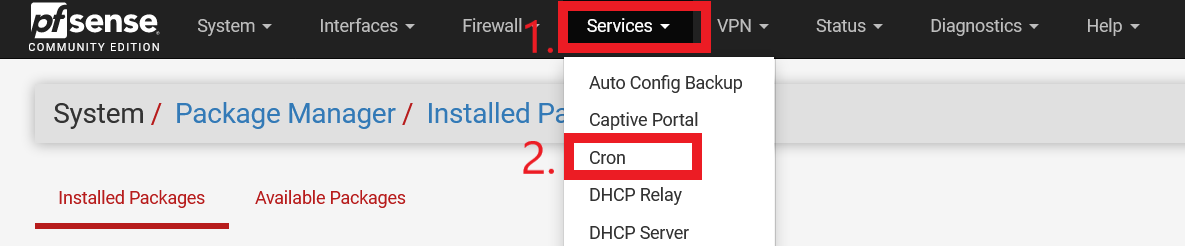
Figure 12: Location of pfSense Cron Menu Item

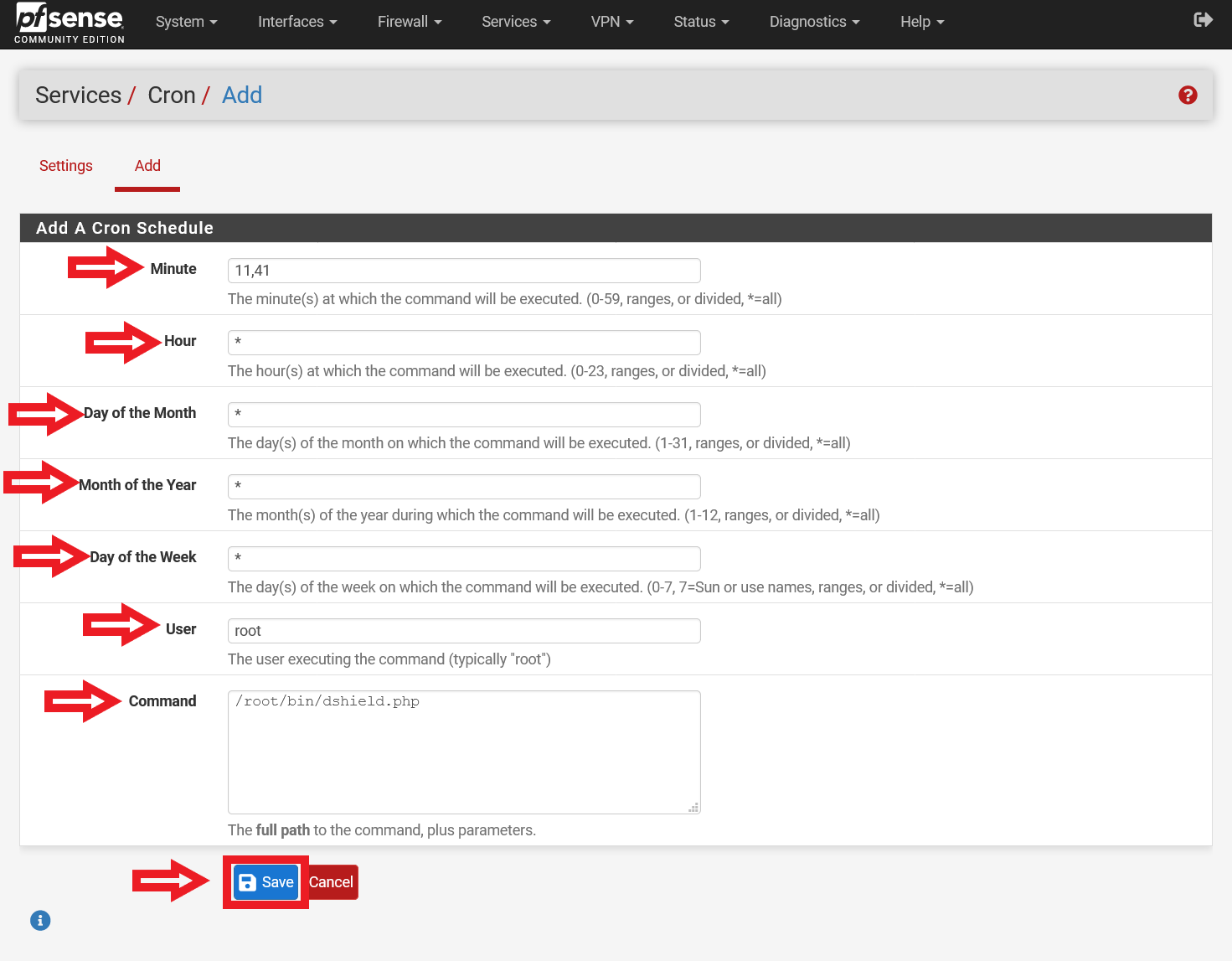
Select “Add”, and fill in the corresponding details (Please refer to Figure 13 for a screenshot of the configuration):

Minute11,41
Hour*
Day of the Month*
Month of the Year*
Day of the Week*
Userroot
Command/root/bin/dshield.php

Figure 13: Configuration of dshield.php Cron Job

6) Configuration complete, and test dshield.php

After all the configuration has been completed, run the command (without quotes) “/root/bin/dshield.php” in the pfSense WebGUI Command Prompt. With reference to Figure 14, it shows a successful execution of dshield.php.
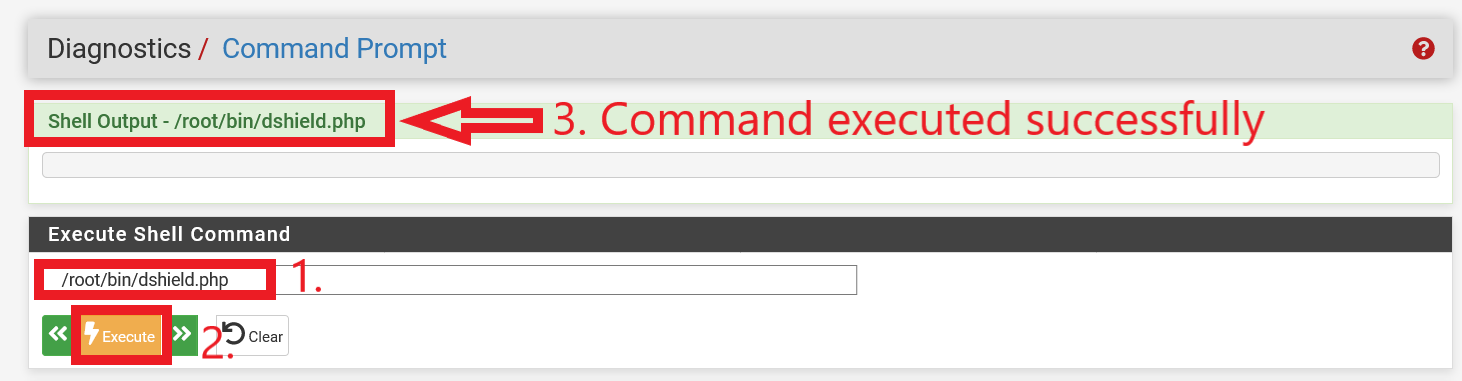
Figure 14: Successful execution of dshield.php

After a few minutes (it may take a while at times), you will receive an acknowledgement from admin<at>dshield[.]org and a short summary of what was submitted to DShield. Alternatively, if you did not opt in to receive an acknowledgement e-mail after submitting your firewall logs, you can also navigate to the “My Reports” tab in your Internet Storm Center account to see the logs that you have submitted (in the last 30 days). The command (input the command without quotes) “cat /tmp/lastdshieldlog” can also be executed in the pfSense WebGUI Command Prompt to check the contents of firewall logs last submitted to the SANS Internet Storm Center.

With that, your pfSense firewall has been configured to regularly submit firewall logs to DShield. Registered users also can optionally enable Fightback in their account, and log reports will be forwarded to the Internet Service Provider (ISP) where the attack originated from after analysis [8]. All DShield data is consolidated over here [9], and will benefit users globally in protecting their networks from intrusion attempts.

References:
[1] https://isc.sans.edu/diary/26766
[2] https://isc.sans.edu/diary/27102
[3] https://isc.sans.edu/howto.html
[4] https://redmine.pfsense.org/issues/10325
[5] https://accounts.google.com/DisplayUnlockCaptcha
[6] https://support.google.com/accounts/answer/185833?hl=en
[7] https://github.com/jullrich/dshieldpfsense
[8] https://isc.sans.edu/fightback.html
[9] https://isc.sans.edu/reports.html

———–
Yee Ching Tok, ISC Handler
Personal Site
Twitter

(c) SANS Internet Storm Center. https://isc.sans.edu Creative Commons Attribution-Noncommercial 3.0 United States License. Read More

The post Submitting pfSense Firewall Logs to DShield, (Thu, Mar 25th) appeared first on Malware Devil.


https://malwaredevil.com/2021/03/25/submitting-pfsense-firewall-logs-to-dshield-thu-mar-25th/?utm_source=rss&utm_medium=rss&utm_campaign=submitting-pfsense-firewall-logs-to-dshield-thu-mar-25th


Wednesday, March 24, 2021

Being a CISO in 2021: How to Be a Business Leader in the Boardroom

With the rise of digital transformation initiatives in 2020, a Chief Information Security Officer’s (CISO) already stressful work environment has become even more complex. A post-pandemic world has spawned other challenges for security professionals with the rise of remote work—like making sure data remained secure in an environment that wasn’t constantly monitored, Zoom hacks, secure API integrations, and dozens of other issues. CISO’s are facing more scrutiny about security posture from the Board of Directors than ever.

CISO’s needed to be on the top of their game—because, in addition to those high-risk challenges, countless businesses found themselves fast-forwarding their digital transformation initiatives to adapt to the new normal. 2020 has been coined as the year of the great accelerator because initiatives that had been put on hold were now suddenly necessary to support remote work. With the lack of in-person face time, combined with security risks, many businesses were playing catch up as threat models and control points changed, and they seemed always to find themselves one step behind.

The post Being a CISO in 2021: How to Be a Business Leader in the Boardroom appeared first on Security Boulevard.

Read More

The post Being a CISO in 2021: How to Be a Business Leader in the Boardroom appeared first on Malware Devil.


https://malwaredevil.com/2021/03/24/being-a-ciso-in-2021-how-to-be-a-business-leader-in-the-boardroom-4/?utm_source=rss&utm_medium=rss&utm_campaign=being-a-ciso-in-2021-how-to-be-a-business-leader-in-the-boardroom-4

Being a CISO in 2021: How to Be a Business Leader in the Boardroom

With the rise of digital transformation initiatives in 2020, a Chief Information Security Officer’s (CISO) already stressful work environment has become even more complex. A post-pandemic world has spawned other challenges for security professionals with the rise of remote work—like making sure data remained secure in an environment that wasn’t constantly monitored, Zoom hacks, secure API integrations, and dozens of other issues. CISO’s are facing more scrutiny about security posture from the Board of Directors than ever.

CISO’s needed to be on the top of their game—because, in addition to those high-risk challenges, countless businesses found themselves fast-forwarding their digital transformation initiatives to adapt to the new normal. 2020 has been coined as the year of the great accelerator because initiatives that had been put on hold were now suddenly necessary to support remote work. With the lack of in-person face time, combined with security risks, many businesses were playing catch up as threat models and control points changed, and they seemed always to find themselves one step behind.

The post Being a CISO in 2021: How to Be a Business Leader in the Boardroom appeared first on Security Boulevard.

Read More

The post Being a CISO in 2021: How to Be a Business Leader in the Boardroom appeared first on Malware Devil.


https://malwaredevil.com/2021/03/24/being-a-ciso-in-2021-how-to-be-a-business-leader-in-the-boardroom-3/?utm_source=rss&utm_medium=rss&utm_campaign=being-a-ciso-in-2021-how-to-be-a-business-leader-in-the-boardroom-3

Being a CISO in 2021: How to Be a Business Leader in the Boardroom

With the rise of digital transformation initiatives in 2020, a Chief Information Security Officer’s (CISO) already stressful work environment has become even more complex. A post-pandemic world has spawned other challenges for security professionals with the rise of remote work—like making sure data remained secure in an environment that wasn’t constantly monitored, Zoom hacks, secure API integrations, and dozens of other issues. CISO’s are facing more scrutiny about security posture from the Board of Directors than ever.

CISO’s needed to be on the top of their game—because, in addition to those high-risk challenges, countless businesses found themselves fast-forwarding their digital transformation initiatives to adapt to the new normal. 2020 has been coined as the year of the great accelerator because initiatives that had been put on hold were now suddenly necessary to support remote work. With the lack of in-person face time, combined with security risks, many businesses were playing catch up as threat models and control points changed, and they seemed always to find themselves one step behind.

The post Being a CISO in 2021: How to Be a Business Leader in the Boardroom appeared first on Security Boulevard.

Read More

The post Being a CISO in 2021: How to Be a Business Leader in the Boardroom appeared first on Malware Devil.


https://malwaredevil.com/2021/03/24/being-a-ciso-in-2021-how-to-be-a-business-leader-in-the-boardroom-2/?utm_source=rss&utm_medium=rss&utm_campaign=being-a-ciso-in-2021-how-to-be-a-business-leader-in-the-boardroom-2

Being a CISO in 2021: How to Be a Business Leader in the Boardroom

With the rise of digital transformation initiatives in 2020, a Chief Information Security Officer’s (CISO) already stressful work environment has become even more complex. A post-pandemic world has spawned other challenges for security professionals with the rise of remote work—like making sure data remained secure in an environment that wasn’t constantly monitored, Zoom hacks, secure API integrations, and dozens of other issues. CISO’s are facing more scrutiny about security posture from the Board of Directors than ever.

CISO’s needed to be on the top of their game—because, in addition to those high-risk challenges, countless businesses found themselves fast-forwarding their digital transformation initiatives to adapt to the new normal. 2020 has been coined as the year of the great accelerator because initiatives that had been put on hold were now suddenly necessary to support remote work. With the lack of in-person face time, combined with security risks, many businesses were playing catch up as threat models and control points changed, and they seemed always to find themselves one step behind.

The post Being a CISO in 2021: How to Be a Business Leader in the Boardroom appeared first on Security Boulevard.

Read More

The post Being a CISO in 2021: How to Be a Business Leader in the Boardroom appeared first on Malware Devil.


https://malwaredevil.com/2021/03/24/being-a-ciso-in-2021-how-to-be-a-business-leader-in-the-boardroom/?utm_source=rss&utm_medium=rss&utm_campaign=being-a-ciso-in-2021-how-to-be-a-business-leader-in-the-boardroom

Sonrai Security Deepens Security Ties With AWS

Sonrai cloud data protection

Sonrai Security announced today it has extended its ability to incorporate metadata captured from the public cloud operated by Amazon Web Services (AWS) into a platform that applies security policies based on identity. Brendan Hannigan, CEO, Sonrai Security, said in addition to achieving an AWS security competency, the Sonrai Dig platform is also now integrated..

The post Sonrai Security Deepens Security Ties With AWS appeared first on Security Boulevard.

Read More

The post Sonrai Security Deepens Security Ties With AWS appeared first on Malware Devil.


https://malwaredevil.com/2021/03/24/sonrai-security-deepens-security-ties-with-aws/?utm_source=rss&utm_medium=rss&utm_campaign=sonrai-security-deepens-security-ties-with-aws

Sierra Wireless Website Still Down After Ransomware Attack

Enterprise Vulnerabilities
From DHS/US-CERT’s National Vulnerability Database
CVE-2021-21385
PUBLISHED: 2021-03-24

Mifos-Mobile Android Application for MifosX is an Android Application built on top of the MifosX Self-Service platform. Mifos-Mobile before commit e505f62 disables HTTPS hostname verification of its HTTP client. Additionally it accepted any self-signed certificate as valid. Hostname verification is …

CVE-2021-21386
PUBLISHED: 2021-03-24

APKLeaks is an open-source project for scanning APK file for URIs, endpoints &amp; secrets. APKLeaks prior to v2.0.3 allows remote attackers to execute arbitrary OS commands via package name inside application manifest. An attacker could include arguments that allow unintended commands or code to be…

CVE-2021-1411
PUBLISHED: 2021-03-24

Multiple vulnerabilities in Cisco Jabber for Windows, Cisco Jabber for MacOS, and Cisco Jabber for mobile platforms could allow an attacker to execute arbitrary programs on the underlying operating system with elevated privileges, access sensitive information, intercept protected network traffic, or…

CVE-2021-1417
PUBLISHED: 2021-03-24

Multiple vulnerabilities in Cisco Jabber for Windows, Cisco Jabber for MacOS, and Cisco Jabber for mobile platforms could allow an attacker to execute arbitrary programs on the underlying operating system with elevated privileges, access sensitive information, intercept protected network traffic, or…

CVE-2021-1418
PUBLISHED: 2021-03-24

Multiple vulnerabilities in Cisco Jabber for Windows, Cisco Jabber for MacOS, and Cisco Jabber for mobile platforms could allow an attacker to execute arbitrary programs on the underlying operating system with elevated privileges, access sensitive information, intercept protected network traffic, or…

The post Sierra Wireless Website Still Down After Ransomware Attack appeared first on Malware Devil.


https://malwaredevil.com/2021/03/24/sierra-wireless-website-still-down-after-ransomware-attack/?utm_source=rss&utm_medium=rss&utm_campaign=sierra-wireless-website-still-down-after-ransomware-attack

California State Controller’s Office Suffers Data Breach

Enterprise Vulnerabilities
From DHS/US-CERT’s National Vulnerability Database
CVE-2021-21385
PUBLISHED: 2021-03-24

Mifos-Mobile Android Application for MifosX is an Android Application built on top of the MifosX Self-Service platform. Mifos-Mobile before commit e505f62 disables HTTPS hostname verification of its HTTP client. Additionally it accepted any self-signed certificate as valid. Hostname verification is …

CVE-2021-21386
PUBLISHED: 2021-03-24

APKLeaks is an open-source project for scanning APK file for URIs, endpoints &amp; secrets. APKLeaks prior to v2.0.3 allows remote attackers to execute arbitrary OS commands via package name inside application manifest. An attacker could include arguments that allow unintended commands or code to be…

CVE-2021-1411
PUBLISHED: 2021-03-24

Multiple vulnerabilities in Cisco Jabber for Windows, Cisco Jabber for MacOS, and Cisco Jabber for mobile platforms could allow an attacker to execute arbitrary programs on the underlying operating system with elevated privileges, access sensitive information, intercept protected network traffic, or…

CVE-2021-1417
PUBLISHED: 2021-03-24

Multiple vulnerabilities in Cisco Jabber for Windows, Cisco Jabber for MacOS, and Cisco Jabber for mobile platforms could allow an attacker to execute arbitrary programs on the underlying operating system with elevated privileges, access sensitive information, intercept protected network traffic, or…

CVE-2021-1418
PUBLISHED: 2021-03-24

Multiple vulnerabilities in Cisco Jabber for Windows, Cisco Jabber for MacOS, and Cisco Jabber for mobile platforms could allow an attacker to execute arbitrary programs on the underlying operating system with elevated privileges, access sensitive information, intercept protected network traffic, or…

The post California State Controller’s Office Suffers Data Breach appeared first on Malware Devil.


https://malwaredevil.com/2021/03/24/california-state-controllers-office-suffers-data-breach/?utm_source=rss&utm_medium=rss&utm_campaign=california-state-controllers-office-suffers-data-breach

Ransomware Incidents Continue to Dominate Threat Landscape

Cisco Talos’ IR engagements found attackers relied heavily on malware like Zloader and BazarLoader to distribute ransomware in the past three months.

Ransomware operators relied heavily on a handful of commodity Trojans, open source reconnaissance tools, and legitimate Windows utilities to execute many of their attacks during the past quarter, according to data from incidents handled by the Cisco Talos Incident Response (CTIR) team.

The data, collected from customer locations between November 2020 and January 2021, showed attackers continuing to overwhelmingly use phishing emails with malicious documents to deliver Trojans for downloading ransomware on victim systems.

But unlike in the recent past where the Emotet and Trickbot malware families were the primary vehicles for distributing ransomware, many of the Trojans used for this purpose in the past quarter were commodity tools such as Zloader, BazarLoader, and IcedID. According to the CTIR team, nearly 70% of the ransomware attacks it responded to over the three-month period used these or similar Trojans to deliver ransomware.

“We saw a variety of commodity Trojans used this quarter, as opposed to previous quarters in which Trickbot and Emotet were dominant,” says Brad Garnett, general manager of the Cisco Talos Incident Response team.

For enterprises, the trend could spell even more trouble on the ransomware front.

“Commodity Trojans are easy to obtain and possess numerous capabilities for lateral movement, command-and-control communications, etc., which can increase the efficacy of a ransomware attack,” Garnett notes.

The CTIR team’s data from incident response engagements showed ransomware dominated the threat landscape during the three-month period just like it has for the past the seven straight quarters. The most prolific ransomware families included Ryuk, Vatet, WastedLocker, and variants of Egregor.

As they have in the past, ransomware operators took advantage of several open source and legitimate admin tools and utilities to facilitate attacks, move laterally in compromised networks, hide malicious activity, and take other actions. Some 65% — or nearly two-thirds — of the ransomware incidents the Cisco Talos team responded to involved the use of PowerShell, and 30% of the incidents involved the use of PsExec. Other commonly used free and commercially available and dual-use tools included Cobalt Strike, CCleaner for deleting unwanted files, the open source TightVNC for enabling remote control of Windows and Linux PCs, and compression software such as WinRAR and 7-Zip.

Abusing Legit Tools and Utilities
The CTIR team also encountered several incidents where attackers used open source reconnaissance tools such as the Active Directory (AD) search utility ADFind, the AD information-gathering tool ADRecon, and the Bloodhound tool for visualizing AD environments and finding potential attack paths.

As one example of how ransomware operators are leveraging these tools, the CTIR team pointed to an incident where the attackers, after gaining an initial foothold on the victim network, took advantage of the Group Policy replication feature in Windows AD to install Ryuk ransomware. In that instance, the adversary leveraged PsExec to move laterally and execute remote commands. They eventually obtained domain administrator (DA) credentials and used it to encrypt some 1,000 endpoints and wipe backup indexes.

“Ransomware continues to pose the greatest threat to enterprises,” Garnett says. “Phishing remains the most observed infection vector for these attacks, underscoring the importance of email security and phishing training.”

In addition, enterprises must enable multifactor authentication where possible, disable legacy protocols, and limit use of powerful Windows tools in trusted accounts.

Ransomware was the predominant threat. But the CTIR team also responded to multiple incidents involving malware distributed via poisoned updates to SolarWinds’ Orion network management technology. Some 18,000 organizations worldwide — including several Cisco Talos customers — were impacted in that breach. However, only one of the incidents that Cisco Talos investigated involved post-compromise activity. In that incident, the attackers had set up a PowerShell script that looked like it was designed to receive more code likely for executing malicious activity.

Looking at the current quarter, Garnett expects Cisco Talos will have to respond to more SolarWinds-related incidents because the full scope and impact of that incident is likely larger than what’s known so far. He also expects the CTIR team will have to respond to more incidents involving the believed China-based Hafnium group and its recent attacks targeting four critical zero-day vulnerabilities in Microsoft Exchange Server.

“For Hafnium, we are actively supporting customers globally across different sectors and continue to see an uptick in IR services requests from customers [impacted by the attacks],” he says.

Jai Vijayan is a seasoned technology reporter with over 20 years of experience in IT trade journalism. He was most recently a Senior Editor at Computerworld, where he covered information security and data privacy issues for the publication. Over the course of his 20-year … View Full Bio

Recommended Reading:

Comment |

Email This |

Print |

RSS

More Insights

The post Ransomware Incidents Continue to Dominate Threat Landscape appeared first on Malware Devil.


https://malwaredevil.com/2021/03/24/ransomware-incidents-continue-to-dominate-threat-landscape/?utm_source=rss&utm_medium=rss&utm_campaign=ransomware-incidents-continue-to-dominate-threat-landscape

Barbary Pirates and Russian Cybercrime

In 1801, the United States had a small Navy. Thomas Jefferson deployed almost half that Navy—three frigates and a schooner—to the Barbary C...